Maybe almost every Magento developer has had the task to customize the increment-ids for orders or customers in Magento.
Recap Magento 1
In Magento 1 you had to change the column increment_prefix in the table eav_entity_store .
I am sure there are modules out there that let you achieve that in convenient way.
We have done that by using Setup-scripts most of the time.
When a new store is created you need set the increment_prefix afterwards and do so for all entities that you need and that are defined in eav_entity_type.
So far an rather straight forward task I would say.
What has changed in Magento 2
Let’s take a look at the eav_entity_store table.

In this database an order and a rma has already been created.
But as you can see the order and customer entity no longer is maintained within this table.
In Magento 2 the increment-id generation mechanism basically has not changed for certain entities. The increment-id generation for customers and RMAs still uses the eav_entity_store .
The sales module has received some changes regarding the generation of those increment-ids.
Let’s have a look at what changed in Magento2 regarding the order increment-id generation.
There are two new tables that you may not have seen yet, them being sales_sequence_meta and sales_sequence_profile .
In the example below you see the content of those for the default website and store setup.
Table sales_sequence_meta
There is a table called sales_sequence_meta which defines store-specific sequence-tables for the sales entity-types.
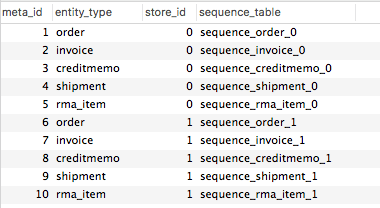
Table sales_sequence_profile
Then we have a table sales_sequence_profile that contains the configuration for the increment-id generation.
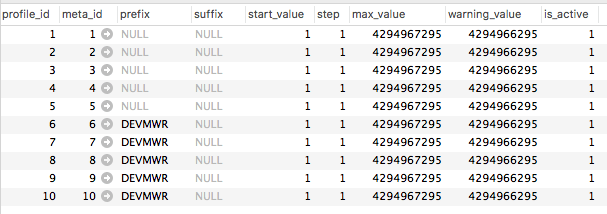
Most of the columns are pretty self-explanatory.
You can define a prefix and suffix that is added to the beginning respectively the ending of the generated increment-id.
With the start_value you can define the first increment-id.
The step column defines the increments that are made between increment-ids.
So to change the prefix for the order increment-ids we need to change to column prefix to the desired value, “DEVMWR” in this case.
This will result in an order increment-id like DEVMWR000000004
After that change the orders will receive a custom increment-id.
If you have any notes feel free to leave a comment.

Magento1 since 2008 / Magento2 since 2015
Passionate Road Bike Rider (~3.500km/yr)
Loves building software with a elaborate architecture and design
3x Magento Certified
Software Developer >10 years
Head of Magento Development @ netz98