Category: Magento 2

  • Redirect disabled product pages instead of 404 page in Magento 2

    Redirect disabled product pages instead of 404 page in Magento 2

    In this blog post I’ll show how to implement a Magento 2 Extension which allows to redirect from disabled product url to

    • a custom url
    • assigned category of a highest level as next fallback if no custom url is entered on product level (custom attribute)
    • home page as last fallback if no categories found

    instead of showing a 404 Not Found page.

    We will call the extension N98_DisabledProductRedirect

    Extension Code

    Basic files

    registration.php

    <?php
    
    use Magento\Framework\Component\ComponentRegistrar;
    
    ComponentRegistrar::register(
        ComponentRegistrar::MODULE,
        'N98_DisabledProductRedirect',
        __DIR__
    );

    etc/module.xml

    <?xml version="1.0"?>
    <config xmlns:xsi="http://www.w3.org/2001/XMLSchema-instance" xsi:noNamespaceSchemaLocation="urn:magento:framework:Module/etc/module.xsd">
        <module name="N98_DisabledProductRedirect" setup_version="1.0.0">
            <sequence>
                <module name="Magento_Catalog"/>
            </sequence>
        </module>
    </config>
    

    Plugin on Product View frontend Controller

    etc/frontend/di.xml

    <?xml version="1.0"?>
    <config xmlns:xsi="http://www.w3.org/2001/XMLSchema-instance" xsi:noNamespaceSchemaLocation="urn:magento:framework/ObjectManager/etc/config.xsd">
        <type name="Magento\Catalog\Controller\Product\View">
            <plugin name="disabled_product_redirect_plugin" type="N98\DisabledProductRedirect\Plugin\ProductRedirectPlugin" />
        </type>
    </config>
    

    Plugin/ProductRedirectPlugin.php

    <?php
    declare(strict_types=1);
    
    namespace N98\DisabledProductRedirect\Plugin;
    
    use Magento\Catalog\Api\ProductRepositoryInterface;
    use Magento\Catalog\Model\Product;
    use Magento\Framework\Controller\Result\RedirectFactory;
    use Magento\Framework\Exception\NoSuchEntityException;
    use N98\DisabledProductRedirect\Service\GetRedirectUrlForDisabledProductService;
    
    class ProductRedirectPlugin
    {
        /**
         * @var ProductRepositoryInterface
         */
        private ProductRepositoryInterface $productRepository;
    
        /**
         * @var RedirectFactory
         */
        private RedirectFactory $redirectFactory;
    
        /**
         * @var GetRedirectUrlForDisabledProductService
         */
        private GetRedirectUrlForDisabledProductService $getRedirectUrlForDisabledProductService;
    
        /**
         * ProductRedirectPlugin constructor.
         *
         * @param ProductRepositoryInterface $productRepository
         * @param RedirectFactory $redirectFactory
         * @param GetRedirectUrlForDisabledProductService $getRedirectUrlForDisabledProductService
         */
        public function __construct(
            ProductRepositoryInterface $productRepository,
            RedirectFactory $redirectFactory,
            GetRedirectUrlForDisabledProductService $getRedirectUrlForDisabledProductService
        ) {
            $this->productRepository = $productRepository;
            $this->redirectFactory = $redirectFactory;
            $this->getRedirectUrlForDisabledProductService = $getRedirectUrlForDisabledProductService;
        }
    
        /**
         * Main plugin method.
         *
         * @param \Magento\Catalog\Controller\Product\View $subject
         * @param callable $proceed
         * @return \Magento\Framework\Controller\Result\Redirect
         * @throws \Magento\Framework\Exception\LocalizedException
         */
        public function aroundExecute($subject, callable $proceed)
        {
            $productId = $subject->getRequest()->getParam('id');
    
            try {
                $product = $this->productRepository->getById($productId);
                if ((int)$product->getStatus() === Product\Attribute\Source\Status::STATUS_DISABLED) {
                    $redirectUrl = $this->getRedirectUrlForDisabledProductService->execute($product);
    
                    $resultRedirect = $this->redirectFactory->create();
                    $resultRedirect->setUrl($redirectUrl);
                    $resultRedirect->setHttpResponseCode(302);
                    return $resultRedirect;
                }
            } catch (NoSuchEntityException $e) {
                return $proceed();
            }
    
            return $proceed();
        }
    }
    

    Service “Get Redirect URL for disabled product”

    Service/GetRedirectUrlForDisabledProductService.php

    <?php
    declare(strict_types=1);
    
    namespace N98\DisabledProductRedirect\Service;
    
    use Magento\Catalog\Api\Data\ProductInterface;
    use Magento\Store\Model\StoreManagerInterface;
    
    class GetRedirectUrlForDisabledProductService
    {
        /**
         * GetRedirectUrlForDisabledProductService constructor.
         *
         * @param StoreManagerInterface $storeManager
         */
        public function __construct(private readonly StoreManagerInterface $storeManager)
        {
        }
    
        /**
         * Get redirect URL for a disabled product
         *
         * @param ProductInterface $product
         * @return string
         * @throws \Magento\Framework\Exception\LocalizedException
         * @throws \Magento\Framework\Exception\NoSuchEntityException
         */
        public function execute(ProductInterface $product): string
        {
            // Check for a defined-per-product URL attribute
            $customRedirectUrl = $product->getData('redirect_url_if_disabled');
            if ($customRedirectUrl) {
                return $customRedirectUrl;
            }
    
            // Fallback to the highest-level category URL
            /** @var \Magento\Catalog\Model\ResourceModel\Category\Collection $categoryCollection */
            $categoryCollection = $product->getCategoryCollection();
            $categoryCollection->addAttributeToSelect('url_key')->load();
    
            $highestLevelCategory = null;
            foreach ($categoryCollection as $category) {
                if (!$highestLevelCategory || $category->getLevel() < $highestLevelCategory->getLevel()) {
                    $highestLevelCategory = $category;
                }
            }
    
            if ($highestLevelCategory) {
                /** @var \Magento\Catalog\Model\Category $highestLevelCategory */
                return $highestLevelCategory->getUrl();
            }
    
            // Default fallback URL (home page)
            return $this->storeManager->getStore()->getBaseUrl();
        }
    }
    

    Data Patch to create attribute “redirect_url_if_disabled”

    Setup/Patch/Data/AddRedirectUrlProductAttribute.php

    <?php
    declare(strict_types=1);
    
    namespace N98\DisabledProductRedirect\Setup\Patch\Data;
    
    use Magento\Catalog\Model\Product;
    use Magento\Eav\Setup\EavSetup;
    use Magento\Eav\Setup\EavSetupFactory;
    use Magento\Framework\Setup\ModuleDataSetupInterface;
    use Magento\Framework\Setup\Patch\DataPatchInterface;
    
    class AddRedirectUrlProductAttribute implements DataPatchInterface
    {
        /**
         * AddRedirectUrlProductAttribute constructor.
         *
         * @param EavSetupFactory $eavSetupFactory
         * @param ModuleDataSetupInterface $moduleDataSetup
         */
        public function __construct(
            private readonly EavSetupFactory          $eavSetupFactory,
            private readonly ModuleDataSetupInterface $moduleDataSetup
        ) {
        }
    
        /**
         * Add attribute "redirect_url_if_disabled" to products and assign to default attribute set
         *
         * @return void
         * @throws \Magento\Framework\Exception\LocalizedException
         * @throws \Magento\Framework\Validator\ValidateException
         */
        public function apply()
        {
            /** @var EavSetup $eavSetup */
            $eavSetup = $this->eavSetupFactory->create(['setup' => $this->moduleDataSetup]);
    
            $eavSetup->addAttribute(Product::ENTITY, 'redirect_url_if_disabled', [
                'type'       => 'text',
                'label'      => 'Redirect URL (if product is disabled)',
                'input'      => 'textarea',
                'required'   => false,
                'sort_order' => 100,
                'global'     => \Magento\Eav\Model\Entity\Attribute\ScopedAttributeInterface::SCOPE_STORE,
                'group'      => 'General',
            ]);
    
            $attributeSetId = $eavSetup->getDefaultAttributeSetId(Product::ENTITY);
            $attributeGroupId = $eavSetup->getAttributeGroupId(Product::ENTITY, $attributeSetId, 'General');
            $eavSetup->addAttributeToGroup(
                Product::ENTITY,
                $attributeSetId,
                $attributeGroupId,
                'redirect_url_if_disabled',
                100
            );
        }
    
        /**
         * @inheritDoc
         */
        public static function getDependencies()
        {
            return [];
        }
    
        /**
         * @inheritDoc
         */
        public function getAliases()
        {
            return [];
        }
    }
    

    Conclusion

    As you could see in the code, the module is pretty simple. For redirect code we used 302 but also 301 can be used or you can make it configurable via Store Configuration.

    Feel free to leave a comment.

    P.S. In your comment you can answer a quiz question: was the blog post featured image AI generated or created manually? 😊

  • Run n98-magerun2 from everywhere

    Are you still copying the n98-magerun2.phar to your project root? There is a better way to run the tool. I created a small video to show you your options.

  • Create a GraphQL Mesh from scratch

    Create a GraphQL Mesh from scratch

    GraphQL Mesh is a powerful tool that allows you to use GraphQL query language, regardless of the source’s original format. It can be used with REST APIs, gRPC, SOAP, and more. In this blog post, we’ll explore how to set up and use GraphQL Mesh in your projects.

    Warning: The article requires a bit of NodeJS knowledge. The examples are tested with NodeJS 16.
    We also define a environment variable MAGENTO_ACCESS_TOKEN containing a a Magento Bearer Token. to access the API. If you don’t have a Magento system available the then replace it with another GraphQL endpoint and modify the examples here.

    Setting Up GraphQL Mesh

    To get started with GraphQL Mesh, you’ll first need to install the necessary dependencies. You can do this by adding the following to your package.json file:

    {
      "dependencies": {
        "@graphql-mesh/cli": "^0.82.35",
        "@graphql-mesh/graphql": "^0.22.7",
        "@graphql-mesh/openapi": "^0.24.13",
        "@graphql-mesh/transform-filter-schema": "^0.14.115",
        "@graphql-mesh/transform-prefix": "^0.93.1",
        "graphql": "^16.6.0"
      }
    }
    

    Once you’ve added these dependencies, you can install them using your package manager of choice.

    Install the dependencies with yarn or npm. We use yarn here:

    yarn install

    Writing a GraphQL Query

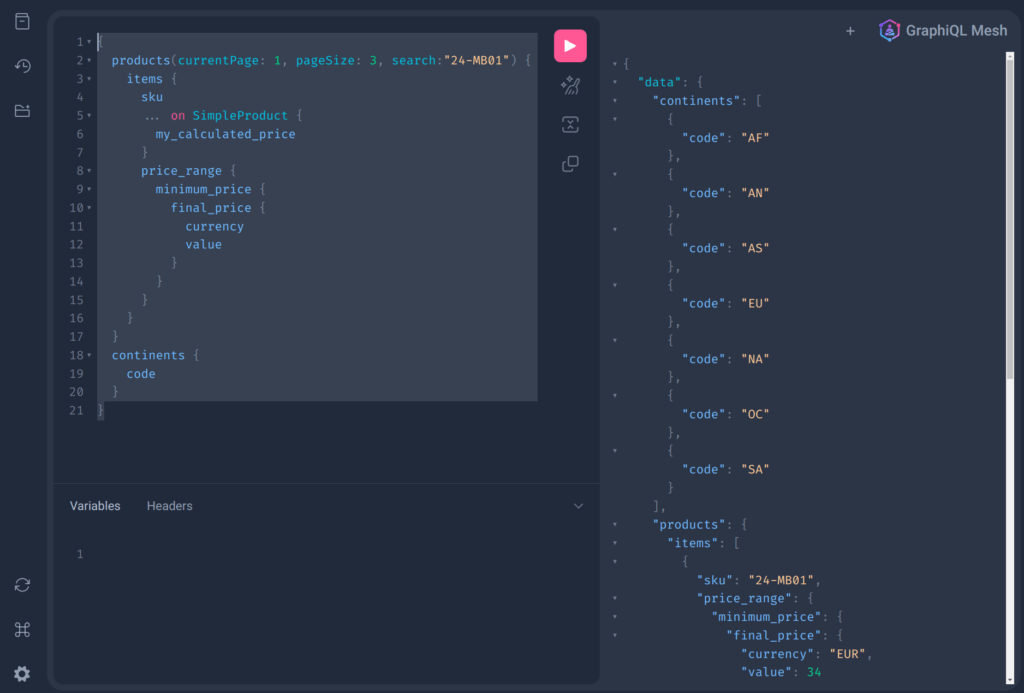
    With GraphQL Mesh, you can write queries that fetch data from multiple sources. Here’s an example of a GraphQL query that fetches product data and station data (yes, it’s a wild mix of APIs):

    {
      products(currentPage: 1, pageSize: 3, search:"24-MB01") {
        items {
          sku
          ... on SimpleProduct {
            my_calculated_price
          }
          price_range {
            minimum_price {
              final_price {
                currency
                value
              }
            }        
          }
        }
      }
      continents {
        code
      }
    }

    In this example, products and continents are two different queries that fetch data from different sources. The products query fetches product data, while continents fetches geographical information. Both queries are fired agains two different backend systems and APIs. As a developer you don’t see the backend systems. You see only one unified APIs. That’s one of the big advantages.

    Creating Resolvers

    Resolvers in GraphQL are functions that resolve data for your queries. In GraphQL Mesh, you can create resolvers that fetch data from your sources and return it in the format you need. Here’s an example of a resolver for the SimpleProduct type:

    import { Resolvers } from './.mesh'
    
    const resolvers: Resolvers = {
        SimpleProduct: {
            my_calculated_price: {
                selectionSet: /* GraphQL */`
                {
                    id,
                    price_range {
                        minimum_price {
                            final_price {
                                value
                            }
                        }        
                    }
                }
                `,
                resolve: async (root, _args, context, info) => {
                    console.log(root)
                    return (99.98 + root.price_range.minimum_price.final_price.value).toFixed(4)
                }
            }
        }
    }
    
    export default resolvers

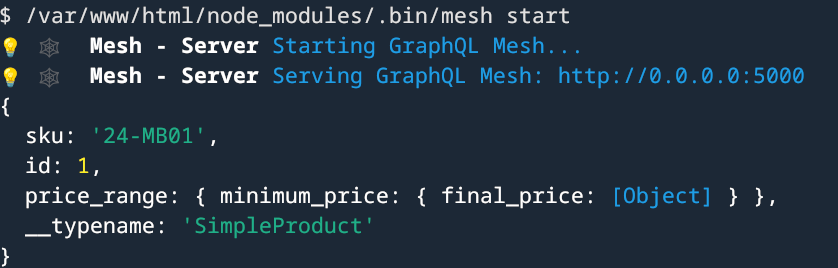
    In this example, the my_calculated_price resolver fetches the price of a product and adds a fixed amount to it as example of a price calculation. We added a console.log here. If you query the products with the my_calculated_price field then you should see the value in your running console.

    Configuring GraphQL Mesh

    Finally, you’ll need to configure GraphQL Mesh to use your sources and resolvers. You can do this in the .meshrc.yaml file:

    serve:
      port: 5000
      browser: false
      playground: true
    sources:
      - name: Magento
        handler:
          graphql:
            endpoint: https://magento-demo.example.com/graphql
            operationHeaders:
              Authorization: Bearer {env.MAGENTO_ACCESS_TOKEN}
    
      - name: Countries
        handler:
          graphql:
            endpoint: https://countries.trevorblades.com
    
    transforms:
      - filterSchema:
          mode: wrap
          filters:
            - Query.!giftCardAccount
    
    additionalTypeDefs: |
      extend type SimpleProduct {
    
    
        sap_price: Float
      }
    
    
    additionalResolvers:
        - "./resolvers"

    In this configuration file, we’ve defined two sources: Magento and Countries. Each source has a GraphQL endpoint that GraphQL Mesh will fetch data from. We’ve also defined a transform that filters out the giftCardAccount query from the schema.

    The additionalTypeDefs section allows us to extend existing types with our own fields. In this case, we’re extending the SimpleProduct type with a my_calculated_price field.

    The additionalResolvers section is where we specify the path to our resolvers file.

    The library can do a lot of more stuff. One important feature is filtering the schema. Sometimes you don’t want publish everything in your schema. We then use a filter transformer to strip some meta data (giftCardAccount query in our example). It’s then not possible anymore to fetch this entities.

    You can find a brief documentation here: https://the-guild.dev/graphql/mesh

    Now you can try to run the mesh:

    yarn mesh build
    yarn mesh start
    // or dev mode -> yarn mesh dev

    This should build and run the mesh.

    If you open the printed url in your browser you should see a nice API playground.

    Conclusion

    GraphQL Mesh is a powerful tool that allows you to use GraphQL with any source, regardless of its original format. By setting up your dependencies, writing your queries, creating your resolvers, and configuring GraphQL Mesh, you can start fetching data from multiple sources with ease.

    Remember, the examples provided in this blog post are just that – examples. Your actual implementation may vary based on your specific needs and the sources you’re working with. However, these examples should provide a solid foundation for you to start working with GraphQL Mesh. Happy coding!

  • AJAX loading of related products in Magento 2

    AJAX loading of related products in Magento 2

    Introduction

    In some projects the amount of related products can be significant. In my case there were more than 300 related products and upsell products on some product detail pages. The consequence of this was a high time to first byte on product detail pages. In the mentioned project it was about 15 seconds for some of the products. So we searched for a possible optimization. We finally decided to implement asynchronous loading of product recommendations via AJAX. At the end we had a significant performance improvement and better user experience.

    In the following I will describe how to implement the solution on the example of related products on product detail pages. With some modifications this can also be used for upsell products on PDP, or even for crosssells in the Checkout Cart.

    In the following we use a sample extension called N98_AjaxProductRecommendations.

    The principle of the implementation

    First what needs to be done is remove the rendering of the related product block on product detail page. After that we replace the removed block with a custom placeholder block with own placeholder template. The template contains a placeholder <div> element and an initialization of a custom JS file. On document ready event an AJAX request is triggered to get the content of related products list and to put the content into the mentioned placeholder <div>. For the AJAX request we need a custom controller class and an abstract layout file. In the placeholder template we also build a check whether the product has related products and only if so, initialize the JS. This avoids unneeded requests for pages where there are no related products linked.

    Initialize module N98_AjaxProductRecommendations

    etc/module.xml :

    <?xml version="1.0"?>
    <!--
    /**
     * @copyright Copyright (c) netz98 GmbH (https://www.netz98.de)
     */
    -->
    <config xmlns:xsi="http://www.w3.org/2001/XMLSchema-instance" xsi:noNamespaceSchemaLocation="urn:magento:framework:Module/etc/module.xsd">
        <module name="N98_AjaxProductRecommendations">
            <sequence>
                <module name="Magento_Catalog" />
                <module name="Magento_TargetRule" />
            </sequence>
        </module>
    </config>
    

    composer.json :

    {
        "name": "n98/ext.magento2.n98.ajax-product-recommendations",
        "description": "Switch to AJAX loading of product recommendations.",
        "type": "magento2-module",
        "license": [
            "proprietary"
        ],
        "authors": [
            {
                "name": "netz98 GmbH",
                "email": "magento@netz98.de"
            }
        ],
        "autoload": {
            "files": [
                "registration.php"
            ],
            "psr-4": {
                "N98\\AjaxProductRecommendations\\": ""
            }
        }
    }
    

    registration.php :

    <?php
    /**
     * @copyright Copyright (c) netz98 GmbH (https://www.netz98.de)
     */
    
    \Magento\Framework\Component\ComponentRegistrar::register(
        \Magento\Framework\Component\ComponentRegistrar::MODULE,
        'N98_AjaxProductRecommendations',
        __DIR__
    );
    

    Route definition and controller

    etc/frontend/routes.xml :

    <config xmlns:xsi="http://www.w3.org/2001/XMLSchema-instance" xsi:noNamespaceSchemaLocation="urn:magento:framework:App/etc/routes.xsd">
        <router id="standard">
            <route id="n98_ajaxproductrecommendations" frontName="n98_ajaxproductrecommendations">
                <module name="N98_AjaxProductRecommendations" />
            </route>
        </router>
    </config>

    Controller/Ajax/RenderRelated.php :

    <?php
    /**
     * @copyright Copyright (c) netz98 GmbH (https://www.netz98.de)
     *
     * @see PROJECT_LICENSE.txt
     */
    
    namespace N98\AjaxProductRecommendations\Controller\Ajax;
    
    use Magento\Catalog\Api\ProductRepositoryInterface;
    use Magento\Framework\App\Action\Action;
    use Magento\Framework\App\Action\Context;
    use Magento\Framework\App\ResponseInterface;
    use Magento\Framework\Controller\Result\Json;
    use Magento\Framework\Controller\Result\JsonFactory;
    use Magento\Framework\Registry;
    
    /**
     * Class RenderRelated
     *
     * @package N98\AjaxProductRecommendations\Controller\Ajax
     */
    class RenderRelated extends Action
    {
        const BLOCK_NAME_PRODUCT_RELATED_PRODUCTS = 'catalog.product.related';
        /**
         * @var JsonFactory
         */
        private $jsonFactory;
        /**
         * @var ProductRepositoryInterface
         */
        private $productRepository;
        /**
         * @var Registry
         */
        private $coreRegistry;
    
        /**
         * Render constructor.
         * @param Context $context
         * @param JsonFactory $jsonFactory
         * @param ProductRepositoryInterface $productRepository
         * @param Registry $coreRegistry
         */
        public function __construct(
            Context $context,
            JsonFactory $jsonFactory,
            ProductRepositoryInterface $productRepository,
            Registry $coreRegistry
        ) {
            parent::__construct($context);
            $this->jsonFactory = $jsonFactory;
            $this->productRepository = $productRepository;
            $this->coreRegistry = $coreRegistry;
        }
    
        /**
         * Execute action based on request and return result
         *
         * Note: Request will be added as operation argument in future
         *
         * @return \Magento\Framework\Controller\ResultInterface|ResponseInterface
         * @throws \Magento\Framework\Exception\NotFoundException
         */
        public function execute()
        {
            if (!$this->getRequest()->isAjax()) {
                $this->_forward('noroute');
                return;
            }
    
            $result = $this->jsonFactory->create();
    
            $productId = $this->getRequest()->getParam('product_id');
    
            if (!$productId) {
                return $this->setErrorResult(
                    $result,
                    __('Product recommendations could not be loaded.')
                );
            }
    
            try {
                $product = $this->productRepository->getById($productId);
                /*
                 * set current product in registry for this
                 * 2 keys in order it to be used in rendered blocks
                 */
                $this->coreRegistry->register('product', $product);
                $this->coreRegistry->register('current_product', $product);
    
                $this->_view->loadLayout(
                    ['default', 'n98_ajaxproductrecommendations_content_abstract'],
                    true,
                    true,
                    false
                );
                $layout = $this->_view->getLayout();
                $block = $layout->getBlock(self::BLOCK_NAME_PRODUCT_RELATED_PRODUCTS);
                if (!$block) {
                    return $this->setErrorResult(
                        $result,
                        __('Product recommendations could not be loaded.')
                    );
                }
                $output = $block->toHtml();
                $result->setData(
                    [
                        'output' => $output,
                        'success' => true
                    ]
                );
                return $result;
            } catch (\Exception $e) {
                return $this->setErrorResult(
                    $result,
                    __('Product recommendations could not be loaded.')
                );
            }
        }
    
        /**
         * Set error result
         *
         * @param Json $result
         * @param string $errorMessage
         * @return Json
         */
        private function setErrorResult(Json $result, $errorMessage)
        {
            $result->setData(
                [
                    'output' => $errorMessage,
                    'success' => false
                ]
            );
    
            return $result;
        }
    }
    

    Frontend Block, Layouts, Template, ViewModel and JS file

    Block/Placeholder/Related.php :

    <?php
    /**
     * @copyright Copyright (c) netz98 GmbH (https://www.netz98.de)
     *
     * @see PROJECT_LICENSE.txt
     */
    
    namespace N98\AjaxProductRecommendations\Block\Placeholder;
    
    use Magento\Catalog\Block\Product\View as CatalogProductView;
    
    /**
     * Class Related
     *
     * @package N98\AjaxProductRecommendations\Block\Placeholder
     */
    class Related extends CatalogProductView
    {
        /**
         * @return string
         */
        public function getAjaxUrl()
        {
            // return relative url, base urls will be prefixed in js
            return 'n98_ajaxproductrecommendations/ajax/renderRelated';
        }
    }
    

    view/frontend/layout/catalog_product_view.xml :

    <?xml version="1.0"?>
    <!--
    /**
     * @copyright Copyright (c) netz98 GmbH (https://www.netz98.de)
     *
     * @see PROJECT_LICENSE.txt
     */
    -->
    <page layout="1column" xmlns:xsi="http://www.w3.org/2001/XMLSchema-instance"
          xsi:noNamespaceSchemaLocation="urn:magento:framework:View/Layout/etc/page_configuration.xsd">
        <body>
            <referenceContainer name="content.aside">
                <block class="N98\AjaxProductRecommendations\Block\Placeholder\Related"
                       name="catalog.product.related.placeholder" as="related-products-placeholder"
                       template="N98_AjaxProductRecommendations::placeholder/related.phtml"
                       before="product.info.upsell">
                    <arguments>
                        <argument name="view_model" xsi:type="object">N98\AjaxProductRecommendations\ViewModel\RelatedViewModel</argument>
                    </arguments>
                </block>
            </referenceContainer>
            <!-- Remove related blocks as they are now loaded via AJAX -->
            <referenceBlock name="related_products_impression" remove="true"/>
            <referenceBlock name="catalog.product.related" remove="true"/>
        </body>
    </page>
    

    view/frontend/layout/n98_ajaxproductrecommendations_content_abstract.xml :

    <?xml version="1.0"?>
    <!--
    /**
     * @copyright Copyright (c) netz98 GmbH (https://www.netz98.de)
     *
     * @see PROJECT_LICENSE.txt
     */
    -->
    <layout xmlns:xsi="http://www.w3.org/2001/XMLSchema-instance" xsi:noNamespaceSchemaLocation="urn:magento:framework:View/Layout/etc/layout_generic.xsd">
        <block class="Magento\TargetRule\Block\Catalog\Product\ProductList\Related" name="catalog.product.related" template="Magento_Catalog::product/list/items.phtml">
            <arguments>
                <argument name="type" xsi:type="string">related-rule</argument>
                <argument name="view_model" xsi:type="object">Magento\Catalog\ViewModel\Product\Listing\PreparePostData</argument>
            </arguments>
            <block class="Magento\Catalog\Block\Product\ProductList\Item\Container" name="related.product.addto" as="addto">
                <block class="Magento\Wishlist\Block\Catalog\Product\ProductList\Item\AddTo\Wishlist"
                       name="related.product.addto.wishlist" as="wishlist" before="compare"
                       template="Magento_Wishlist::catalog/product/list/addto/wishlist.phtml"/>
                <block class="Magento\Catalog\Block\Product\ProductList\Item\AddTo\Compare"
                       name="related.product.addto.compare" as="compare"
                       template="Magento_Catalog::product/list/addto/compare.phtml"/>
            </block>
        </block>
    </layout>
    

    view/frontend/templates/placeholder/related.phtml :

    <?php
    /**
     * @copyright Copyright (c) netz98 GmbH (https://www.netz98.de)
     *
     * @see       PROJECT_LICENSE.txt
     */
    /** @var $block \N98\AjaxProductRecommendations\Block\Placeholder\Related */
    /** @var \N98\AjaxProductRecommendations\ViewModel\RelatedViewModel $viewModel */
    $viewModel = $block->getData('view_model');
    $product = $block->getProduct();
    ?>
    <?php if ($viewModel->productHasRelatedProducts($product)): ?>
        <?php
        $htmlPlaceholderId = 'product-recommendation-detailpage-related-placeholder';
        ?>
        <div id="<?php echo $htmlPlaceholderId; ?>"></div>
        <?php
        $ajaxUrl = $block->getAjaxUrl();
        $loaderImage = $block->escapeUrl($block->getViewFileUrl('images/loader-1.gif'));
        ?>
        <script type="text/x-magento-init">
        {
            "*": {
                "N98_AjaxProductRecommendations/js/related-products-loader": {
                    "ajaxUrl": "<?php echo $ajaxUrl; ?>",
                    "productId": "<?php echo $product->getId(); ?>",
                    "htmlPlaceholderId": "<?php echo $htmlPlaceholderId; ?>",
                    "loaderImage": "<?php echo $loaderImage; ?>"
                }
            }
        }
    
        </script>
    <?php endif; ?>
    

    view/frontend/web/js/related-products-loader.js :

    define([
        "jquery",
        "loader"
    ], function ($) {
        "use strict";
    
        function renderRelatedProducts(config) {
            var ajaxUrl = BASE_URL + config.ajaxUrl;
            var productId = config.productId;
            var elementId = config.htmlPlaceholderId;
            var loaderImageUrl = config.loaderImage;
    
            $(document).ready(function () {
                $.ajax({
                    context: '#' + elementId,
                    url: ajaxUrl,
                    type: 'POST',
                    data: {product_id: productId},
                    dataType: 'json',
                    beforeSend: function() {
                        $('#' + elementId).loader({icon: loaderImageUrl});
                        $('#' + elementId).trigger('processStart');
                    },
                    success: function(data) {
                        var element = $('#' + elementId);
                        if (data.success === true) {
                            element.html(data.output).trigger('contentUpdated');
                            $('form[data-role="tocart-form"]').catalogAddToCart();
                        } else {
                            element.html('<p><strong>' + data.output + '</strong></p>'); // display error message
                        }
                        return data.success;
                    },
                    complete: function() {
                        $('#' + elementId).trigger('processStop');
                    },
                    error: function() {
                        $('#' + elementId).trigger('processStop');
                    }
                });
            });
        }
    
        return renderRelatedProducts;
    });
    

    ViewModel/RelatedViewModel.php :

    <?php
    /**
     * @copyright Copyright (c) netz98 GmbH (https://www.netz98.de)
     *
     * @see       PROJECT_LICENSE.txt
     */
    
    namespace N98\AjaxProductRecommendations\ViewModel;
    
    use Magento\Catalog\Api\Data\ProductInterface;
    use Magento\Catalog\Model\Product;
    use Magento\Framework\View\Element\Block\ArgumentInterface;
    
    /**
     * Class RelatedViewModel
     *
     * @package N98\AjaxProductRecommendations\ViewModel
     */
    class RelatedViewModel implements ArgumentInterface
    {
        /**
         * Product has related products check
         *
         * @param ProductInterface $product
         *
         * @return bool
         */
        public function productHasRelatedProducts(ProductInterface $product)
        {
            /** @var Product $product */
            $relatedCollection = $product->getRelatedLinkCollection();
    
            // use getSize() methods in order not to load collection but just trigger count sql
            if ($relatedCollection->getSize() > 0) {
                return true;
            }
    
            return false;
        }
    }
    

    Summing up

    The presented code was tested with Magento Commerce 2.3.5 and simple products only. The examples in this article do not claim to be complete. Feel free to leave a comment if you have a question or suggestion for improvements.

  • How a wrong carrier implementation causes a server outage

    How a wrong carrier implementation causes a server outage

    Sometimes one wrong line of code can break your site. In the following I will describe a mistake in a Magento 2 custom carrier implementation, which causes a massive overloading of server resources (CPU, RAM, DB processes) and even can cause an outage of your Magento store.

    The one line of code

    The following line of code is the reason for the problems, if used in the collectRates() method, or in methods, called from collectRates() in the Carrier class:

    $quote = $this->checkoutSession->getQuote();
    

    So, in other words, you must not obtain the quote object globally via the checkout session.

    The reason

    The method \Magento\Checkout\Model\Session::getQuote(), called for the first time, triggers loading the quote. If we then look at the method \Magento\Quote\Model\Quote::_afterLoad() :

        /**
         * Trigger collect totals after loading, if required
         *
         * @return $this
         */
        protected function _afterLoad()
        {
            // collect totals and save me, if required
            if (1 == $this->getTriggerRecollect()) {
                $this->collectTotals()->save();
                $this->setTriggerRecollect(0);
            }
            return parent::_afterLoad();
        }

    We then can see, that for quotes, having the field (also a DB column) trigger_recollect set to 1, collectTotals() method is called.

    An attentive reader will already notice, what is going wrong here. It’s an infinite loop! Quote::collectTotals() will trigger shipping carriers’ method collectRates() and thats where the loop is closed.

    The trigger_recollect flag is set in Magento:

    • for quotes depending on catalog price rules
    • for quotes containing products which were updated (e.g. in Admin or via API)

    In my case there were a lot of such kind of quotes because of frequent product updates.

    The result was overloaded CPUs, RAM, full MySQL process list and several outages as the infinite loops were being executed for the value of seconds equals PHP max_execution_time.

    How to avoid this

    The shipping carrier’s method collectRates() gets the object of the class \Magento\Quote\Model\Quote\Address\RateRequest passed, where the already loaded quote object should be obtained from (if needed). Unfortunately there is no method “getQuote()” in the RateRequest class. The following snippet shows an example of obtaining the quote correctly:

            /**
             * Do not use checkoutSession->getQuote()!!! it will cause infinite loop for
             * quotes with trigger_recollect = 1, see Quote::_afterLoad()
             */
            $items = $request->getAllItems();
            if (empty($items)) {
                return false;
            }
    
            /** @var \Magento\Quote\Model\Quote\Item $firstItem */
            $firstItem = reset($items);
            if (!$firstItem) {
                return false;
            }
    
            $quote = $firstItem->getQuote();
            if (!($quote instanceof \Magento\Quote\Model\Quote)) {
                return false;
            }

    I hope this post can save some nerves for you and your team. Feel free to leave a comment.

  • Sequence of Magento 2 Install / Upgrade / Recurring scripts

    Sequence of Magento 2 Install / Upgrade / Recurring scripts

    Preamble

    In one of my last tasks I had to write an upgrade script in which an assignment of a newly created frontend theme to some of the stores should be implemented.

    The following code-part describes what I did here:

    /**
     *
     */
    protected function assignNewThemeToSelectedStores()
    {
        $storeIdsForNewTheme = [];
    
        foreach ($this->storesCodesWithNewTheme as $storeCode) {
            $storeIdsForNewTheme[] = $this->storeRepository->get($storeCode)->getId();
        }
    
        /** @var \Magento\Theme\Model\ResourceModel\Theme\Collection $themes */
        $themes = $this->themeCollectionFactory->create()->loadRegisteredThemes();
        /**
         * @var \Magento\Theme\Model\Theme $theme
         */
        foreach ($themes as $theme) {
           if ($theme->getCode() === 'Mynewly/createdtheme') {
           $this->themeConfig->assignToStore(
               $theme,
               $storeIdsForNewTheme
           );
           }
        }
    }

    As I already had an InstallData Script in the module and it already has run on some dev machines and staging systems, I put the following code to the newly created UpgradeData script.

    The problem

    The code in the upgrade script did not take any effect after running php bin/magento setup:upgrade. I found out that I could force it to take effect only after deleting the module entry from setup_module table an re-running setup:upgrade command.

    The reason

    Debugging of the setup:upgrade command revealed the fact, that at the moment of the first execution of my UpgradeData script, the new theme was not registered in the “theme” Magento DB table. It looked strange for me, because I’ve added a dependency to “Magento_Theme” module in my module.xml, as I obviously relied on this module’s code and data.

    I then found out, that the registration of newly added themes is implemented in the following script:

    vendor/magento/module-theme/Setup/RecurringData.php

    After debugging and analyzing the setup:upgrade command code, I came to the following result: in Magento the Setup Scripts are executed in the following order:

    • InstallSchema & UpgradeSchema
    • Recurring (Schema)
    • InstallData & UpgradeData
    • RecurringData

    In this scopes the dependencies of the modules affect the sequence of the script execution, but if your module’s script depends on the code which is executed in a script of another module in a later scope than the scope of your script, your code will not work.

    The solution

    As my script depends on the latest scope “RecurringData” I had no choice than to put my code also in a “RecurringData” script. As recurring means it is executed on each setup:upgrade run, I made some checks in my script, in order to execute some performance critical tasks only if the right theme isn’t already set for the relevant stores.


  • Get PDF files by Magento Webapi

    Get PDF files by Magento Webapi

    Magento 2 comes with a modern REST interface. One of the advantages of the REST interface is that it can handle multiple response types. A client can request data from the server with a list of acceptable response formats. Out of the box Magento 2 supports two types. It comes with JSON and XML support.

    You can test it with a simple call to your local store.

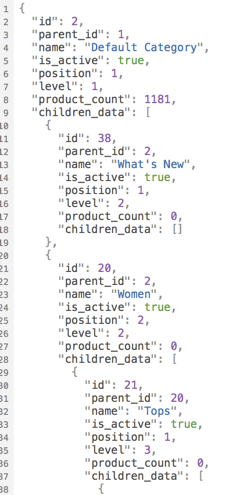
    curl -X GET --header "Accept: application/json" "http://<store-baseurl>/rest/default/V1/categories"

    If you omit the accept header the server will return JSON as default. Let’s change the accept header to “application/json”.

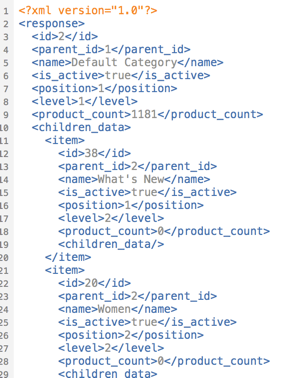
    curl -X GET --header "Accept: application/xml" "http://<store-baseurl>/rest/default/V1/categories"

    Now you should see a well formed XML document:

    Extend the list of acceptable mime types

    Magento 2 can handle JSON and XML. What if we want to add an alternative return format? The bad news… it cannot handle it by default. The good news… You can add the support by yourself.
    The response is generated internally by response renderers which must implement the RendererInterface.

    interface RendererInterface
    {
        /**
         * Render content in a certain format.
         *
         * @param object|array|int|string|bool|float|null $data
         * @return string
         */
        public function render($data);
    
        /**
         * Get MIME type generated by renderer.
         *
         * @return string
         */
        public function getMimeType();
    }
    

    The interface is really simple. A mime type must be defined. In our example we intend to handle the mime type “application/pdf”. The main idea of this demo is to return an existing invoice directly as printable PDF document instead of the JSON or XML data.

    ## Request Workflow

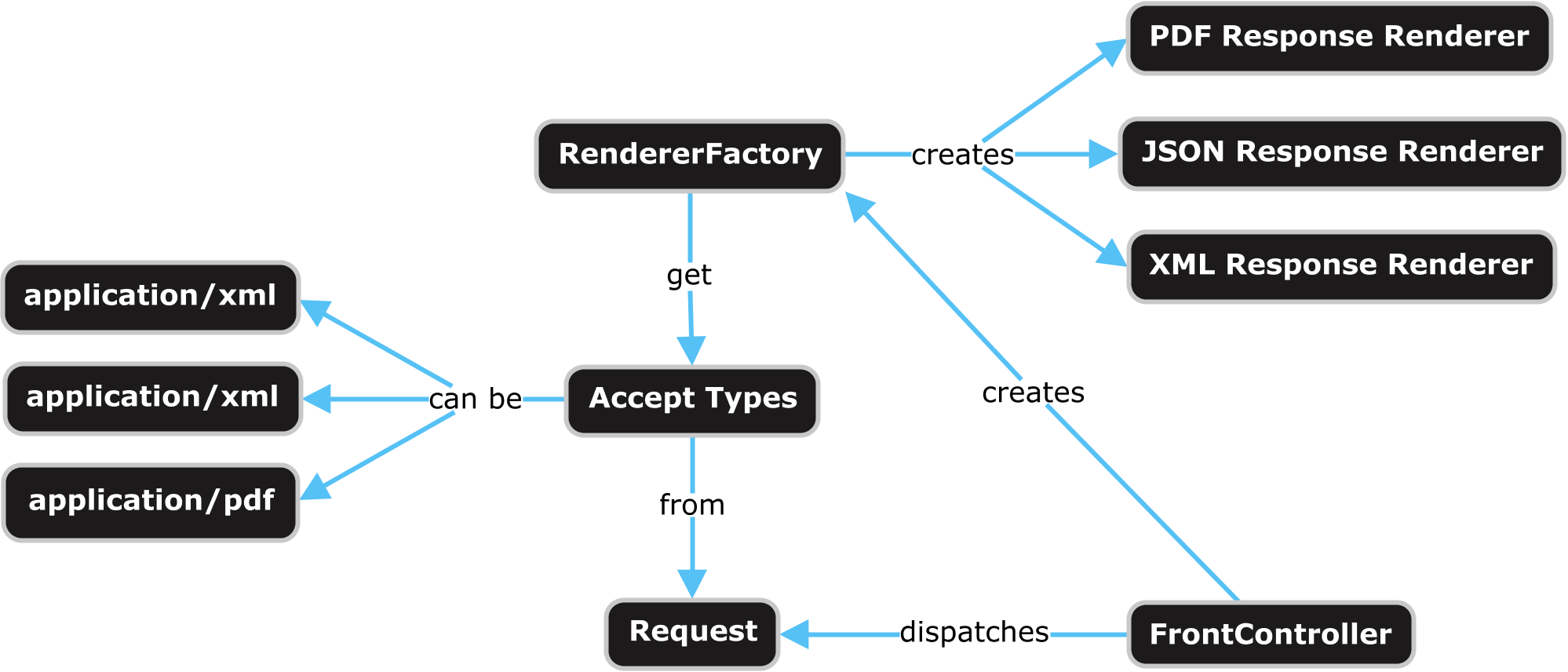
    A request by a browser or a HTTP client (i.e. curl) is sent to the server. The request is dispatched by a special REST FrontController. The FrontController executes some business logic and passes the generated output data to a response object. The response object is generated by a RendererFactory which creates a renderer object based on the mime types of the request accept header.

    Webapi Response Rendering Overview

    If we want to add our own renderer for a specific mime type we can use the Magento 2 Dependency Injection for that. The RendererFactory gets a list of available renderers via di.xml. The next thing we need to do is to create an own module and to add the di.xml in our module with following content:

    <?xml version="1.0"?>
    <config xmlns:xsi="http://www.w3.org/2001/XMLSchema-instance"
            xsi:noNamespaceSchemaLocation="urn:magento:framework:ObjectManager/etc/config.xsd">
    
        <type name="Magento\Framework\Webapi\Rest\Response\RendererFactory">
            <arguments>
                <argument name="renders" xsi:type="array">
                    <item name="application_pdf" xsi:type="array">
                        <item name="type" xsi:type="string">application/pdf</item>
                        <item name="model" xsi:type="string">\N98\WebapiRestPdf\Response\Renderer\PdfRenderer</item>
                    </item>
                </argument>
            </arguments>
        </type>
    
    </config>
    

    Now our response renderer must be created. It must implement the renderer interface. Firstly we add the getMimeType method and let them return the value “application/pdf”. Secondly we implement the render method which returns the PDF data. In our example we only support the REST URL “/V1/invoices”.

    <?php
    namespace N98\WebapiRestPdf\Response\Renderer;
    
    use Magento\Framework\Webapi\Exception;
    use Magento\Framework\Webapi\Rest\Request;
    use Magento\Framework\Webapi\Rest\Response\RendererInterface;
    use Magento\Sales\Api\InvoiceRepositoryInterface;
    use N98\WebapiRestPdf\Service\InvoicePdfGeneratorService;
    
    class PdfRenderer implements RendererInterface
    {
        /**
         * @var \Magento\Framework\Webapi\Rest\Request
         */
        private $request;
    
        /**
         * @var \N98\WebapiRestPdf\Service\InvoicePdfGeneratorService
         */
        private $invoicePdfGeneratorService;
    
        /**
         * @var \Magento\Sales\Api\InvoiceRepositoryInterface
         */
        private $invoiceRepository;
    
        /**
         * Pdf constructor.
         * @param \Magento\Framework\Webapi\Rest\Request $request
         * @param \N98\WebapiRestPdf\Service\InvoicePdfGeneratorService $invoicePdfGeneratorService
         * @param \Magento\Sales\Api\InvoiceRepositoryInterface $invoiceRepository
         */
        public function __construct(
            Request $request,
            InvoicePdfGeneratorService $invoicePdfGeneratorService,
            InvoiceRepositoryInterface $invoiceRepository
        ) {
            $this->request = $request;
            $this->invoicePdfGeneratorService = $invoicePdfGeneratorService;
            $this->invoiceRepository = $invoiceRepository;
        }
    
        /**
         * Render content in a certain format.
         *
         * @param object|array|int|string|bool|float|null $data
         * @return string
         * @throws \Magento\Framework\Webapi\Exception
         */
        public function render($data)
        {
            if (!strstr($this->request->getPathInfo(), '/V1/invoices')) {
                throw new Exception(__('PDF rendering is not supported for this URI'));
            }
    
            if (isset($data['entity_id'])) {
                $invoice = $this->invoiceRepository->get($data['entity_id']);
                $pdf = $this->invoicePdfGeneratorService->execute($invoice);
    
                return $pdf->render();
            }
         
            return null;
        }
    
        /**
         * Get MIME type generated by renderer.
         *
         * @return string
         */
        public function getMimeType()
        {
            return 'application/pdf';
        }
    }
    

    For a better software architecture we place the PDF generation code in an own InvoicePdfGeneratorService class.

    <?php
    namespace N98\WebapiRestPdf\Service;
    
    use Magento\Sales\Api\Data\InvoiceInterface;
    
    class InvoicePdfGeneratorService
    {
        /**
         * @var \Magento\Sales\Model\Order\Pdf\Invoice
         */
        private $invoicePdf;
    
        /**
         * PdfGeneratorService constructor.
         * @param \Magento\Sales\Model\Order\Pdf\Invoice $invoicePdf
         */
        public function __construct(\Magento\Sales\Model\Order\Pdf\Invoice $invoicePdf)
        {
            $this->invoicePdf = $invoicePdf;
        }
    
        /**
         * @param \Magento\Sales\Api\Data\InvoiceInterface $invoice
         * @return \Zend_Pdf
         */
        public function execute(InvoiceInterface $invoice)
        {
            return $this->invoicePdf->getPdf([$invoice]);
        }
    }
    

    That’s all we need to code. As you can see Magento 2 is very extendable. If you have ideas for additional formats, create your own renderer.

    Testing

    Before we start a test of the new functionality, we need an invoice in the database. Simply create a new order in your shop and create an invoice for it in the Magento admin.

    To test the new renderer we can use CURL again. To fetch an invoice you need API credentials. The simplest way to do that, is to get an “Access Token”.

    Have a look in the documentation to see how you can obtain an access token: http://devdocs.magento.com/guides/v2.1/get-started/authentication/gs-authentication-token.html

    On my local machine this CURL command looks like this:

    curl -o invoice.pdf -X GET \
    --header "Accept: application/pdf" \
    --header "Authorization: Bearer 0b4sdr02nis73md8qsg3y3b6uk4hi5k4" \
    "http://magento.dev/rest/default/V1/invoices/1"

    This command calls the Magento Shop, which should now return the content of a PDF file. The PDF content is written to the file “invoice.pdf”.

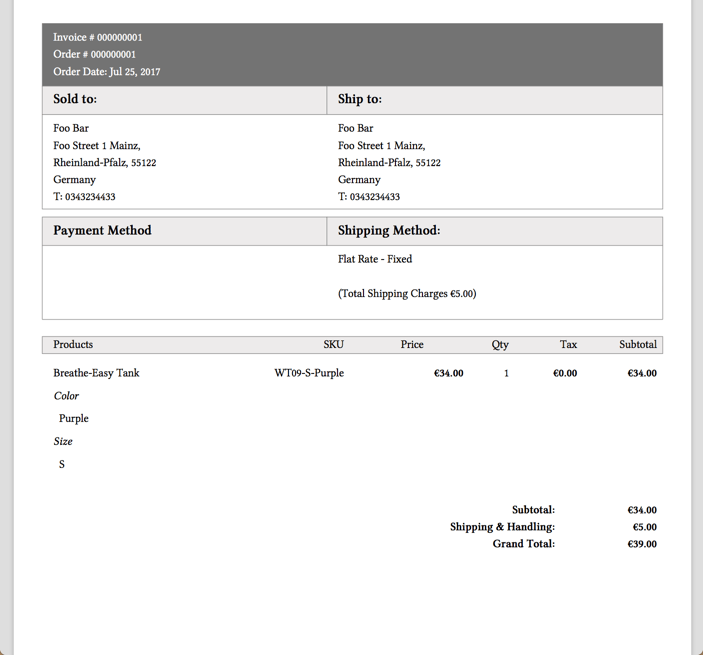
    My PDF looks like this:

    Great! We can now get PDF invoices by the REST API!

    Conclusion

    Magento 2 can be extended in an easy way. If you like to play a little bit with the code of this blog post, checkout our demo module on Github.

    https://github.com/netz98/N98_WebapiRestPdf

  • Think outside the box: Magento 2 as API framework

    Think outside the box: Magento 2 as API framework

    In this article, we will cover the web-API and how to use Magento 2 as a standalone API-framework.

    If the web-API is new to you, I recommend to read the development documentation of it first: Magento 2 API documentation

    Why should I do this?

    Short answer: Because you can!

    Not really, there is no reason why you shouldn’t try it at least and have some fun with it – you might get used to it 😉

    With Magento 2, the whole web-API was rebuild from scratch to compete with state of the art frameworks. Together with the well working dependency injection approach, it absolutely makes sense to take a deeper look at it.

    Also, one big advantage of Magento’s implementation of the API is the easy wiring between the request-routing and the executed code that handles the request.

    Compared to Symfony, for example, the creation of new endpoints is easier and more intuitive.

    In the simplest possible case, the definition of a endpoint only contains 6 lines of code:

    <route url="/V1/modules" method="GET">
         <service class="Magento\Backend\Service\V1\ModuleServiceInterface" method="getModules"/>
         <resources>
             <resource ref="Magento_Backend::admin"/>
         </resources>
    </route>

    Aside from the easy definition of a new API endpoint, you can also use Magento’s build-in features such as ACL resources for access management, plugins/interceptors, automatically generated factories and proxies.

    You see, beside the basic shop functionality you also have a well designed toolset to create APIs at your fingertips, no matter of the size or complexity of your project.

    Challenge accepted

    So, what do we need to modify the default Magento installation in order to get this working?

    In fact, it isn’t as much as you might think. We only need to hide the Magento storefront to the public and that’s it (more or less).

    For sure, you also could hide the administration backend and the API endpoints, that comes along with Magento by default, but in our case we are absolutely fine with them. We keep them for now, because of we will need them later.

    Hide the shop

    For hiding the shop, there is a wide range of multiple options that starts with modifying the webserver’s request-resolving and ends with rewriting the entire routing component of the Magento core.

    In our case, we did something in between and created a module with a very low footprint to achieve this.

    By installing thins module, all storefront requests will be blocked except the REST, Swagger and the administration backend related ones.

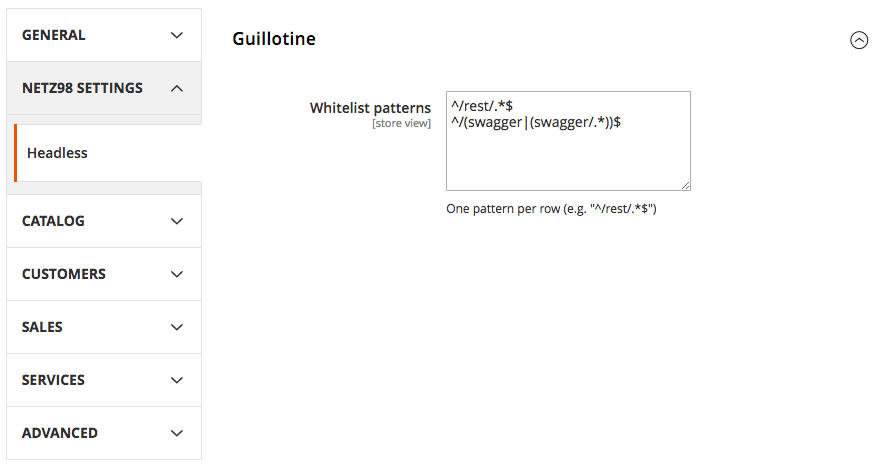
    If you want to allow more pages to be accessible, you can simply modify the whitelist-patterns using the system configuration settings.

    To hide the default frontend of Magento, simply install the following module according to it’s installation guide: netz98/headless-guillotine

    Example Usage

    After installing the module, you will find a new system-configuration setting:

    This will rise an exception in case a blocked route is requested. The printed error will do the trick while you are testing, but I would recommend to add a configuration for handling the exception in a proper way later on – so the customer won’t get a blank page with cryptic informations in case he directly accesses the page  😉

    Summary

    You see, with a very view steps you can use Magento 2 as a API framework, that implements state of the art techniques and supports the modern web-development.

    The module provided by netz98 makes it really simple to quickly hide your storefront and to start your backend development.

    Final Words

    Have you implemented similar things or have you tested the setup as described in this post?

    Let me know about it in the comments below, I’d really like to chat with you about your approaches and ideas – your feedback is highly appreciated!

  • Use Swagger to generate a full functional Magento API Client

    Use Swagger to generate a full functional Magento API Client

    Magento 2 comes with a nice swagger schema which describes the Webapi. The Magento guys were very clever to choose swagger. It not only comes with a schema, but moreover it is a complete interactive API client as well.

    A swagger schema is a JSON document to formalize the REST API. Formalized documents have the big advantage that you can process the data with a machine. One idea I had was to create a PHP API for the Magento 2 API. Fortunately the swagger guys created a code generator tool. I really like the idea to generate code out of the schema. The swagger code-gen tool comes with support for multiple languages. PHP is one of the standard languages.

    The code generator tool can be found here: http://swagger.io/swagger-codegen/

    If you are on a mac it’s possible to install the code generator with homebrew.

    brew install swagger-codegen

    After the installation you can test the tool with the help command.

    swagger-codegen help

    On my machine i can see this help output. Works!

    usage: swagger-codegen-cli <command> [<args>]
    
    The most commonly used swagger-codegen-cli commands are:
        config-help   Config help for chosen lang
        generate      Generate code with chosen lang
        help          Display help information
        langs         Shows available langs
        meta          MetaGenerator. Generator for creating a new template set and configuration for Codegen.  The output will be based on the language you specify, and includes default templates to include.
        version       Show version information
    
    See 'swagger-codegen-cli help <command>' for more information on a specific
    command.

    Run the generator

    Now we are able to run the code generator. I used the schema from public developer documentation. You can also use your own schema from an existing installation.

    swagger-codegen generate -i http://devdocs.magento.com/swagger/schemas/latest-2.1.schema.json -l php
    cd SwaggerClient-php
    composer install --prefer-dist

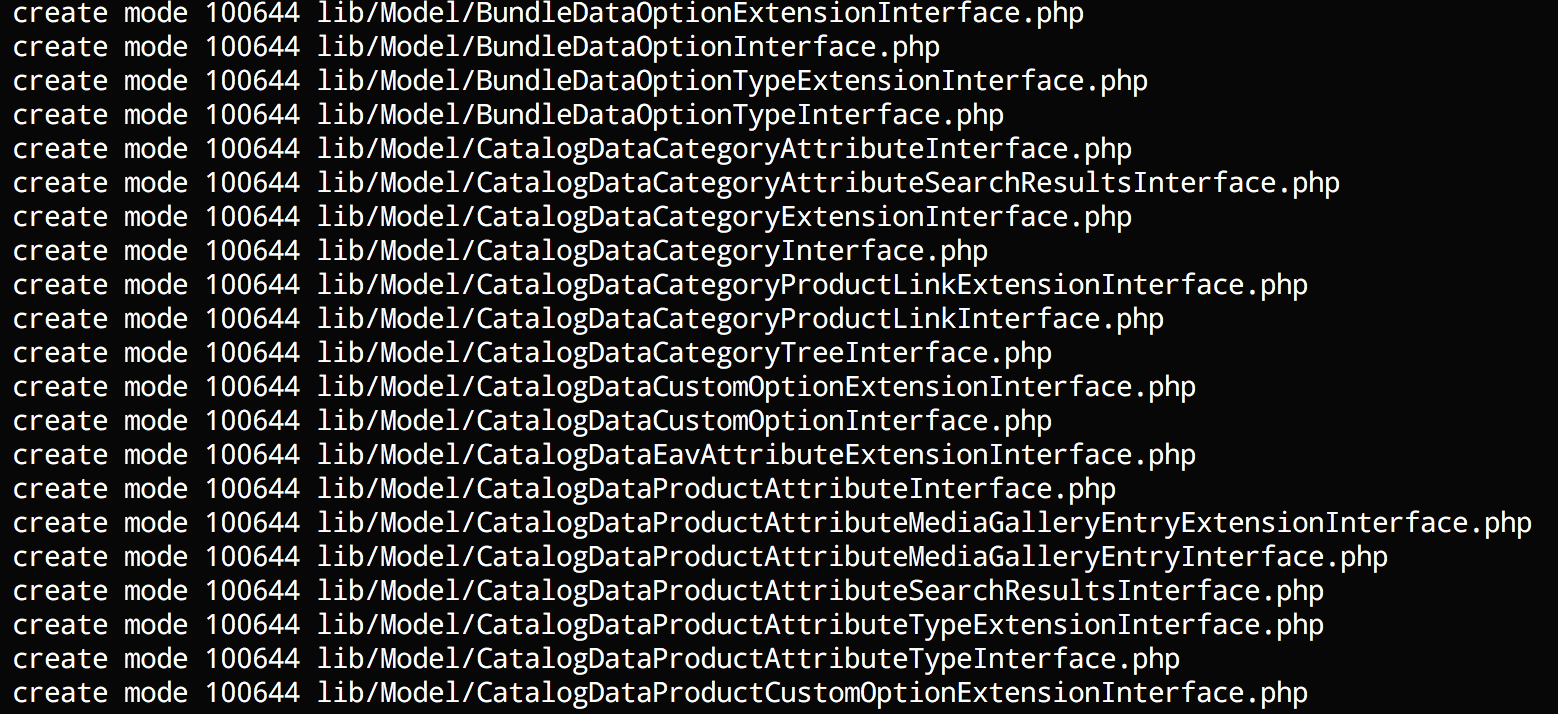
    You should see a long list of generated classes like this:

    Run test unit tests

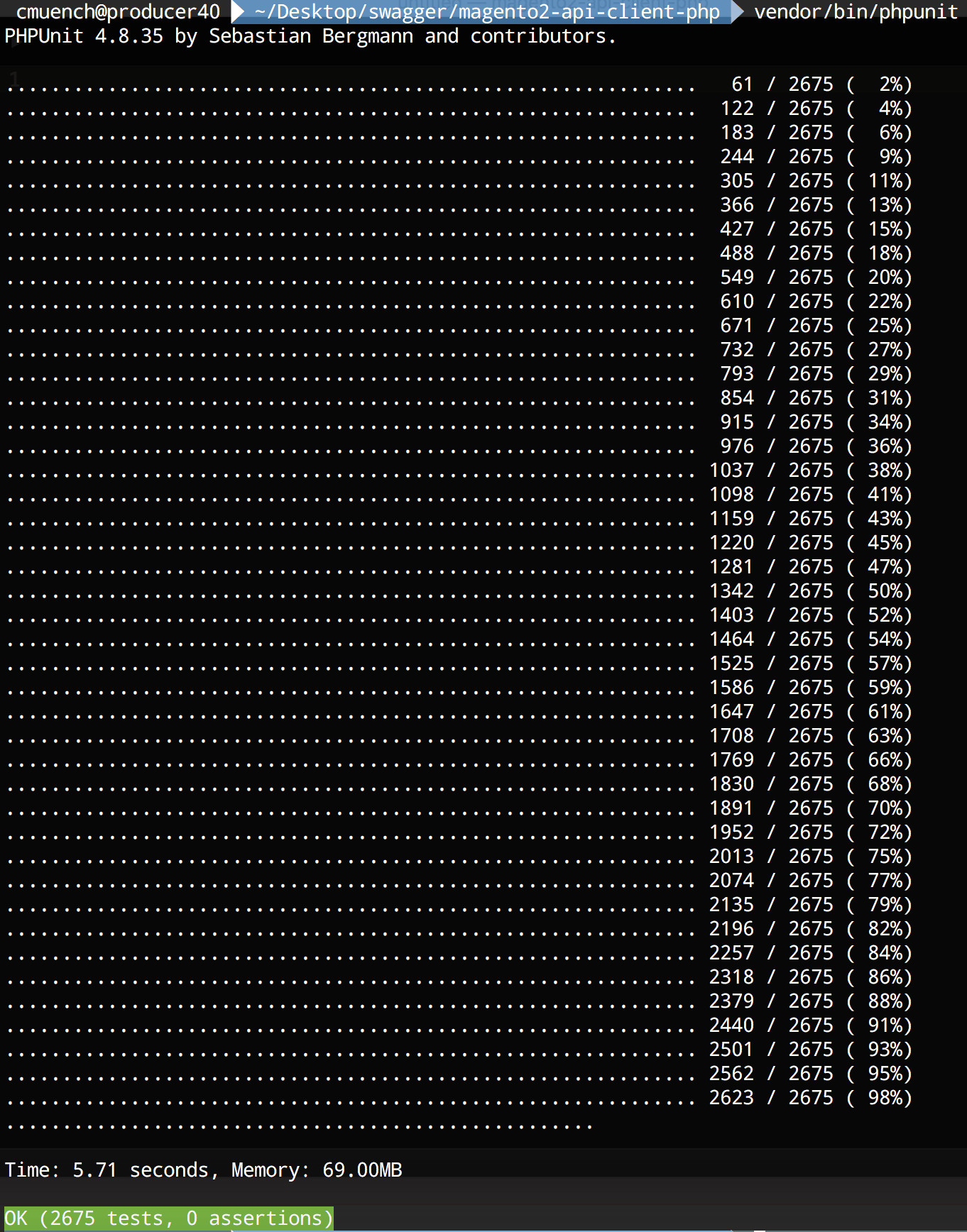
    After the code generation is done, we should run the generated unit tests. You can run the tests by typing vendor/bin/phpunit in the project folder.

    Test the new generated client

    After that we can try our freshly generated API client library.

    As an example we will fetch all the installed Magento modules of our shop instance.

    <?php
    require_once __DIR__ . '/vendor/autoload.php';
    
    $baseUrl = '{{YOUR_SHOP_URL}}/rest';
    $token = 'bearer {{YOUR_API_TOKEN}}';
    
    $config = new \Swagger\Client\Configuration();
    $config->setHost($baseUrl);
    $config->addDefaultHeader('Authorization', $token);
    
    $apiClient = new \Swagger\Client\ApiClient($config);
    
    $apiInstance = new \Swagger\Client\Api\BackendModuleServiceV1Api($apiClient);
    
    try {
        $result = $apiInstance->backendModuleServiceV1GetModulesGet();
        print_r($result);
    } catch (Exception $e) {
        echo $e->getMessage();
    }

    Save the script as installed_modules.php and replace {{YOUR_SHOP_URL}}  with a local or remote shop url and {{YOUR_API_TOKEN}} with a API bearer token of your user. A brief description about the generation of API-Tokens can be found in the developer documentation topic “Token-based authentication“.

    Now run the script with php installed_modules.php.

    On my local machine I am getting this output:

    Array
    (
        [0] => Magento_Store
        [1] => Magento_AdvancedPricingImportExport
        [2] => Magento_Directory
        [3] => Magento_Theme
        [4] => Magento_Backend
        [5] => Magento_Backup
        [6] => Magento_Eav
        [7] => Magento_Customer
        [8] => Magento_BundleImportExport
        [9] => Magento_AdminNotification
        [10] => Magento_CacheInvalidate
        [11] => Magento_Indexer
        [12] => Magento_Cms
        [13] => Magento_CatalogImportExport
        [14] => Magento_Catalog
        [15] => Magento_Rule
        [16] => Magento_Msrp
        [17] => Magento_Search
        [18] => Magento_Bundle
        [19] => Magento_Quote
        [20] => Magento_CatalogUrlRewrite
        [21] => Magento_Widget
        [22] => Magento_SalesSequence
        [23] => Magento_CheckoutAgreements
        [24] => Magento_Payment
        [25] => Magento_Downloadable
        [26] => Magento_CmsUrlRewrite
        [27] => Magento_Config
        [28] => Magento_ConfigurableImportExport
        [29] => Magento_CatalogInventory
        [30] => Magento_SampleData
        [31] => Magento_Contact
        [32] => Magento_Cookie
        [33] => Magento_Cron
        [34] => Magento_CurrencySymbol
        [35] => Magento_CatalogSearch
        [36] => Magento_CustomerImportExport
        [37] => Magento_CustomerSampleData
        [38] => Magento_Deploy
        [39] => Magento_Developer
        [40] => Magento_Dhl
        [41] => Magento_Authorization
        [42] => Magento_User
        [43] => Magento_ImportExport
        [44] => Magento_Sales
        [45] => Magento_CatalogRule
        [46] => Magento_Email
        [47] => Magento_EncryptionKey
        [48] => Magento_Fedex
        [49] => Magento_GiftMessage
        [50] => Magento_Checkout
        [51] => Magento_GoogleAnalytics
        [52] => Magento_GoogleOptimizer
        [53] => Magento_GroupedImportExport
        [54] => Magento_GroupedProduct
        [55] => Magento_Tax
        [56] => Magento_DownloadableImportExport
        [57] => Magento_Braintree
        [58] => Magento_Integration
        [59] => Magento_LayeredNavigation
        [60] => Magento_Marketplace
        [61] => Magento_MediaStorage
        [62] => Magento_ConfigurableProduct
        [63] => Magento_MsrpSampleData
        [64] => Magento_Multishipping
        [65] => Magento_NewRelicReporting
        [66] => Magento_Newsletter
        [67] => Magento_OfflinePayments
        [68] => Magento_SalesRule
        [69] => Magento_OfflineShipping
        [70] => Magento_PageCache
        [71] => Magento_Captcha
        [72] => Magento_Paypal
        [73] => Magento_Persistent
        [74] => Magento_ProductAlert
        [75] => Magento_Weee
        [76] => Magento_ProductVideo
        [77] => Magento_CatalogSampleData
        [78] => Magento_Reports
        [79] => Magento_RequireJs
        [80] => Magento_Review
        [81] => Magento_BundleSampleData
        [82] => Magento_Rss
        [83] => Magento_DownloadableSampleData
        [84] => Magento_Authorizenet
        [85] => Magento_OfflineShippingSampleData
        [86] => Magento_ConfigurableSampleData
        [87] => Magento_SalesSampleData
        [88] => Magento_ProductLinksSampleData
        [89] => Magento_ThemeSampleData
        [90] => Magento_ReviewSampleData
        [91] => Magento_SendFriend
        [92] => Magento_Ui
        [93] => Magento_Sitemap
        [94] => Magento_CatalogRuleConfigurable
        [95] => Magento_Swagger
        [96] => Magento_Swatches
        [97] => Magento_SwatchesSampleData
        [98] => Magento_GroupedProductSampleData
        [99] => Magento_TaxImportExport
        [100] => Magento_TaxSampleData
        [101] => Magento_GoogleAdwords
        [102] => Magento_CmsSampleData
        [103] => Magento_Translation
        [104] => Magento_Shipping
        [105] => Magento_Ups
        [106] => Magento_UrlRewrite
        [107] => Magento_CatalogRuleSampleData
        [108] => Magento_Usps
        [109] => Magento_Variable
        [110] => Magento_Version
        [111] => Magento_Webapi
        [112] => Magento_SalesRuleSampleData
        [113] => Magento_CatalogWidget
        [114] => Magento_WidgetSampleData
        [115] => Magento_Wishlist
        [116] => Magento_WishlistSampleData
        [117] => N98_Tutorial
        [118] => N98_Tutorial2
    )

    Conclusion

    That’s it. We have a full functional REST API client in PHP to call Magento 2 instances. The generated code is not perfect but very usable.

    You can try it by yourself. For all lazy developers we pushed the code in a public github repository.

    https://github.com/netz98/magento2-swagger-api-client-demo

    Have fun!

  • Nice to know: Install N98-Magerun via Composer

    There is a so far merely undocumented installation procedure for Magerun that is extremely handy in project configurations.

    You just require Magerun within the Magento project and you can then execute it from the vendor’s bin folder:

    $ composer require n98/magerun2
    [...]
    $ ./vendor/bin/n98-magerun2 --version
    n98-magerun2 version 1.3.2 by netz98 GmbH

    Afterwards if you commit the composer.json  and composer.lock  files it is a take-away for the whole team.

    So it is regardless whether you’re running it locally, inside a docker container or a complete different system. After composer install, n98-magerun2 is available on all target systems.

    Just Another Install Example

    Here another example I just did with one of our systems that run via docker on my end, but I’m installing on my local system (the folder is mounted inside the docker container):

    $ composer require n98/magerun2 --ignore-platform-reqs
    [...]

    The –ignore-platform-reqs  switch make composer to install it even despite my local system does not have all Magento2 requirements.