Tag: magento2

  • Request data through a proxy with GuzzleHttp – PSR-7 compliant

    Request data through a proxy with GuzzleHttp – PSR-7 compliant

    When a Magento shop – or any other PHP application – is required to request data from or transmit data to a remote server, it is often necessary to redirect the traffic through a Http-proxy server. In my case this was essential because the called endpoint allows only certain IP addresses to access the requested ressource. Since I am working from various locations, each having a different IP address, I had to find a way that certain Http-requests are routed through the company’s proxy server. This article is going to describe what a proxy actually does for us, why I cannot and should not use PHP’s environment variables and what the best solution is for scenarios where PSR-7 / PHP-Http in combination with GuzzleHttp might be.

    What about PSR-15?

    Good point! This text will discuss Http middleware components on client side with the example of adding proxy configurations to a request. The relatively new PSR-15 standard handles the server side and focuses mainly on manipulating the response which is sent back to the calling host. Nevertheless you will get a lot of useful information from the standard and the explanation.

    Why don’t you simply use the the HTTP_PROXY environment variable?

    Guzzle indeed accesses the PHP environment variable HTTP_PROXY and routes every request through the specified proxy, if this value is actually configured in php.ini or by using the setenv()-command. But for security reasons this feature is only available when the script is called from the shell (checked using method php_sapi_name()). More information on the vulnerability and the reason why GuzzleHttp declines to use the settings from environment variables can be found at httpoxy.org.

    GuzzleHttp offers a proxy-configuration within the request()-method – why not use this?

    Because it it not PSR-7 compliant! The HTTP message interface simply does not provide a method with name request that allows the developer to pass an options-array in which we could add our proxy-configuration. Instead the interface does only declare a method sendRequest that accepts an object of type \Psr\Http\Message\RequestInterface which also does not offer any proxy configuration.

    Middleware and Handlers

    Middleware components are a powerful – and PSR-7 compliant – way to manipulate Http requests before they’re sent to a remote server.

    In an example scenario where it would be required to send authentication data in each server call, it’d sure be exhausting to update the credentials for each method call all over your application’s code. Adding a middleware layer that automatically adds the necessary data to each request, before it is transmitted, will reduce the code lines to be updated to just a single one (maybe two).

    A middleware is simply a method that resides between the command for sending a request and the actual transmittion. It allows to add, remove or modify data, the target-URL or any other property of the \Psr\Http\Message\RequestInterface as well as additional configuration, that is important for data transfer.

    More information on the PSR-7 standard is given in our in-depth series.

    Create a middleware and add it to the HandlerStack

    The diagram below sketches on the top half the classical way of sending a request: The developer adds a a sendRequest command along with the connection and data settings hold by $request and passes it to a various transmittion mechanism, e.g. GuzzleHttp.
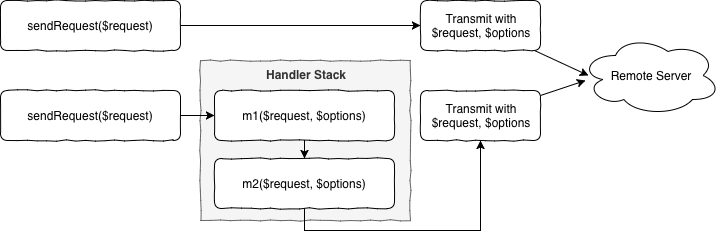
    In the bottom half of the diagram two sample middleware methods m1 and m2 are added to stack that resides between sending the request and the actual transmittion. Both methods are free to modify the request or the configuration hold by $options and are executed one after another, as described by the chain of responsibility, part of the infamous Gang of Four.

    The following implementation has proven to be stable but might be a bit more complex than what is actually necessary to create a middleware method. The reason for that is because of a better test-ability and more flexibility for future add-ons.

    Class ProxyMiddleware

    First step is to create a new class called ProxyMiddleware that is responsible to prepare the concrete middleware method for the handler stack, managed by GuzzleHttp. This class has static method, which holds the proxy settings (URL and port) and will return a closure that will be pushed onto the handler stack later.

    public static function getProxyMiddleware($serverUrl): callable
    {
        self::$proxyUrl = $serverUrl;
    ​
        return function (callable $handler) {
            return new ProxyMiddleware($handler);
        };
    }

    As soon as the closure is called during data transmittion a new instance of the ProxyMiddleware-class is created and invoked by the stack dispatcher. Therefore we need to implement the actual middleware-call inside of the magic __invoke-method:

    public function __invoke(RequestInterface $request, array $options)
    {
       $fn = $this->nextHandler;

       $options['proxy'] = [
           'http'  => self::$proxyUrl,
           'https' => self::$proxyUrl,
      ];

       return $fn($request, $options);
    }

    It’s that simple! We just add the proxy information to the $options-array and pass the new information onto the method described by $nextHandler. That was easy!

    Add our middleware to the handler stack

    After we have created the middleware handler, we need to tell GuzzleHttp to actually execute it after the sendRequest-command is executed. For this second step we need to instantiate a new HandlerStack-object using the class’ static create-method.

    $handlerStack = \GuzzleHttp\HandlerStack::create();
    $handlerStack->push(ProxyMiddleware::getProxyMiddleware('proxy_url'), 'middleware_id');

    $options['handler'] = $handlerStack;

    $httpClient = \Http\Adapter\Guzzle6\Client::createWithConfig($options);

    Now we simply push the previously described closure onto the stack together with an identifier-string. Allthough this ID is optional, it will be more than helpful for debugging your application, since Guzzle adds a couple of default middlewares to the stack and you would end up in a unmanageable mess.

    After we have created and configured the handler stack, we simply use the static createWithConfig-method that allows us to inject a options-array into the instantiation of a new Guzzle PSR-7 compliant Http client.

    From now on, all requests that are sent using this Http client will be transmitted with your middleware executed inbetween and having the proxy setting configured!

    Caveat: Unit Testing

    Testing your new middleware-class might be a little bit tricky. I just want you to know that closures, like the class member $nextHandler can be mocked using PHP’s pre-defined core class \stdClass and the magic __invoke method. In case you’re using PHPUnit, the following snippet might be helpful:

    $nextHandlerMock = $this->createPartialMock(\stdClass::class, ['__invoke']);

    More information

  • Sequence of Magento 2 Install / Upgrade / Recurring scripts

    Sequence of Magento 2 Install / Upgrade / Recurring scripts

    Preamble

    In one of my last tasks I had to write an upgrade script in which an assignment of a newly created frontend theme to some of the stores should be implemented.

    The following code-part describes what I did here:

    /**
     *
     */
    protected function assignNewThemeToSelectedStores()
    {
        $storeIdsForNewTheme = [];
    
        foreach ($this->storesCodesWithNewTheme as $storeCode) {
            $storeIdsForNewTheme[] = $this->storeRepository->get($storeCode)->getId();
        }
    
        /** @var \Magento\Theme\Model\ResourceModel\Theme\Collection $themes */
        $themes = $this->themeCollectionFactory->create()->loadRegisteredThemes();
        /**
         * @var \Magento\Theme\Model\Theme $theme
         */
        foreach ($themes as $theme) {
           if ($theme->getCode() === 'Mynewly/createdtheme') {
           $this->themeConfig->assignToStore(
               $theme,
               $storeIdsForNewTheme
           );
           }
        }
    }

    As I already had an InstallData Script in the module and it already has run on some dev machines and staging systems, I put the following code to the newly created UpgradeData script.

    The problem

    The code in the upgrade script did not take any effect after running php bin/magento setup:upgrade. I found out that I could force it to take effect only after deleting the module entry from setup_module table an re-running setup:upgrade command.

    The reason

    Debugging of the setup:upgrade command revealed the fact, that at the moment of the first execution of my UpgradeData script, the new theme was not registered in the “theme” Magento DB table. It looked strange for me, because I’ve added a dependency to “Magento_Theme” module in my module.xml, as I obviously relied on this module’s code and data.

    I then found out, that the registration of newly added themes is implemented in the following script:

    vendor/magento/module-theme/Setup/RecurringData.php

    After debugging and analyzing the setup:upgrade command code, I came to the following result: in Magento the Setup Scripts are executed in the following order:

    • InstallSchema & UpgradeSchema
    • Recurring (Schema)
    • InstallData & UpgradeData
    • RecurringData

    In this scopes the dependencies of the modules affect the sequence of the script execution, but if your module’s script depends on the code which is executed in a script of another module in a later scope than the scope of your script, your code will not work.

    The solution

    As my script depends on the latest scope “RecurringData” I had no choice than to put my code also in a “RecurringData” script. As recurring means it is executed on each setup:upgrade run, I made some checks in my script, in order to execute some performance critical tasks only if the right theme isn’t already set for the relevant stores.


  • Introducing MageDeploy2

    Introducing MageDeploy2

    In our recent post series about Deploying Magento2 using Jenkins and deployer I was showing you how our Deployments are set up.

    In case you haven’t read them and are interested in the details here are the links:

    During the time of writing those articles I realized quite some improvements and generalizations that could be done to make this deployment more maintainable, extensible and customizable. I wanted to have a deployment setup that allows local execution with colored output, execution on a build server without interaction and usage in a build pipeline.
    Furthermore I wanted the deployment setup not only to be usable within netz98 but also by the whole Magento community.

    What I came up with I called MageDeploy2 which I will introduce with this post.

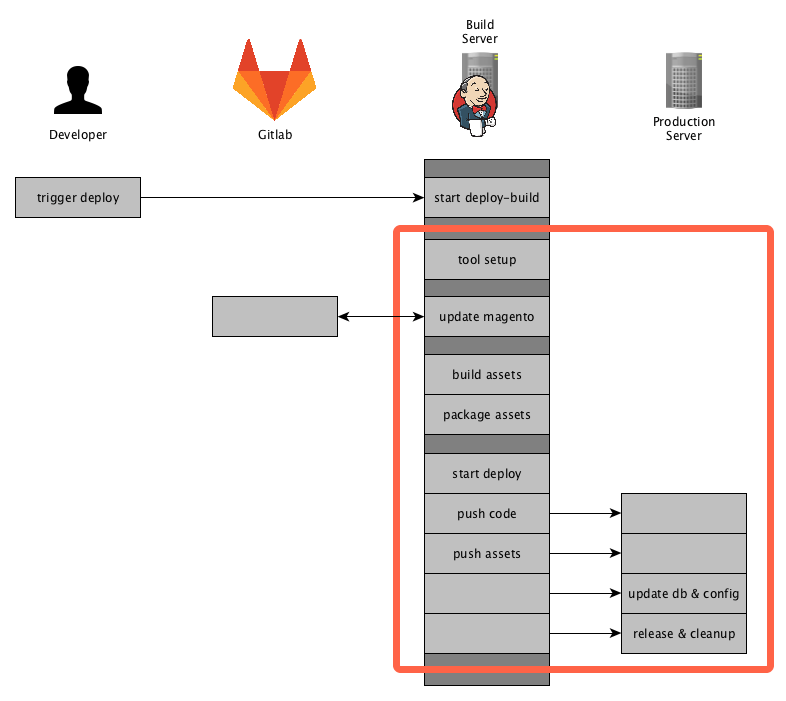
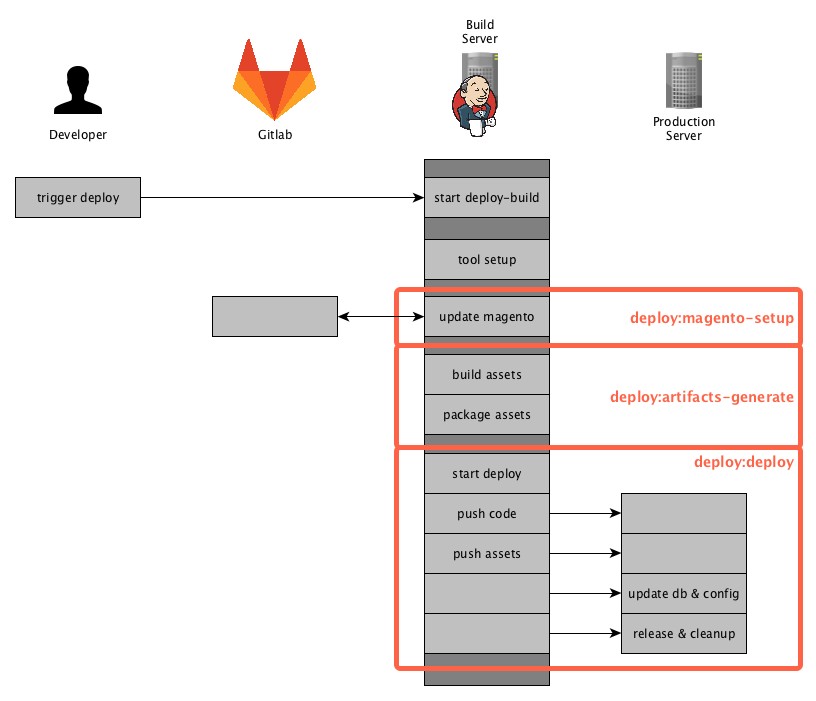
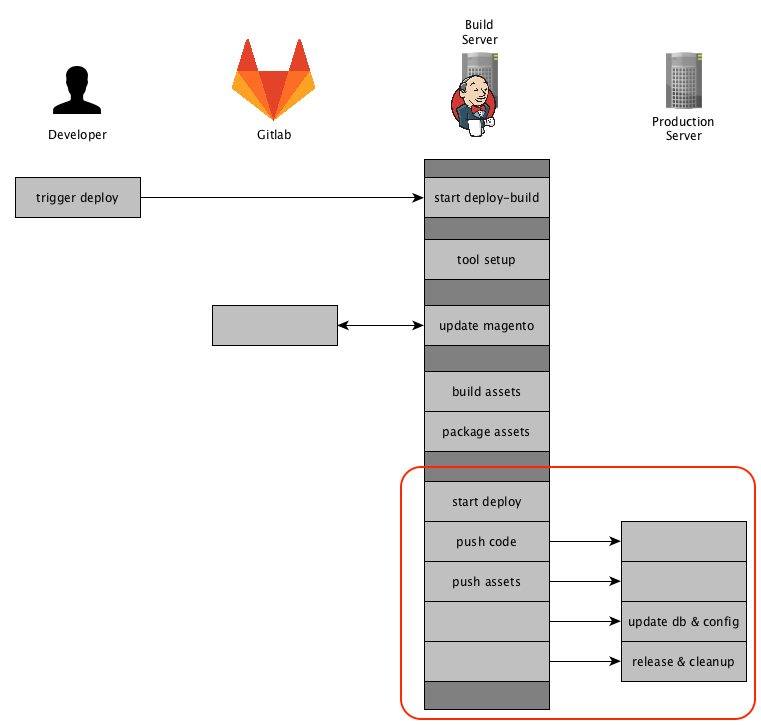
    If you read the previous post you will probably remember the diagrams showing the actions executed on the particular servers. I used one of those to mark the areas which will be provided by the MageDeploy2 setup.

    Now let’s go into details on how those phases and steps are implemented and what you need to get started with a PUSH deployment for Magento2 yourself.

    About MageDeploy2

    MageDeploy2 combine’s multiple technologies and open-source projects to provide the deployment setup.
    It basically is a set of tools, configurations files, some custom tasks for Robo and Deployer, all tailored to fit the needs of deploying a Magento2 project.

    For those new to Robo and Deployer:

    • Robo is a task runner that allows you to write fully customizable tasks in common OOP PHP style http://robo.li/
    • Deployer is Deployment tool for php, which follows a approach similar to capistrano https://deployer.org/

    I will not go into to much detail on how those tools work, you can get that from their designated websites and documentation.

    MageDeploy2 can be divided into 3 phases that can each be triggered separately.

    • magento-setup (preparing a local magento-setup)
    • artifacts-generate (generating the assets and packaging them)
    • deploy (release to production environment)

    Those phases are implemented as commands in the RoboFile.

    MageDeploy2 is divided into different packages that are installed when installing through composer.

    • mwltr/robo-deployer : contains Robo-Tasks for deployer
    • mwltr/robo-magento2 : contains Magento2 specific Robot-Tasks

    Those Robo-Tasks are not a full set of all possible commands and options but currently offer the commands and modifiers needed in deployment scenario. They are decoupled and can be re-used in other projects.

    As far as the deployer setup is concerned, MageDeploy2 uses n98/n98-deployer to include deployer configurations and tasks, them being:

    • set of Magento2 specific tasks
    • Magento2 Default Recipe
    • RoleManager for servers
    • optimized deployer standard tasks

    Requirements

    As I mentioned earlier, Magento2 Deployment Setup is using Robo to control the local setup and the overall deployment process. To achieve the actual deployment to the distinct environment it comes with a pre-configured Deployer setup. Please note that using Deployer is not mandatory, you can use whatever tool you like.

    It also expects that you have a git repository available, where you have commited your Magento2 composer.json file in either the root or in a sub-directory. Right now we are only supporting git but it should not be that big of a problem to connect to another VCS.
    Finally you need to have configured the access to the Magento composer repository for your current user.

    Create a new Deployment

    To Create a new deployment setup just run the following command.

    composer create-project mwltr/magedeploy2-base <dir>

    Note: Robo needs to be installed using composer, otherwise the usage of custom Tasks is not available. See the Robo Documentation Including Additional Tasks

    Configuration

    After the Installation you have to edit the magedeploy2.php and the deploy.php file to suit your needs. MageDeploy2 assumes you have a git repository containing the magento composer.json. Furthermore your local build environment can clone said repository and download the Magento packages using composer.

    MageDeploy2 Configuration

    To configure the MageDeploy2 use the following command:

    ./vendor/bin/robo config:init

    It will guide you throught the most important configuration options. Don’t worry you can edit the magedeploy2.php later-on.

    Next, run

    ./vendor/bin/robo validate

    to validate your build environment is setup.

    Setup local build environment

    If you are done with the configuration in magedeploy2.php, you can see if your build environment can be setup. To do so run this command:

    ./vendor/bin/robo deploy:magento-setup develop

    You can use a different branch or tag depending on your git repository setup.

    After the magento-setup has run successfully, you can now generate the assets by running the command:

    ./vendor/bin/robo deploy:artifacts-generate

    After this command is complete you should see the packages beneath shop.

    At this point we are sure that the local build setup is working and we can now continue with releasing our project.

    Deployer Configuration

    To evaluate we will create a local deployment target. To do so copy the local.php.dist by runing

    cp config/local.php.dist config/local.php

    and set the config values according to your local deploy target.

    Check the configuration in deploy.php and adjust it to your requirements. The default configurations and tasks are defined in \N98\Deployer\Recipe\Magento2Recipe. You can also have a look at all the configurations available in the Deployer Documentation

    Setting up deploy directory tree

    After you are done with setting the configuration, you can now initialize the directory tree of the deploy target run

    ./vendor/bin/dep deploy:prepare local

    This will create the required directories on your local deploy target.

    Setting up deploy target (optional)

    If you want to set up your deploy target as well you can use the command

    ./vendor/bin/dep server:setup local

    It will make an initial deployment to push your code to the deploy target.

    When this is done navigate to your local deploy_path and run the magento install command to setup the database. This might look something like this:

    cd <deploy_path>
    php bin/magento setup:install --db-host=127.0.0.1 --db-name=magedeploy2_dev_test_1_server --db-user=root --admin-email=admin@mwltr.de 
    --admin-firstname=Admin --admin-lastname=Admin --admin-password=admin123 --admin-user=admin 
    --backend-frontname=admin --base-url=http://magedeploy2_dev --base-url-secure=https://magedeploy2_dev 
    --currency=EUR --language=en_US --session-save=files --timezone=Europe/Berlin --use-rewrites=1

    Now we have Magento database and configuration on our deploy target and are ready to continue with the final step.

    Deploying the project

    At this point, you have setup the build environment and target environment and can finally start with the actual deployment. You can do so by running:

    ./vendor/bin/dep deploy local

    Congrats you have successfully setup your deployment pipeline and run the first deployment!

    Commands

    If you went through the tutorial above, you may have already used most of them.
    A full list of commands is available in the github repository here:
    https://github.com/mwr/magedeploy2-base#commands
    The following diagram shows the commands responsibility within the deployment pipeline.

    deploy:magento-setup

    Runs all tasks in the stage magento-setup. It will setup or update a local Magento instance by pulling the source-code from git, installing composer dependencies and installing or updating a local database.

    deploy:artifacts-generate

    Runs the Magento di:compile and setup:static-content-deploy commands to generate the assets. It is using your configuration from the magedeploy2.php.

    After generating those assets it will create packages, again according to your configuration.

    deploy:deploy

    This command will invoke deployer to release your project and push the prepared artifacts to the server.

    deploy

    Triggers the deployment with all it’s stages and can be considered to run deploy:magento-setup, deploy:artifacts-generate and deploy:deploy internally.

    Customization

    MageDeploy2 was designed to be highly customizable to suite your needs. Here are some areas that are easy to adjust:

    • Add or overwrite Robo-Tasks
    • Add or overwrite existing or additional configuration to MageDeploy2
    • Customize Deployer but still have the basic set of tasks available
    • Exchange deployer with a different tool

    The go into details here would exceed the purpose of this introduction. We may go into details in this area in a later post though.

    Final Words

    This is it, I hope you like the tool and it will be helpful setting up a PUSH deployment of your own.
    And as always let me know your thoughts and feedback in the comments below or contact me directly.


  • Deploying Magento2 – Future Prospects [4/4]

    Deploying Magento2 – Future Prospects [4/4]

    This post is part of series:

    Recap

    In the previous posts we dived into our Deployment Pipeline and the Release to the staging or production environments. You should check those posts first before reading this one.

    In this post we will share our thoughts on where we want to go with our deployment setup and what we have planned.

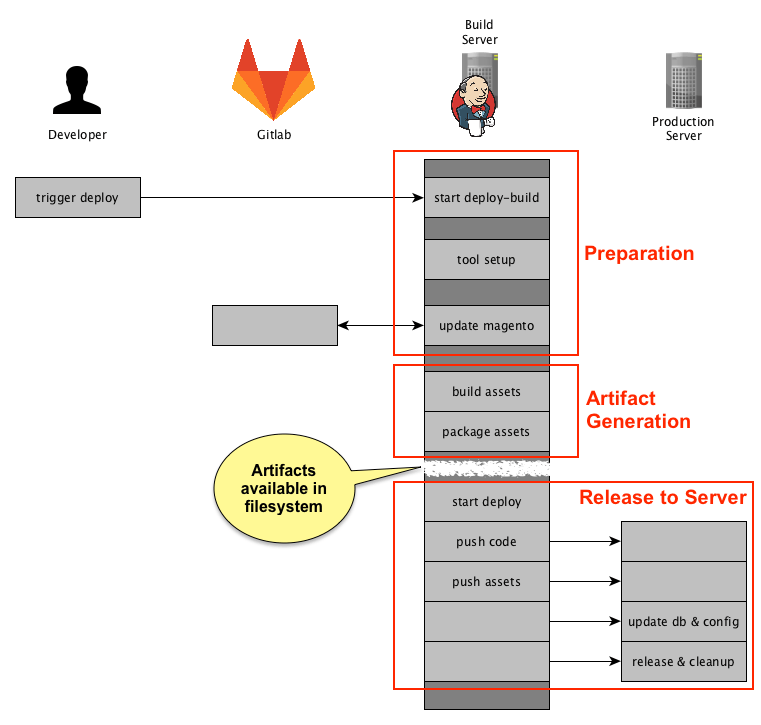
    To recall, this is our current Deployment Setup in a simplified overview:

    I have marked the phases the deployment is going through and the one important point in our deployment which is when all artifacts have been created and are available in the filesystem.
    This will be the key-point in our deployment setups, because we can have a clean cut here and switch /adjust the following phase based on our customers needs or the server infrastructural requirements.

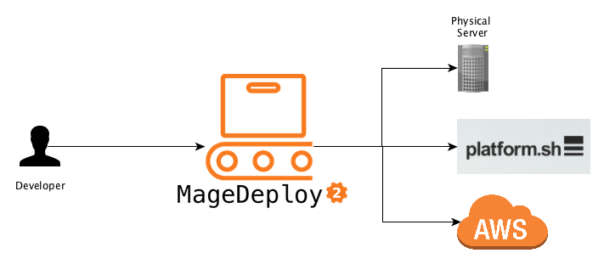
    Our goal is to have a standard setup as far as possible and then be able to deploy to physical servers, cloud setups or even use completely different deployment approach.

    Preface

    The next paragraphs will be about the different setups we plan to serve with this deployment. Note that the following Deployment Setups are still under evaluation and are just stating my current thoughts on their specific area. Furthermore the diagrams shown below are superficial abstractions of the matter, so don’t expect to many details here.

    Optimising Artifact Generation

    Before we can continue to attach our deployment to different setups, there is one optimization I want to take in advance.
    At the moment we are generating multiple artifacts. A short reminder, these are the artifacts we are creating:

    config.tar.gz
    var_di.tar.gz
    var_generation.tar.gz
    pub_static.tar.gz
    shop.tar.gz
    

    To be more flexible in the future and to have a clean integration point (think of it like an Interface), I want to reduce the artifacts we create to exactly one.
    This should be possible but has not been implemented yet. It will be easier to extend and easier to understand if we have one artifact to continue with from there.
    Furthermore some setups might even require exactly one artifact so we would need it anyways.

    Deploying to platform.sh

    At the moment we are having some Magento2 projects delivered through platform.sh. The Deployment process and setup itself currently differs heavily from the previously described setup. Mainly because of historical reasons. At the time we had to create it, we still had our more or less our PULL & PUSH Setup described in the first post Deploying Magento2 &#8211; History &#038; Overview [1/4]. With our current platform.sh deployment we are still used jenkins, but mainly to trigger the build and deploy processes on the platform.sh side.
    That means that all processes are run on the platform.sh setup and thus directly pull from our gitlab or the Magento Composer Repository.

    This is not ideal due to speed issues we experience when compiling the assets in our platform.sh setup. Additionally we need to configure access to the netz98 Gitlab and Composer repository and of course the Magento Composer repository, as the composer install is run on the plaform.sh setup.
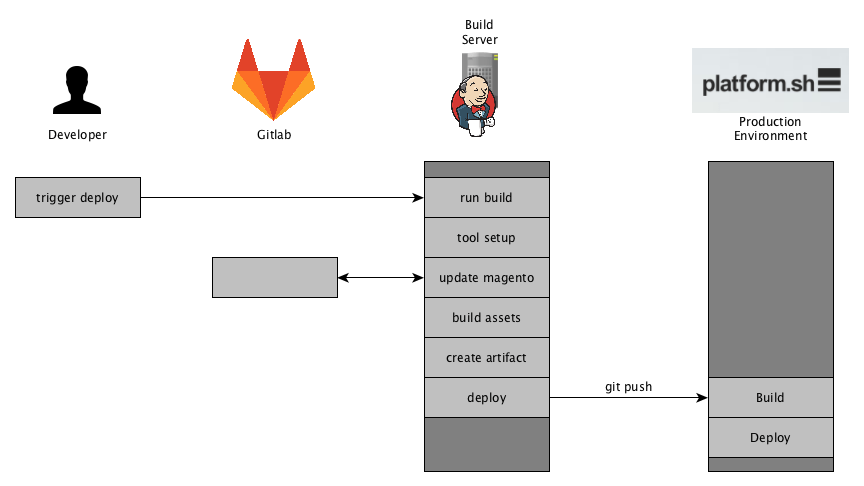
    To ease these situations we are tending to create a setup like this:

    As you can see, we are generating the assets and the artifact on our build server which is way faster than doing this in our platform.sh setup. If the artifact is available we will push that artifact to the git repository offered by platform.sh, thus triggering the actual deployment to the production environment.
    The final steps are to upgrade the production database, import config, control the release, cleanup, etc.

    In theory this should work, because we are just pushing code to platform.sh which is then used to run our application. We are planning to try this approach with the next platform.sh setup, probably in a months time. You can expect some post about our experience with this.

    Deploying to AWS using CodeDeploy

    We are working on AWS Cloud Deployments as well. With the approach we are following now should be able to deploy to a AWS Cloud Setup as well. We are evaluating different approaches to meet our customers requirements and still be cost effective.

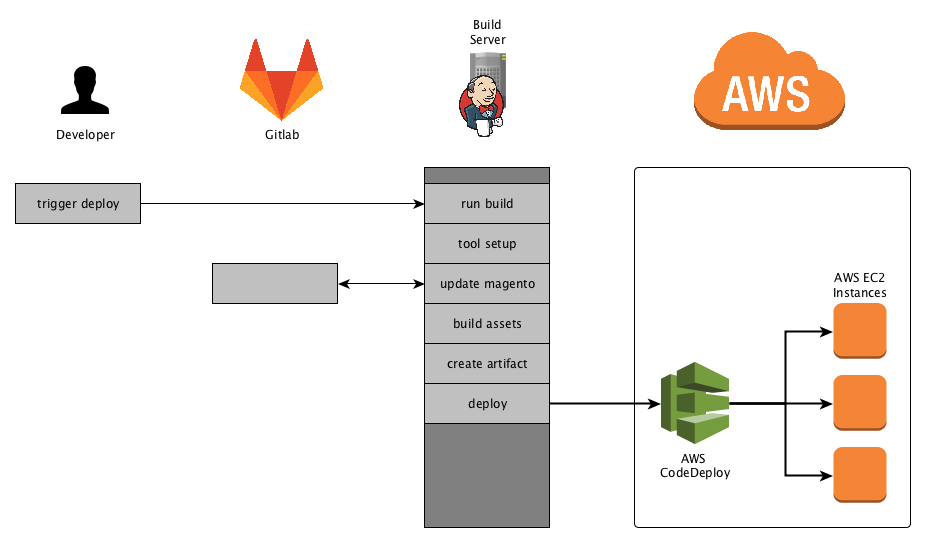
    In this version we would deploy our code using AWS CodeDeploy which is taking care of updating the EC2 instances. The Database Upgrade would then be triggered on a admin EC2 instance which is not in the auto-scaling group.

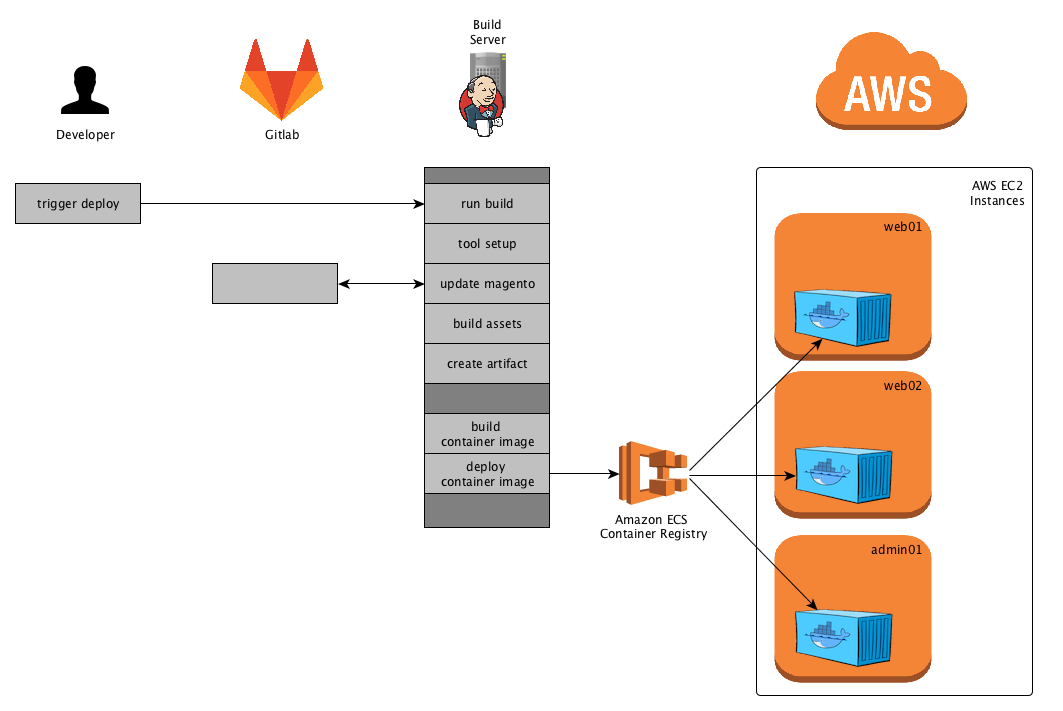
    This is an example of how the deployment of the source-code / the application might look like. I know this is more like an easy setup, depending on the customers needs and budget this is one way to go.

    Deploy to AWS using ECS

    Deploying the source code to the EC2 Instances is one way to go. You can also use Amazon EC2 Container Service (in short Amazon ECS) to create Containers and deploy them to your EC2 instances. In short you are running one or more containers on you EC2 instances and control those containers through the Amazon ECS container registry.

    What we plan on doing here is creating the container image based on the artifacts we created using the standard deployment mechanism. This pre-build container image is then pushed to the Amazon ECS Registry. From there the deployment to the EC2 instances is controlled. The Container definition and the images to use for them is defined using Task Definitions. You can define multiple containers and the EC2 instances they shall be running on. The above overview is limited to the application deployment as this is the main target of this blog series. We might go in to more detail on our plans for different AWS Deployment setups with a more complete view.

    Deploying to …

    Thinking ahead, we might run into unexpected or complicated server environments. Following this push only approach we have a way that should be re-usable in most cases. Be it deploying with a restrictive VPN connection or to a highly secured server which does not allow a PULL.

    Summary

    This series was all about introducing our way of automatically deploying to our environments and how we got there. I hope you got a good understanding on the advantages of a PULL Deployment and you might achieve it yourself.

    As always, leave a comment if you got anything to add or to give us some feedback.

    Oh and …

    P.S.

    As I mentioned in my last post I am working on a default setup for Magento2 deployments. It is meant to be used as a starting point for custom deployments and helps you getting your automatic deployment pipeline up and running in a short amount of time. Futhermore I want to create a central point were issues or special constellations regarding the asset generation are handled.
    It will be configureable and highly customizable and it will contain some basic tasks that can be re-used.
    The project will be completely open-source and available via github.
    My next post will be a introduction to that Deployment, so stay tuned and leave a message here or ping me on twitter if you feel like it.

  • Deploying Magento2 – Releasing to Production [3/4]

    Deploying Magento2 – Releasing to Production [3/4]

    This post is part of series:

    Recap

    In the last post Jenkins Build-Pipeline Setup we had a look at our Jenkins Build-Pipeline and how to the setup and configuration is done. If you haven’t read it yet you should probably do so before reading this post.
    The last step in our Build-Pipeline was the actual Deployment which can be defined like this:

    stage 'Deployment'
    if (DEPLOY == 'true') {
        sh "./dep deploy --tag=${TAG} ${STAGE}"
    }

    You may notice the missing sshagent call compared to the previous post. This sshagent call results from one of our older deployment setups where we were still pulling code from the server. After writing the post about our Build-Pipeline setup I questioned that, and as it turns out we don’t need that anymore and can simplify our Deployments. This part was actually not so trivial to setup if you don’t know exactly what to do and what to look for, so I am happy to scratch that complexity.

    In this post we will dive into the actual Deployment and Rollout of your Magento2 application.

    Remembering the visualization of your Deployment Process, we are now enter the last action-block. I have marked the part we are going to elaborate accordingly.

    Prerequisites

    In the stage ‘Asset Generation’ we build all the necessary assets and created tar.gz files for them.
    Thus before starting stage ‘Deployment’ we have the following files available in the workspace of our Jenkins Build.

    config.tar.gz
    var_di.tar.gz
    var_generation.tar.gz
    pub_static.tar.gz
    shop.tar.gz

    Next up, those files will be used to build the release on the remote server.

    Starting the Deploy

    As mentioned in the last post we are using Deployer here to handle the release to staging or production environments.

    ./dep deploy --tag=${TAG} ${STAGE}

    The TAG and STAGE environment variables are set by Jenkins and defined for each Build, before starting the actual Build.
    A possible command might state like this:

    ./dep deploy --tag=3.2.0.1 production

    This call will rollout the release with the tag 3.2.0.1  to the production  environment.
    Though our deployer setup is no longer making a git connection we are providing the tag here to identify the release later on.

    Deployer Setup

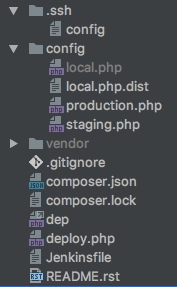
    So this is how our Deploy Repository is setup:

    Here you can also see the Jenkinsfile defining the Build-Pipeline. We have a config directory containing the configurations for our environments. Including a possible local setup. The local setup is really helpful when improving or upgrading the deployment.

    In our deploy repository we have a composer.json to manage the necessary dependencies for the deployment. Them being deployer itself and our own set of tasks. Having our tasks in a dedicated repository gives us the possibility to share those tasks through out all deployments. That’s one thing I didn’t like with the default deployer approach.

    "require": {
        "deployer/deployer": "^4.0",
        "n98/lib.n98.framework.deployer": "^1.0.0"
    }

    deploy.php

    Let’s take a look at the deploy.php file that defines the configuration and tasks that are necessary for our deployment. We will go into more Detail afterwards.

    <?php
    /**
     * @copyright Copyright (c) 1999-2016 netz98 GmbH (http://www.netz98.de)
     *
     * @see PROJECT_LICENSE.txt
     */
    namespace Deployer;
    
    use N98\Deployer\Registry;
    use N98\Deployer\Task\BuildTasks;
    use N98\Deployer\Task\CleanupTasks;
    use N98\Deployer\Task\DeployTasks;
    use N98\Deployer\Task\MagentoTasks;
    use N98\Deployer\Task\SystemTasks;
    
    require 'recipe/common.php';
    
    /**
     * CONFIGURATION
     */
    $sharedFiles = [
        'src/app/etc/env.php',
    ];
    set('shared_files', $sharedFiles);
    
    $sharedDirs = [
        'src/pub/media',
        'src/var/log',
        'src/var/session',
        'src/var/composer_home',
        'src/var/n98_integration',
    ];
    set('shared_dirs', $sharedDirs);
    
    set('writable_dirs', []);
    set('keep_releases', 6);
    set('ssh_type', 'native');
    set('bin/n98_magerun2', 'n98-magerun2');
    set('webserver-user', 'www-data');
    set('webserver-group', 'www-data');
    set('phpfpm_service', 'php7.0-fpm');
    set('nginx_service', 'nginx');
    
    /**
     * SERVERS
     */
    $configLocal = __DIR__ . '/config/local.php';
    if (is_file($configLocal)) {
        require_once $configLocal;
    }
    require_once __DIR__ . '/config/staging.php';
    require_once __DIR__ . '/config/production.php';
    
    /**
     * TASKS & CONFIG
     */
    Registry::register();
    
    /**
     * DEPLOYMENT PIPELINE
     */
    desc('Deploy Project');
    task(
        'deploy', [
            'deploy:initialize',
            'deploy:prepare',
            'deploy:release',
            BuildTasks::TASK_UPLOAD_SHOP,
            BuildTasks::TASK_UPLOAD_CONFIG_DIR,
            BuildTasks::TASK_UPLOAD_PUB_STATIC_DIR,
            BuildTasks::TASK_UPLOAD_VAR_GENERATION_DIR,
            BuildTasks::TASK_FIX_FILE_OWNERSHIP,
            'deploy:shared', // link shared dirs / files
            MagentoTasks::TASK_SYMLINKS_ENABLE,
            'deploy:symlink', // ACTIVATE RELEASE
            MagentoTasks::TASK_MAINTENANCE_MODE_ENABLE,
            MagentoTasks::TASK_CACHE_DISABLE,
            MagentoTasks::TASK_SETUP_UPGRADE,
            MagentoTasks::TASK_CONFIG_DATA_IMPORT,
            MagentoTasks::TASK_CMS_DATA_IMPORT,
            MagentoTasks::TASK_CACHE_ENABLE,
            BuildTasks::TASK_FIX_FILE_OWNERSHIP,
            'deploy:clear_paths',
            MagentoTasks::TASK_MAINTENANCE_MODE_DISABLE,
            SystemTasks::TASK_PHP_FPM_RESTART,
            // SystemTasks::TASK_NGINX_RESTART,
            CleanupTasks::TASK_CLEANUP,
            'success',
        ]
    );
    
    after('deploy:prepare', BuildTasks::TASK_SHARED_DIRS_GENERATE);
    
    // Rollback in case of failure
    onFailure('deploy', DeployTasks::TASK_ROLLBACK);

    As you can see this file does not look like the default deploy.php files using lambda functions. We have moved the Task definition into a class N98\Deployer\Registry that is provided by n98/lib.n98.framework.deployer. Furthermore we have moved our tasks and their identifier to seperate classes to get them reusable and shareable using a composer package.
    Now let’s have a look at each section.

    deploy.php – configuration

    $sharedFiles = [
        'src/app/etc/env.php',
    ];
    set('shared_files', $sharedFiles);
    
    $sharedDirs = [
        'src/pub/media',
        'src/var/log',
        'src/var/session',
        'src/var/composer_home',
        'src/var/n98_integration',
    ];
    set('shared_dirs', $sharedDirs);
    
    set('writable_dirs', []);
    set('keep_releases', 6);
    set('ssh_type', 'native');
    set('bin/n98_magerun2', 'n98-magerun2');
    set('webserver-user', 'www-data');
    set('webserver-group', 'www-data');
    set('phpfpm_service', 'php7.0-fpm');
    set('nginx_service', 'nginx');

    We have added the default shared files and directories to the deployer default parameters shared_files and shared_dirs.
    ssh_type is set to native so we are using the ssh client provided by the operation system.
    webserver-user and webserver-group are used to apply the correct directory permissions.
    phpfpm_service and nginx_service is used to restart those services automatically during the deployment (using a custom task).

    deploy.php – servers

    $configLocal = __DIR__ . '/config/local.php';
    if (is_file($configLocal)) {
        require_once $configLocal;
    }
    require_once __DIR__ . '/config/staging.php';
    require_once __DIR__ . '/config/production.php';
    

    We have put the server specific configurations into separate files in the directory config. This way we can have a local.php.dist to setup a config for a local dev-environment.
    We could extend this to just include the environment provided as a parameter to deployer.

    A server config might look like this:

    <?php
    namespace Deployer;
    
    use N98\Deployer\RoleManager;
    
    $deployPath = '<PATH_ON_SERVER>';
    $sshConfigFile = '.ssh/config';
    
    $production = server('web01', '<IP>');
    $production->user('admin');
    $production->identityFile();
    $production->set('deploy_path', $deployPath);
    $production->stage('production');
    
    RoleManager::addServerToRoles('web01', ['web', 'db']);

    We are using the identityFile .ssh/config provided within the deploy repository. At first, I was assuming that deployer will use this file when running the native ssh commands and pass the config-file as a parameter like ssh -i .ssh/config . As it turns out it does not do that, instead it parses the ssh config-file and just extracts the Hostname, user and IdentifyFile directives.
    Though I will be creating a pull request that will make the usage of the config-file possible. I have tested it, and it works well, because why shouldn’t it.

    Futhermore we have created a class called RoleManager, which we use to define roles for servers and assign tasks to those roles. This functionality is needed for easily triggering specific tasks only on specific servers. It will be translated to $task->onlyOn() call later in the deployment. The main advantage and purpose is the ease of use and portability throught multiple deployment projects.

    deploy.php – adding the tasks

    To register our default Tasks we have created a Registry class that takes care of this process. This class also takes the roles mentioned above into account.

    Registry::register();

    With deployer you can define as much tasks as you like. It all comes together with your deploy pipeline that you define in your deploy.php.

    deploy.php – task classes

    We have split up all of our tasks to the following classes:

    • BuildTasks – tasks for basic initialization and an overwrite for the rollback
    • CleanupTasks – improved cleanup task
    • DeployTasks – improved rollback task
    • MagentoTasks – our Magento specific tasks
    • SystemTasks – tasks to restart nginx and php-fpm

    Those classes have class constants that are used to register the tasks and to define the build pipeline.

    I won’t go into to much detail regarding all the Tasks, because some of them are just triggering Magento commands. And it would just go beyond the scope of this post.
    If you are interested in more details about the Tasks just let me know, we might add another post highlighting and explaining them.

    Here is an excerpt from MagentoTasks:

    class MagentoTasks 
    {
        const TASK_SETUP_UPGRADE = 'magento:setup_upgrade';
    
        // …
    
        /**
         * Run Magento setup:upgrade
         */
        public static function runSetupUpgrade()
        {
            $srcDir = self::$srcDir;
            \Deployer\run("cd $srcDir; php bin/magento setup:upgrade --keep-generated");
        }
    
        // …
    }

    This is what the task action and the definition inside the Registry::register(); looks like this:

    self::registerTask(
        MagentoTasks::TASK_SETUP_UPGRADE, 'run Magento Updates',
        function () { MagentoTasks::runSetupUpgrade(); }, ['db']
    );

    With the Registry::registerTask being defined like this:

    protected static function registerTask($code, $desc, \Closure $body, array $roles = null)
    {
        \Deployer\desc($desc);
        $task = \Deployer\task($code, $body);
    
        if (is_array($roles)) {
            $servers = RoleManager::getServerListByRoles($roles);
    
            $task->onlyOn($servers);
        }
    
        return $task;
    }

    Using this method we are adding the default tasks to the deployer project and are applying the roles mentioned above.

    deploy.php – deploy pipeline

    Having defined all of our tasks, we can now take care of the deploy pipeline. This is how our default deploy pipeline for deployer is defined.

    desc('Deploy Project');
    task(
        'deploy', [
            'deploy:initialize',
            'deploy:prepare',
            'deploy:release',
            BuildTasks::TASK_UPLOAD_SHOP,
            BuildTasks::TASK_UPLOAD_CONFIG_DIR,
            BuildTasks::TASK_UPLOAD_PUB_STATIC_DIR,
            BuildTasks::TASK_UPLOAD_VAR_GENERATION_DIR,
            BuildTasks::TASK_FIX_FILE_OWNERSHIP,
            'deploy:shared', // link shared dirs / files
            MagentoTasks::TASK_SYMLINKS_ENABLE,
            'deploy:symlink', // ACTIVATE RELEASE
            MagentoTasks::TASK_MAINTENANCE_MODE_ENABLE,
            MagentoTasks::TASK_CACHE_DISABLE,
            MagentoTasks::TASK_SETUP_UPGRADE,
            MagentoTasks::TASK_CONFIG_DATA_IMPORT,
            MagentoTasks::TASK_CMS_DATA_IMPORT,
            MagentoTasks::TASK_CACHE_ENABLE,
            BuildTasks::TASK_FIX_FILE_OWNERSHIP,
            'deploy:clear_paths',
            MagentoTasks::TASK_MAINTENANCE_MODE_DISABLE,
            SystemTasks::TASK_PHP_FPM_RESTART,
            // SystemTasks::TASK_NGINX_RESTART,
            CleanupTasks::TASK_CLEANUP,
            'success',
        ]
    );
    
    after('deploy:prepare', BuildTasks::TASK_SHARED_DIRS_GENERATE);
    
    // Rollback in case of failure
    onFailure('deploy', DeployTasks::TASK_ROLLBACK);

    We have added the deploy:initialize task which will detect the stable release and save it with \Deployer\set(‘release_path_stable’, $releasePathStable);

    The BuildTasks::TASK_SHARED_DIRS_GENERATEwill ensure the necessary shared directories are available.

    The last thing I want to point out regarding the pipeline, is the rollback after an error during the deployment.

    onFailure('deploy', DeployTasks::TASK_ROLLBACK);

    By default deployer does not rollback in case somethings goes sideways. Deployer has a default task defined but it is not used by default, you would have to call it manually.

    Caveats

    While setting up this deployment pipeline we ran into different troubles with deployer. The rollback task and the detection of the current stable release are a bit buggy which is why we implemented an improved version ourselves. This improved version will not use an integer as the release directory but instead used the tag or branch being provided to deployer. The branch is getting postfixed with the current date and for the tags there is also a check to not deploy to the same directory twice.

    During development the releases folder might look something like this:

    develop-20170112142355
    develop-20170112142709
    develop-20170112143301
    develop-20170112145154
    develop-20170113073002

    Furthermore the standard cleanup tasks was also not quite stable and reliable, so we had to overwrite that too. We had situations where the former current release was deleted due to an issue how deployer builds its internal release_list. That error only occurred when multiple deploys went sideways.

    I am evaluating how much of our adjustments can be provided as a pull-request to the deployer project itself.

    Summary

    This is it, I hope you gathered some insights on how our deployment setup works and how you could setup your own.

    In the next blog post we will share some thought on where we want to go with this deployment in the future and how it is re-used in different environments and server setups.

    If you want to know or see more details, feel free to leave a comment or contact me directly on twitter, see the authors box below.

    See you next time.

    Teaser

    I am working on a default setup for a Magento2 deployment that can be used as starting point for deployment. Containing the most important tasks, the possibility to use for Pipeline builds, a default deployer setup, etc.

    So stay tuned 🙂

  • Workaround for Magento 2 Issue #5418 – Product Grid does not work after Import

    Workaround for Magento 2 Issue #5418 – Product Grid does not work after Import

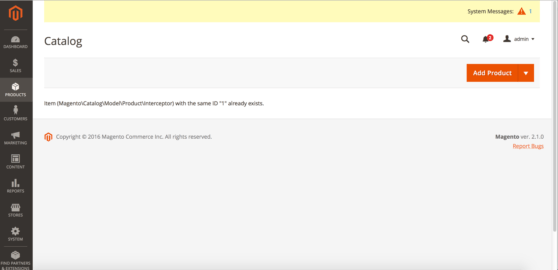
    The Magento 2 Importer is a simple way to import and update Product Data and many more. Since July 2016, an Import will throw an Exception at the Product Grid. Today, I added a small script as a Workaround, which I want to share.

    It is actually simple and based on the Yonn-Trimoreau‘s SQL Query. I setup a bashscript, which enters the working dir and executes the query via n98-magerun2. After that, I added a CronJob to call the Script every Minute(In case someone starts the Import manually).

    This is the Bash Script:

    #!/usr/bin/env bash
    cd to/your/working/dir/ && /usr/local/bin/n98-magerun2.phar db:query 'DELETE FROM cataloginventory_stock_item WHERE product_id IN ( SELECT * FROM( SELECT product_id FROM cataloginventory_stock_item GROUP BY product_id HAVING COUNT( product_id ) >1 )tblTMP WHERE website_id = 1 )'

    My CronJob Configuration looks like this:

    # Job 1 by David Lambauer <d.lambauer@netz98.de>
    # This is a little Workaround for the following Magneto 2 Issue:
    # https://github.com/magento/magento2/issues/5418
    # This should be removed after the fix was applied.
    * * * * * www-data /path/to/your/bash/script/magento2-issue-workarround.sh

    It is pretty dirty, but it’ll work until Magento applied a Fix.


  • Deploying Magento2 – Jenkins Build-Pipeline [2/4]

    Deploying Magento2 – Jenkins Build-Pipeline [2/4]

    This post is part of series:

    Recap

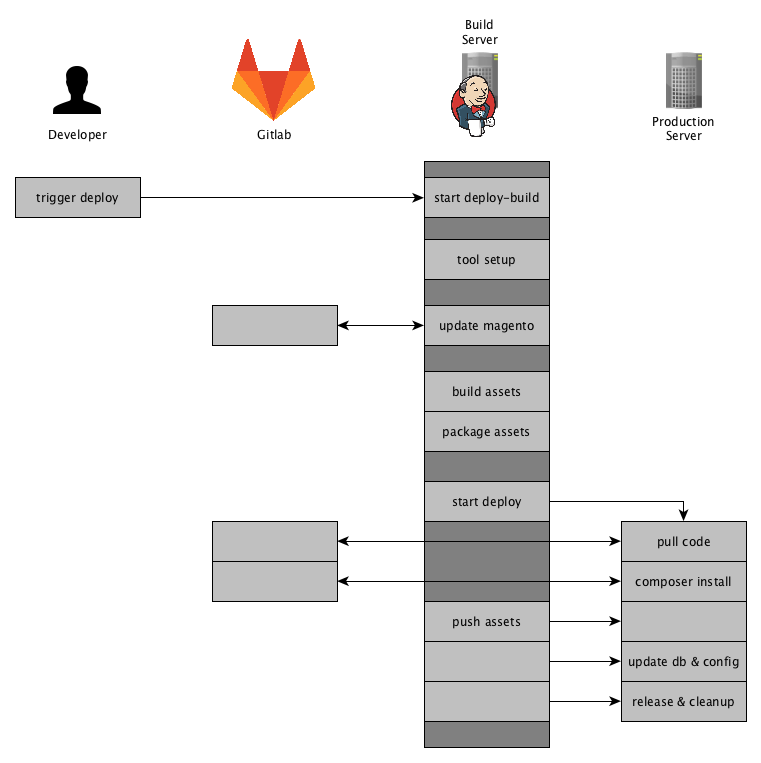
    In the post Deploying Magento2 & History / Overview [1/4] we showed an overview of our deployment for Magento2 and this post will go into more detail on what is happing on the Build-Server and how it is done. So to get you up to speed, this is the overview of our process and what this post will cover:

    Jenkins Build-Pipeline

    Our Build Server is basically a Jenkins running on a dedicated server. The Jenkins Server is the main actor in the whole deployment process.
    It will control the specific phases of the deployment and provide an overview and a detailed monitoring of the output of each phase.

    We are using the Jenkins Build Pipeline feature to organize and control our deployment.
    The Magento2 deployment is split up into the following stages:

    • Tool Setup – ensuring all tools are installed
    • Magento Setup – updating the source-code and update composer dependencies
    • Asset Generation – generating the assets in pub/static var/di var/generation and providing them as packages
    • Deployment – delivering the new release to the production server

    The Jenkinsfile

    There are different ways to create a Jenkins Build-Pipeline, one is to create a Jenkinsfile that defines the stages and the commands to run. We are using just that approach and put that Jenkinsfile into a git repository separate from our magento2 repository. Though this is an approach we have been following for years now, I still think it is best to have your deployment separate from the actual project. But as so often that depends on the individual needs.
    We will add some more dependencies to this repository later.

    Next you will see a skeleton for the Jenkinsfile we are using. I left out the details for the stages for now and will show those further down the post.

    node {
        // ENV variables
        env.PWD = pwd()
        env.STAGE = STAGE
        env.TAG = TAG
        env.REINSTALL_PROJECT = REINSTALL_PROJECT
        env.DELETE_VENDOR = DELETE_VENDOR
        env.GENERATE_ASSETS = GENERATE_ASSETS
        env.DEPLOY = DEPLOY
    
        try {
            // Update Deployment
            checkout scm
    
            stage 'Tool Setup'
            // Setup tools here
    
            stage 'Magento Setup'
            // Setup and update Magento
            
            stage 'Asset Generation'
            if (GENERATE_ASSETS == 'true') {
                // Generate and package assets
            }
    
            stage 'Deployment'
            if (DEPLOY == 'true') {
                // Trigger deployment and start release
            }
    
        } catch (err) {
            currentBuild.result = 'FAILURE'
            throw err
        }
    }
    

    The stage keyword defines a new stage and takes a string as a parameter. You can see the stages I mentioned earlier defined here. The update of our deployment itself is not included as a stage.
    We are using multiple ENV variables that are defined when starting the build. By default DEPLOY and GENERATE_ASSETS are set to true , but we could choose to leave out on of them. So in case there was an error during the Deployment we don’t need to re-generate all the assets.
    The ENV variables REINSTALL_PROJECT and DELETE_VENDOR are used within the stage Magento Setup.

    The ENV variable STAGE is used to identify the server environment we are deploying to, like staging or production. This variable is to be selected when starting the Build and can be individualized to the needs in the project at hand.
    The ENV variable TAG is defining the git branch or git tag where are deploying with this build. It is used later on in the process multiple times.

    Stage Tool Setup

    stage 'Tool Setup'
    sh "${phpBin} -v"
    // Composer deps like deployer
    sh "composer.phar install"
    // Phing
    if (!fileExists('phing-latest.phar')) {
        sh "curl -sS -O https://www.phing.info/get/phing-latest.phar -o ${phingBin}"
    }
    sh "${phingCall} -v"
    sh "printenv"
    

    The first stage “Tool Setup” will install or update the tools needed through out the deployment.
    As you can see we are using composer here to pull in our tools like for example deployer.
    Also we are using phing for some parts during the deployment process, so we are ensuring that the latest phing version is present.

    Stage Magento Setup

    stage 'Magento Setup'
    if (!fileExists('shop')) {
        sh "git clone ${magentoGitUrl} shop"
    } else {
        dir('shop') {
            sh "git fetch origin"
            sh "git checkout -f ${TAG}"
            sh "git reset --hard origin/${TAG}"
        }
    }
    dir('shop') {
        sh "${phingCall} jenkins:flush-all"
        sh "${phingCall} jenkins:setup-project"
        sh "${phingCall} jenkins:flush-all"
    }

    In this stage we are updating the Magento Setup the Build needs to create the assests.
    It basically consists of two steps:

    • Setup or Update the Source-Code of the Magento Shop
    • Setup or Update the Magento-Database

    We are cloning the repository containing the customer project in the directory shop. If we have already cloned the repository we will just update to the tag or branch that is to be deployed.

    Next-up is the project setup using the phing-call jenkins:setup-project. This phing-call is defined by the phing scripts inside our shop repository.
    This call will

    • install the magento composer dependencies,
    • re-install the project therefore deleting the app/etc/env.php, (using REINSTALL_PROJECT )
    • create the database if necessary
    • run setup:upgrade

    Up until recently a database was necessary to create the assests. As far as I know, there is plan to remove the requirement of having a database during the assets creation.

    The phing tasks called in this stage are re-used from our Continous Build Jobs that we run on develop, master, feature and release branches for all of our projects.
    Those Build Jobs are automatically running the Unit and Integration Tests, generating the documentation, Running Code Analyzers and summarizing all this information in a nice little Dashboard.
    Maybe we will have a blog-post about that too. Let’s move on to the next stage.

    Stage Asset Generation

    stage 'Asset Generation'
    dir('shop') {
        if (GENERATE_ASSETS == 'true') {
            sh "${phingCall} deploy:switch-to-production-mode"
            sh "${phingCall} deploy:compile"
            sh "${phingCall} deploy:static-content"
            sh "bash bin/build_artifacts_compress.sh"
    
            archiveArtifacts 'config.tar.gz'
            archiveArtifacts 'var_di.tar.gz'
            archiveArtifacts 'var_generation.tar.gz'
            archiveArtifacts 'pub_static.tar.gz'
            archiveArtifacts 'shop.tar.gz'
        }
    }

    During this stage the deploy job will compile all assets needed for running Magento2 in production-mode.
    Therefore we ensure we are in production-mode and basically call php bin/magento setup:di:compile  and php bin/magento setup:static-content:deploy .
    Those phing-calls you see above are executing the following commands:

    php bin/magento deploy:mode:set --skip-compilation production
    
    rm -Rf var/di
    rm -Rf var/generation
    
    php bin/magento setup:di:compile
    
    bin/magento setup:static-content:deploy --theme=NAMESPACE/base --theme=Magento/backend --language=en_US --language=de_DE
    

    The Bash-Script bin/build_artifacts_compress.sh  creates 5 tar files for

    • shop – containing the Magento Source-Code
    • pub_static – containing the contents of pub/static directory
    • var_generation – containing the contents of var/generation directory
    • var_di – containing the contents of var/di directory
    • config – containing config yaml-files that can be imported using config:data:import

    The config:data:import  command is provided by the Semaio_ConfigImportExport which we are using to manage our systems configuration through.  https://github.com/semaio/Magento2-ConfigImportExport
    After the artifacts have been created, we use the Jenkins archiveArtifacts command to archive the latest artifacts for this build and make them available per HTTP-link in a consistent directory.

    At the moment we are thinking about just creating one artifact instead of 5 and using that from here on. This will have some more advantages that we will cover in our post: “Future Prospect (cloud deployment, artifacts)”

    Now we have prepared all the artifacts we need and are ready to create the new release on our servers and publish it. So now for the final stage “Deployment”.

    Stage Deployment

    stage 'Deployment'
    if (DEPLOY == 'true') {
        sshagent (credentials: [jenkinsSshCredentialId]) {
            sh "./dep deploy --tag=${TAG} ${STAGE}"
        }
    }

    This Stage has probably the shortest content as far as the code in the Jenkinsfile is concerned. We are just triggering the Deployer while passing the STAGE and the TAG to it.

    Deployer is a Deployment Tool for php and is more or less based upon capistrano and following the same concepts applied in capistrano.

    We have defined quite some Magento2 related Deployer Tasks and created some adjustments to the core-tasks fixing bugs or adjusting them to our needs.

    The details what we have done and on how we are using deployer to release the code and pushing the assets to the server environment will be covered in the upcoming post.

    The Stage View of the Pipeline

    At this point we have defined the Build-Pipeline and are ready to execute it.
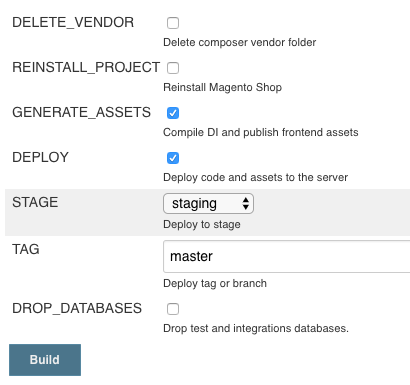
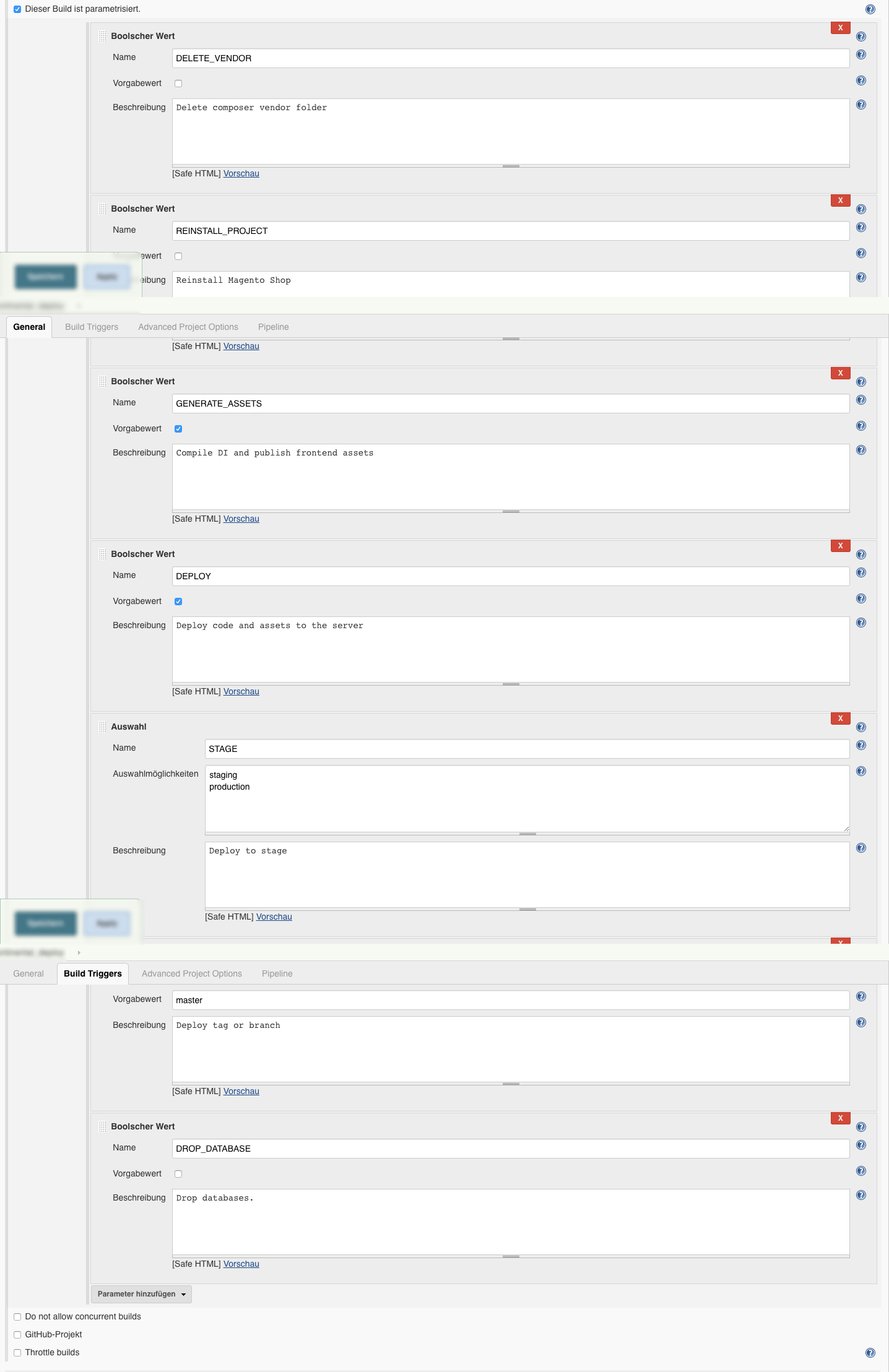
    We do so by configuring the parameters as needed in this form:

    You can see the Environment Variables used in the above mentioned code samples. The image shows the default form with pre-selected variables.
    In some cases it is necessary to delete the vendor directory completely or to drop the jenkins database.

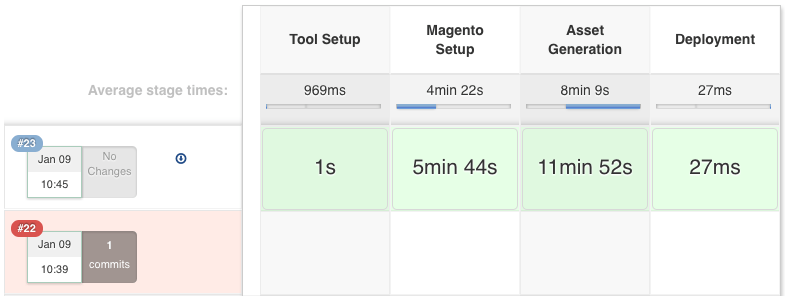
    When running the introduced Build-Pipeline, you are presented with an informative stage view that shows the stages and their completion.
    We can evaluate how our Deployment is progressing and get an estimate how long it will take to finish the stage(s).

    The Jenkins Job Configuration

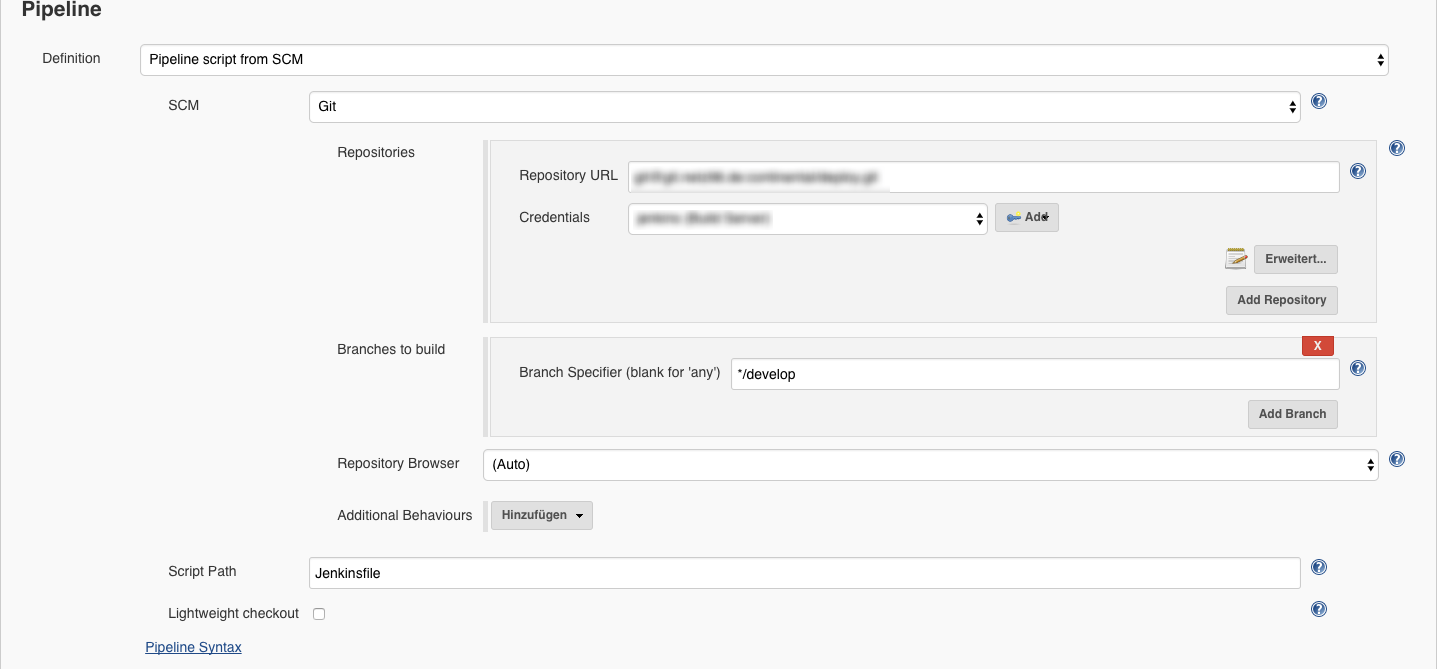
    We are creating our projects based on the pipeline project.
    Then the parameters are added and the git repository url and that’s basically it.

    Here are some screenshots:

    Repository Configuration

    Build Job Parameters


    Summary

    This is the end of the introduction to our Build-Pipeline Setup for Deployments. The next post will cover details to our php-deployer setup.

    I really like the automated and centralized way of Deploying our Magento Shops and of course the resulting advantages. Whenever somethings automated you don’t need to explicitly know or remember all the details of the deployment. It just takes so much of your mind and you can focus on more important tasks.

    Well, that’s it for this post. I hope you enjoyed it and you find it informative. As always, if there any questions or if you’d like to know more about specific details, please feel free to comment or ask us directly on twitter or any other social plattform.

    UPDATE 23-FEB-2017

    Add Screenshot of the Build Form.

    UPDATE 29-MAR-2017

    Add Screenshot of the Build Configuration Parameters and Pipeline

  • Deploying Magento2 – History & Overview [1/4]

    Quite recently we have updated the deployment of our Magento2 projects to a more flexible and reusable way.
    Originally I wanted to create one post to present you our deployment setup, the systems involved, the workflow & process and some code that might be interesting.
    While describing this subject I decided to create a series of posts to cover those parts as it was just getting to extensive for one post.

    I am planing to cover the following topics in separate posts:


    Then let’s get started with a brief introduction of our former setup for Magento1 and Magento2. You might have a similar solution to this one.

    History Magento 1

    When we were starting with our first Magento 2 project in June 2016, we ported the workflow we had established for our Magento 1 projects.

    Our Magento 1 projects are deployed using capistrano and are using a pull approach, where the server fetches the Magento source-code and the composer dependencies using git and composer.
    This approach has some draw backs as we have to have tools installed (git, composer) and we needed a transfer channel back to our gitlab server.

    First Magento 2 Deployment

    At first, we followed the same approach with the Magento 2 projects.
    We applied some minor adjustments to the process, as Magento 2 has some requirement in terms of pre-compilation.


    The solution was to generate the static assets and the di on the build server and pushing that to the production server during the deployment.
    You should not generate those assets on the production server. The actions performed on the production server should be kept to a minimum, to keep the load down and when thinking about a setup with multiple nodes it just does not seem right to this kind of task on each server.
    We ended up with a mixture of a PULL and PUSH deployment, the source-code being pulled by git / composer and the assets being pushed.
    We still had the drawbacks from our Magento 1 deployment, as we basically just extended that to fit the needs of the Magento 2 compilation.

    Current Magento 2 Deployment

    Our goal was to create a pure PUSH deployment where the production server does not need direct access to our git repositories.

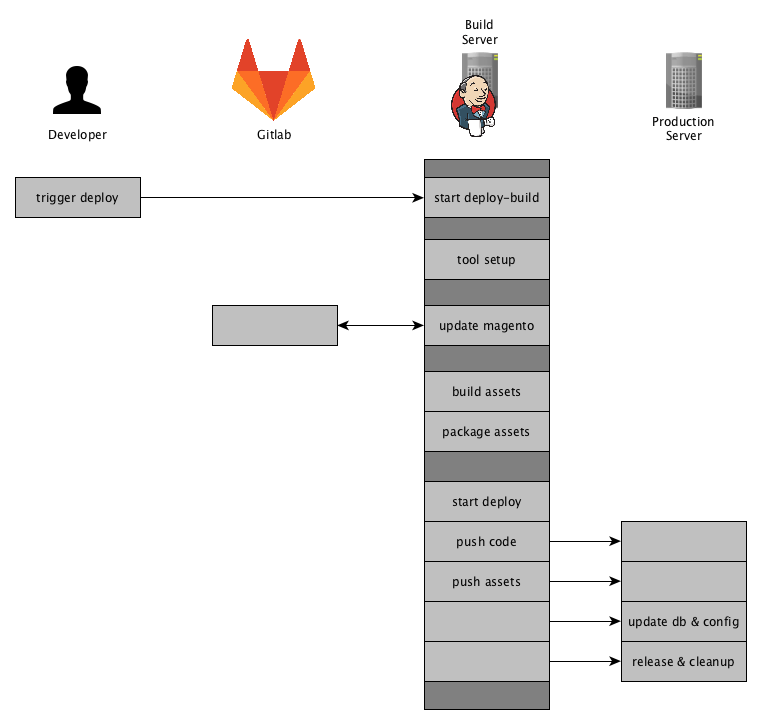
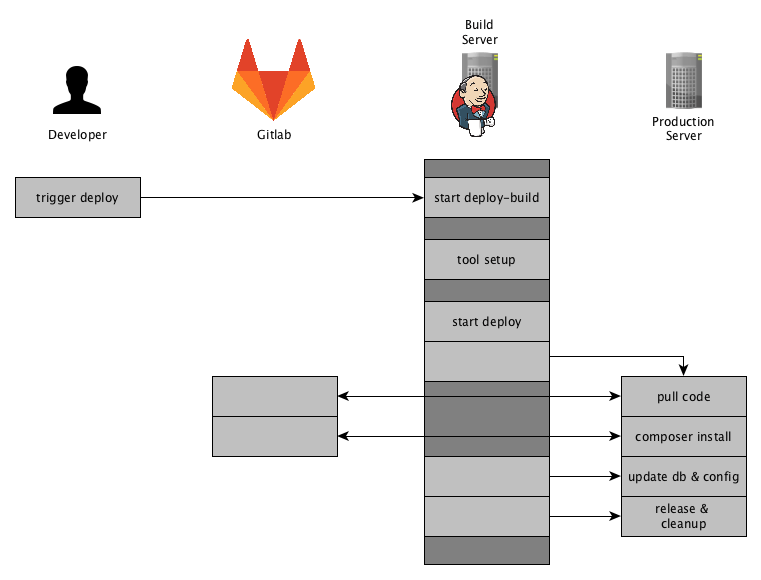
    So here is an Overview of how our current deployment for Magento 2 projects works:

    Jenkins will fetch the source-code using git and composer and update its Magento 2 instance database. It will then generate & package the assets and finally pushes the code and the assests to production server.
    To achieve those steps we have setup a Jenkins Pipeline that we will have a look at next.

    Summary

    This setup comes in handy when any callback (e.g. PULL) is prohibited by a firewall.
    Or even a more restrictive environment where a VPN-Tunnel is to be opened which prevents any other network connections to other system except the server.
    We were faced with that kind of situations recently, but with using the above mentioned approach we had little effort in terms of adjusting our deployment.

    Furthermore following this approach we are flexible where we push to and it is easy to extend and reusable.
    In the post “Future Prospect (cloud deployment, artifacts)” we will shed some light on our future plans on how to extend that deployment for different hosting environments.

    This was a brief overview of how we got to our current Magento2 Deployment and how it works in general.
    The next posts will be about the tool-stack we use and we will share some insights with code samples.

    If you have any feedback or questions, as always, feel free to leave a comment or contact us directly.