Tag: opensource

  • Workaround for Magento 2 Issue #5418 – Product Grid does not work after Import

    Workaround for Magento 2 Issue #5418 – Product Grid does not work after Import

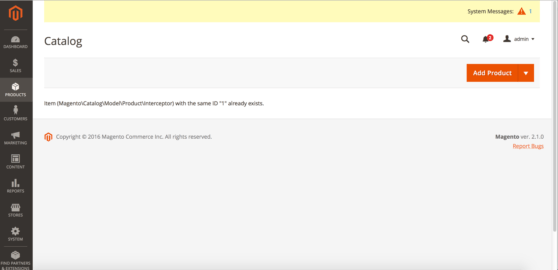
    The Magento 2 Importer is a simple way to import and update Product Data and many more. Since July 2016, an Import will throw an Exception at the Product Grid. Today, I added a small script as a Workaround, which I want to share.

    It is actually simple and based on the Yonn-Trimoreau‘s SQL Query. I setup a bashscript, which enters the working dir and executes the query via n98-magerun2. After that, I added a CronJob to call the Script every Minute(In case someone starts the Import manually).

    This is the Bash Script:

    #!/usr/bin/env bash
    cd to/your/working/dir/ && /usr/local/bin/n98-magerun2.phar db:query 'DELETE FROM cataloginventory_stock_item WHERE product_id IN ( SELECT * FROM( SELECT product_id FROM cataloginventory_stock_item GROUP BY product_id HAVING COUNT( product_id ) >1 )tblTMP WHERE website_id = 1 )'

    My CronJob Configuration looks like this:

    # Job 1 by David Lambauer <d.lambauer@netz98.de>
    # This is a little Workaround for the following Magneto 2 Issue:
    # https://github.com/magento/magento2/issues/5418
    # This should be removed after the fix was applied.
    * * * * * www-data /path/to/your/bash/script/magento2-issue-workarround.sh

    It is pretty dirty, but it’ll work until Magento applied a Fix.


  • Docker: Simplified container mapping for local development

    When you are working with docker on your local machine, you often have to map your local ports to different container and end up in a port-mapping-mess like this:

    • localhost:80 -> Local apache for native stuff
    • localhost:8080 -> Docker container with apache for testing
    • localhost:8100 -> Some sort of dockered WebApp
    • localhost:59924 -> “Yea, well … don’t know, lets check docker process-list …”

    To simplify this mess, we created a little proxy-script (+ environment setup) that will make your life much easier: https://github.com/netz98/docker-router-proxy

    The router proxy will add the ability to dispatch your request based on the container name. To archive this, it adds a special TLD which will be used to determine that we want to call an docker container.

    In our case (default) this will be .dock, but you can choose a different one if you like.

    After configuring the environment (as described within the project description on GitHub) you can simply call your container like this:

    http://my-service-container.dock

    this will be proxied to

    0.0.0.0:8999->80/tcp    my_service_container

    I’m using this script now for several days and it’s absolutely worth the time for setting up the environment. It’s very easy now to navigate through your services and projects just using your browser history.

    I’m very interested what you think about this approach and if you might have found other solutions for this?

    So, please leave a comment!