Month: January 2017

  • Deploying Magento2 – Releasing to Production [3/4]

    Deploying Magento2 – Releasing to Production [3/4]

    This post is part of series:

    Recap

    In the last post Jenkins Build-Pipeline Setup we had a look at our Jenkins Build-Pipeline and how to the setup and configuration is done. If you haven’t read it yet you should probably do so before reading this post.
    The last step in our Build-Pipeline was the actual Deployment which can be defined like this:

    stage 'Deployment'
    if (DEPLOY == 'true') {
        sh "./dep deploy --tag=${TAG} ${STAGE}"
    }

    You may notice the missing sshagent call compared to the previous post. This sshagent call results from one of our older deployment setups where we were still pulling code from the server. After writing the post about our Build-Pipeline setup I questioned that, and as it turns out we don’t need that anymore and can simplify our Deployments. This part was actually not so trivial to setup if you don’t know exactly what to do and what to look for, so I am happy to scratch that complexity.

    In this post we will dive into the actual Deployment and Rollout of your Magento2 application.

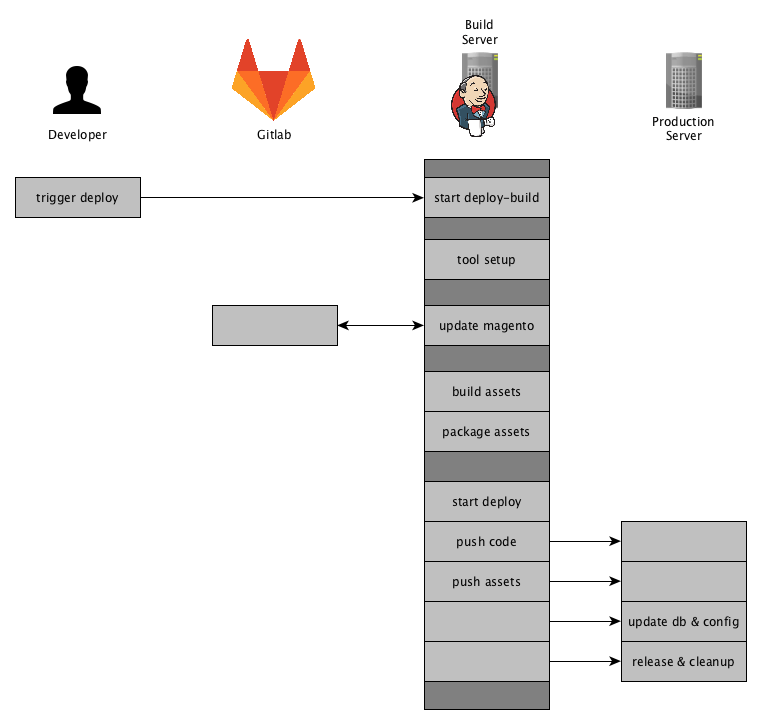
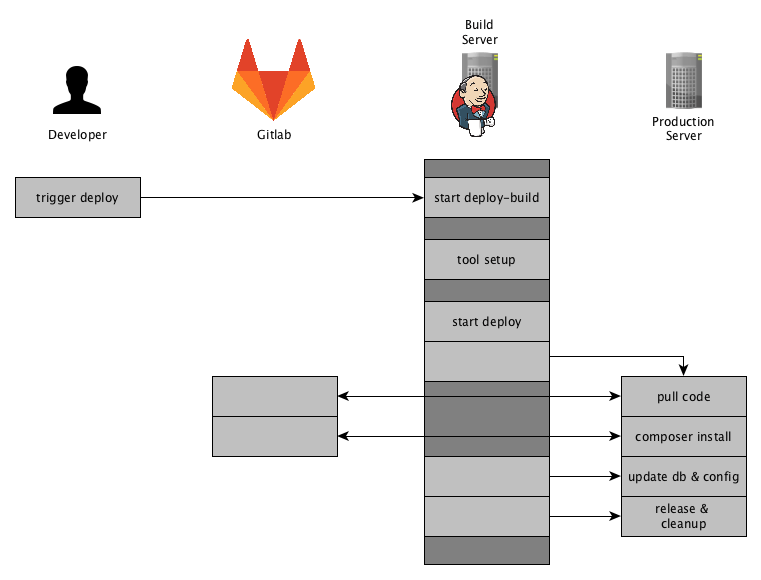
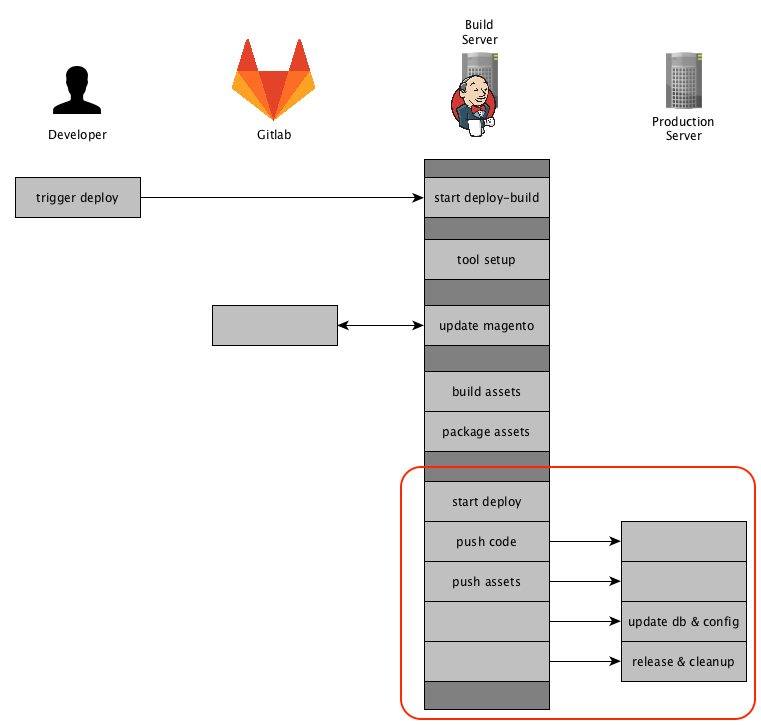
    Remembering the visualization of your Deployment Process, we are now enter the last action-block. I have marked the part we are going to elaborate accordingly.
    Prerequisites

    In the stage ‘Asset Generation’ we build all the necessary assets and created tar.gz files for them.
    Thus before starting stage ‘Deployment’ we have the following files available in the workspace of our Jenkins Build.

    config.tar.gz
    var_di.tar.gz
    var_generation.tar.gz
    pub_static.tar.gz
    shop.tar.gz

    Next up, those files will be used to build the release on the remote server.

    Starting the Deploy

    As mentioned in the last post we are using Deployer here to handle the release to staging or production environments.

    ./dep deploy --tag=${TAG} ${STAGE}

    The TAG and STAGE environment variables are set by Jenkins and defined for each Build, before starting the actual Build.
    A possible command might state like this:

    ./dep deploy --tag=3.2.0.1 production

    This call will rollout the release with the tag 3.2.0.1  to the production  environment.
    Though our deployer setup is no longer making a git connection we are providing the tag here to identify the release later on.

    Deployer Setup

    So this is how our Deploy Repository is setup:
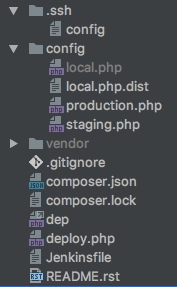
    Here you can also see the Jenkinsfile defining the Build-Pipeline. We have a config directory containing the configurations for our environments. Including a possible local setup. The local setup is really helpful when improving or upgrading the deployment.

    In our deploy repository we have a composer.json to manage the necessary dependencies for the deployment. Them being deployer itself and our own set of tasks. Having our tasks in a dedicated repository gives us the possibility to share those tasks through out all deployments. That’s one thing I didn’t like with the default deployer approach.

    "require": {
        "deployer/deployer": "^4.0",
        "n98/lib.n98.framework.deployer": "^1.0.0"
    }

    deploy.php

    Let’s take a look at the deploy.php file that defines the configuration and tasks that are necessary for our deployment. We will go into more Detail afterwards.

    <?php
    /**
     * @copyright Copyright (c) 1999-2016 netz98 GmbH (http://www.netz98.de)
     *
     * @see PROJECT_LICENSE.txt
     */
    namespace Deployer;
    
    use N98\Deployer\Registry;
    use N98\Deployer\Task\BuildTasks;
    use N98\Deployer\Task\CleanupTasks;
    use N98\Deployer\Task\DeployTasks;
    use N98\Deployer\Task\MagentoTasks;
    use N98\Deployer\Task\SystemTasks;
    
    require 'recipe/common.php';
    
    /**
     * CONFIGURATION
     */
    $sharedFiles = [
        'src/app/etc/env.php',
    ];
    set('shared_files', $sharedFiles);
    
    $sharedDirs = [
        'src/pub/media',
        'src/var/log',
        'src/var/session',
        'src/var/composer_home',
        'src/var/n98_integration',
    ];
    set('shared_dirs', $sharedDirs);
    
    set('writable_dirs', []);
    set('keep_releases', 6);
    set('ssh_type', 'native');
    set('bin/n98_magerun2', 'n98-magerun2');
    set('webserver-user', 'www-data');
    set('webserver-group', 'www-data');
    set('phpfpm_service', 'php7.0-fpm');
    set('nginx_service', 'nginx');
    
    /**
     * SERVERS
     */
    $configLocal = __DIR__ . '/config/local.php';
    if (is_file($configLocal)) {
        require_once $configLocal;
    }
    require_once __DIR__ . '/config/staging.php';
    require_once __DIR__ . '/config/production.php';
    
    /**
     * TASKS & CONFIG
     */
    Registry::register();
    
    /**
     * DEPLOYMENT PIPELINE
     */
    desc('Deploy Project');
    task(
        'deploy', [
            'deploy:initialize',
            'deploy:prepare',
            'deploy:release',
            BuildTasks::TASK_UPLOAD_SHOP,
            BuildTasks::TASK_UPLOAD_CONFIG_DIR,
            BuildTasks::TASK_UPLOAD_PUB_STATIC_DIR,
            BuildTasks::TASK_UPLOAD_VAR_GENERATION_DIR,
            BuildTasks::TASK_FIX_FILE_OWNERSHIP,
            'deploy:shared', // link shared dirs / files
            MagentoTasks::TASK_SYMLINKS_ENABLE,
            'deploy:symlink', // ACTIVATE RELEASE
            MagentoTasks::TASK_MAINTENANCE_MODE_ENABLE,
            MagentoTasks::TASK_CACHE_DISABLE,
            MagentoTasks::TASK_SETUP_UPGRADE,
            MagentoTasks::TASK_CONFIG_DATA_IMPORT,
            MagentoTasks::TASK_CMS_DATA_IMPORT,
            MagentoTasks::TASK_CACHE_ENABLE,
            BuildTasks::TASK_FIX_FILE_OWNERSHIP,
            'deploy:clear_paths',
            MagentoTasks::TASK_MAINTENANCE_MODE_DISABLE,
            SystemTasks::TASK_PHP_FPM_RESTART,
            // SystemTasks::TASK_NGINX_RESTART,
            CleanupTasks::TASK_CLEANUP,
            'success',
        ]
    );
    
    after('deploy:prepare', BuildTasks::TASK_SHARED_DIRS_GENERATE);
    
    // Rollback in case of failure
    onFailure('deploy', DeployTasks::TASK_ROLLBACK);

    As you can see this file does not look like the default deploy.php files using lambda functions. We have moved the Task definition into a class N98\Deployer\Registry that is provided by n98/lib.n98.framework.deployer. Furthermore we have moved our tasks and their identifier to seperate classes to get them reusable and shareable using a composer package.
    Now let’s have a look at each section.

    deploy.php – configuration

    $sharedFiles = [
        'src/app/etc/env.php',
    ];
    set('shared_files', $sharedFiles);
    
    $sharedDirs = [
        'src/pub/media',
        'src/var/log',
        'src/var/session',
        'src/var/composer_home',
        'src/var/n98_integration',
    ];
    set('shared_dirs', $sharedDirs);
    
    set('writable_dirs', []);
    set('keep_releases', 6);
    set('ssh_type', 'native');
    set('bin/n98_magerun2', 'n98-magerun2');
    set('webserver-user', 'www-data');
    set('webserver-group', 'www-data');
    set('phpfpm_service', 'php7.0-fpm');
    set('nginx_service', 'nginx');

    We have added the default shared files and directories to the deployer default parameters shared_files and shared_dirs.
    ssh_type is set to native so we are using the ssh client provided by the operation system.
    webserver-user and webserver-group are used to apply the correct directory permissions.
    phpfpm_service and nginx_service is used to restart those services automatically during the deployment (using a custom task).

    deploy.php – servers

    $configLocal = __DIR__ . '/config/local.php';
    if (is_file($configLocal)) {
        require_once $configLocal;
    }
    require_once __DIR__ . '/config/staging.php';
    require_once __DIR__ . '/config/production.php';
    

    We have put the server specific configurations into separate files in the directory config. This way we can have a local.php.dist to setup a config for a local dev-environment.
    We could extend this to just include the environment provided as a parameter to deployer.

    A server config might look like this:

    <?php
    namespace Deployer;
    
    use N98\Deployer\RoleManager;
    
    $deployPath = '<PATH_ON_SERVER>';
    $sshConfigFile = '.ssh/config';
    
    $production = server('web01', '<IP>');
    $production->user('admin');
    $production->identityFile();
    $production->set('deploy_path', $deployPath);
    $production->stage('production');
    
    RoleManager::addServerToRoles('web01', ['web', 'db']);

    We are using the identityFile .ssh/config provided within the deploy repository. At first, I was assuming that deployer will use this file when running the native ssh commands and pass the config-file as a parameter like ssh -i .ssh/config . As it turns out it does not do that, instead it parses the ssh config-file and just extracts the Hostname, user and IdentifyFile directives.
    Though I will be creating a pull request that will make the usage of the config-file possible. I have tested it, and it works well, because why shouldn’t it.

    Futhermore we have created a class called RoleManager, which we use to define roles for servers and assign tasks to those roles. This functionality is needed for easily triggering specific tasks only on specific servers. It will be translated to $task->onlyOn() call later in the deployment. The main advantage and purpose is the ease of use and portability throught multiple deployment projects.

    deploy.php – adding the tasks

    To register our default Tasks we have created a Registry class that takes care of this process. This class also takes the roles mentioned above into account.

    Registry::register();

    With deployer you can define as much tasks as you like. It all comes together with your deploy pipeline that you define in your deploy.php.

    deploy.php – task classes

    We have split up all of our tasks to the following classes:

    • BuildTasks – tasks for basic initialization and an overwrite for the rollback
    • CleanupTasks – improved cleanup task
    • DeployTasks – improved rollback task
    • MagentoTasks – our Magento specific tasks
    • SystemTasks – tasks to restart nginx and php-fpm

    Those classes have class constants that are used to register the tasks and to define the build pipeline.

    I won’t go into to much detail regarding all the Tasks, because some of them are just triggering Magento commands. And it would just go beyond the scope of this post.
    If you are interested in more details about the Tasks just let me know, we might add another post highlighting and explaining them.

    Here is an excerpt from MagentoTasks:

    class MagentoTasks 
    {
        const TASK_SETUP_UPGRADE = 'magento:setup_upgrade';
    
        // …
    
        /**
         * Run Magento setup:upgrade
         */
        public static function runSetupUpgrade()
        {
            $srcDir = self::$srcDir;
            \Deployer\run("cd $srcDir; php bin/magento setup:upgrade --keep-generated");
        }
    
        // …
    }

    This is what the task action and the definition inside the Registry::register(); looks like this:

    self::registerTask(
        MagentoTasks::TASK_SETUP_UPGRADE, 'run Magento Updates',
        function () { MagentoTasks::runSetupUpgrade(); }, ['db']
    );

    With the Registry::registerTask being defined like this:

    protected static function registerTask($code, $desc, \Closure $body, array $roles = null)
    {
        \Deployer\desc($desc);
        $task = \Deployer\task($code, $body);
    
        if (is_array($roles)) {
            $servers = RoleManager::getServerListByRoles($roles);
    
            $task->onlyOn($servers);
        }
    
        return $task;
    }

    Using this method we are adding the default tasks to the deployer project and are applying the roles mentioned above.

    deploy.php – deploy pipeline

    Having defined all of our tasks, we can now take care of the deploy pipeline. This is how our default deploy pipeline for deployer is defined.

    desc('Deploy Project');
    task(
        'deploy', [
            'deploy:initialize',
            'deploy:prepare',
            'deploy:release',
            BuildTasks::TASK_UPLOAD_SHOP,
            BuildTasks::TASK_UPLOAD_CONFIG_DIR,
            BuildTasks::TASK_UPLOAD_PUB_STATIC_DIR,
            BuildTasks::TASK_UPLOAD_VAR_GENERATION_DIR,
            BuildTasks::TASK_FIX_FILE_OWNERSHIP,
            'deploy:shared', // link shared dirs / files
            MagentoTasks::TASK_SYMLINKS_ENABLE,
            'deploy:symlink', // ACTIVATE RELEASE
            MagentoTasks::TASK_MAINTENANCE_MODE_ENABLE,
            MagentoTasks::TASK_CACHE_DISABLE,
            MagentoTasks::TASK_SETUP_UPGRADE,
            MagentoTasks::TASK_CONFIG_DATA_IMPORT,
            MagentoTasks::TASK_CMS_DATA_IMPORT,
            MagentoTasks::TASK_CACHE_ENABLE,
            BuildTasks::TASK_FIX_FILE_OWNERSHIP,
            'deploy:clear_paths',
            MagentoTasks::TASK_MAINTENANCE_MODE_DISABLE,
            SystemTasks::TASK_PHP_FPM_RESTART,
            // SystemTasks::TASK_NGINX_RESTART,
            CleanupTasks::TASK_CLEANUP,
            'success',
        ]
    );
    
    after('deploy:prepare', BuildTasks::TASK_SHARED_DIRS_GENERATE);
    
    // Rollback in case of failure
    onFailure('deploy', DeployTasks::TASK_ROLLBACK);

    We have added the deploy:initialize task which will detect the stable release and save it with \Deployer\set(‘release_path_stable’, $releasePathStable);

    The BuildTasks::TASK_SHARED_DIRS_GENERATEwill ensure the necessary shared directories are available.

    The last thing I want to point out regarding the pipeline, is the rollback after an error during the deployment.

    onFailure('deploy', DeployTasks::TASK_ROLLBACK);

    By default deployer does not rollback in case somethings goes sideways. Deployer has a default task defined but it is not used by default, you would have to call it manually.

    Caveats

    While setting up this deployment pipeline we ran into different troubles with deployer. The rollback task and the detection of the current stable release are a bit buggy which is why we implemented an improved version ourselves. This improved version will not use an integer as the release directory but instead used the tag or branch being provided to deployer. The branch is getting postfixed with the current date and for the tags there is also a check to not deploy to the same directory twice.

    During development the releases folder might look something like this:

    develop-20170112142355
    develop-20170112142709
    develop-20170112143301
    develop-20170112145154
    develop-20170113073002

    Furthermore the standard cleanup tasks was also not quite stable and reliable, so we had to overwrite that too. We had situations where the former current release was deleted due to an issue how deployer builds its internal release_list. That error only occurred when multiple deploys went sideways.

    I am evaluating how much of our adjustments can be provided as a pull-request to the deployer project itself.

    Summary

    This is it, I hope you gathered some insights on how our deployment setup works and how you could setup your own.

    In the next blog post we will share some thought on where we want to go with this deployment in the future and how it is re-used in different environments and server setups.

    If you want to know or see more details, feel free to leave a comment or contact me directly on twitter, see the authors box below.

    See you next time.

    Teaser

    I am working on a default setup for a Magento2 deployment that can be used as starting point for deployment. Containing the most important tasks, the possibility to use for Pipeline builds, a default deployer setup, etc.

    So stay tuned 🙂

  • Workaround for Magento 2 Issue #5418 – Product Grid does not work after Import

    Workaround for Magento 2 Issue #5418 – Product Grid does not work after Import

    The Magento 2 Importer is a simple way to import and update Product Data and many more. Since July 2016, an Import will throw an Exception at the Product Grid. Today, I added a small script as a Workaround, which I want to share.

    It is actually simple and based on the Yonn-Trimoreau‘s SQL Query. I setup a bashscript, which enters the working dir and executes the query via n98-magerun2. After that, I added a CronJob to call the Script every Minute(In case someone starts the Import manually).

    This is the Bash Script:

    #!/usr/bin/env bash
    cd to/your/working/dir/ && /usr/local/bin/n98-magerun2.phar db:query 'DELETE FROM cataloginventory_stock_item WHERE product_id IN ( SELECT * FROM( SELECT product_id FROM cataloginventory_stock_item GROUP BY product_id HAVING COUNT( product_id ) >1 )tblTMP WHERE website_id = 1 )'

    My CronJob Configuration looks like this:

    # Job 1 by David Lambauer <d.lambauer@netz98.de>
    # This is a little Workaround for the following Magneto 2 Issue:
    # https://github.com/magento/magento2/issues/5418
    # This should be removed after the fix was applied.
    * * * * * www-data /path/to/your/bash/script/magento2-issue-workarround.sh

    It is pretty dirty, but it’ll work until Magento applied a Fix.


  • A framework to prevent invalid stuff in your GIT repository

    A framework to prevent invalid stuff in your GIT repository

    The following blog post describes a a framework for managing and maintaining multi-language pre-commit hooks. The described methods adding a comprehensive quality gate to your publishing workflow. If you are using SVN instead of GIT you can skip this blog post 😛

    The framework was designed by Yelp three years ago. It brings many pre defined checks designed for a generated GIT pre-commit hook. Most of the checks are made to to run against python files. This is not a blocker for PHP developers. Fortunately the framework can be extended by scripts. It’s also possible to share the checks in extra remote repositories. So you can build a pre-commit kit for your purposes. The standard repository comes with some nice checks for i.e. XML or YAML files. Other stuff like checking for broken symlinks or “merge residues”. A complete list and a documentation can be found on project website.

    Installation

    The installation is simple. It can be done by brew or the python installer pip. Most Linux distributions come with pip already installed. Mac users can install python with pip or use brew.

    On Mac:

    brew install pre-commit

    or with Python PIP:

    pip install pre-commit
    

    After the installation we should have a binary “pre-commit”.

    Config

    For configuration a YAML format is used. All the configs are validated by pre-commit. That’s a good thing. If you have a mistake in your config file it will print out a long list of syntax rules. Config entries start with a „repo“ which must be a git repository URL. The example shows the external repository provided by hootsuite.

    - repo: git@github.com:hootsuite/pre-commit-php.git
       sha: 1.2.0
       hooks:
       - id: php-lint
       - id: php-unit
       - id: php-cs-fixer
         files: \.(php)$
    

    Hooks can also be defined locally. Add the pseudo repository name „local“:

    - repo: local
      hooks:
        - id: "run-unit-tests"
          name: "Run Unit-Tests"
          entry: "./vendor/bin/phpunit"
          language: "script"
          always_run: true
          files: \.(php)$

    Every rule must have an IDE. That’s important if you share a rule in your own repository. If the rule is provided by an external repository it must be defined in a „hooks.yaml“ file. To use the hooks in your lokal project a .pre-commit-config.yaml file must be created.

    Install the hooks

    The installation of the hooks in your config can be done by running pre-commit install. That’s all we need to do. After that all our commits are checked by the installed hooks.
    It’s also possible to update the YAML file versions like „composer update“ with pre-commit autoupdate. This fetches the newest version of the commits from remote repositories.

    Test the hooks

    Simply run pre-commit run --all-files to test all hooks against the whole local working copy.

    Commit your code

    Congratulations! You have now a QA step between you and your CI server. If you commit some code the automatic checks should run and prevent bigger issues. To secure the complete project it’s necessary to setup the same checks on your continuous integration server. If you don’t have a CI-Server like Jenkins, Gitlab etc. and working for your own this setup is good enough.

    git commit -a

    Example config for a PHP library

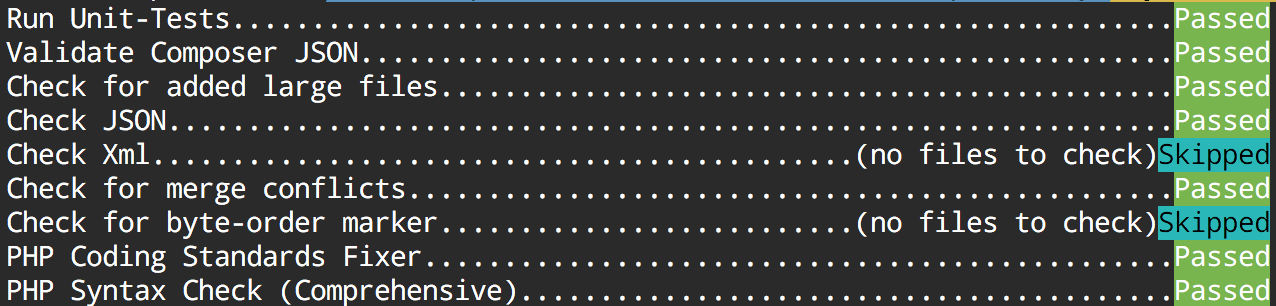
    This config provides us the following checks:

    • Validate composer.json file with composer
    • Prevent large files in commits like a database dump
    • Check for valid JSON and XML files
    • Check if merge conflict entries are not resolved
    • Check if a file has a wrong BOM
    • Run php-cs-fixer and fix code against a .php_cs file.

    Example .pre-commit-config.yaml:

    -   repo: local
        hooks:
        -   id: validate-composer-json
            name: Validate Composer JSON
            entry: "composer validate --strict"
            language: system
            files: composer\.json
    -   repo: git://github.com/pre-commit/pre-commit-hooks
        sha: 5da199bb8d60f764c0f77a20b0a1dc3a7640bcdd
        hooks:
        -   id: check-added-large-files
        -   id: php-unit
        -   id: check-json
        -   id: check-xml
        -   id: check-merge-conflict
        -   id: check-byte-order-marker
    -   repo: git://github.com/hootsuite/pre-commit-php.git
        sha: 1.2.0
        hooks:
        -   id: php-cs-fixer
            args:
            - -q
            - --config-file=.php_cs
        -   id: php-lint-all

    Output:

    If you find the concept good, we would be happy if you leave a comment.

    Have fun!


    PS: Thanks to David Lambauer for discovering the framework at netz98.

  • Fixing issues after changing product attribute type from varchar to text

    Fixing issues after changing product attribute type from varchar to text

    In some cases there is a need to change the backend type of a catalog product attribute from varchar to text. The purpose of this change is to get more than 255 characters space for a string value.

    In this article I will cover the situation when problems occur after changing the backend type of an attribute.

    The Problem

    If the backend type of an attribute is changed, e.g. via install/upgrade script, Magento does not automatically copy and clean up old values. The consequence of that is that there are rudiments in the EAV value tables which cause some side effects. One of the side effects I was facing is editing a product which had a value for the affected attribute before the backend type change (in admin area). No values are displayed and there is no possibility to set a new value.

    So what to do if the change already happened and there is a mix between old value table rudiments and new value table entries?

    The Solution

    One possible solution to solve the issue are the following SQL Statements, here is an example for changing from varchar to text (you need to find out the id of the attribute from the eav_attribute table – here {attribute_id}):

    1. Copy the “value” from varchar table to text table for the case an entry for a product entity exists in both tables, but only if the “value” in the text table is null:

    UPDATE catalog_product_entity_varchar, catalog_product_entity_text 
    SET catalog_product_entity_text.value = catalog_product_entity_varchar.value 
    WHERE catalog_product_entity_varchar.attribute_id = catalog_product_entity_text.attribute_id 
    AND catalog_product_entity_varchar.entity_id = catalog_product_entity_text.entity_id 
    AND catalog_product_entity_text.store_id = catalog_product_entity_varchar.store_id 
    AND catalog_product_entity_text.entity_type_id = catalog_product_entity_varchar.entity_type_id 
    AND catalog_product_entity_text.value is null
    AND catalog_product_entity_varchar.attribute_id = {attribute_id};

     2. Copy entries which do not exist in text value table, but exist in the varchar table

    INSERT IGNORE INTO catalog_product_entity_text 
    (entity_type_id, store_id, attribute_id, entity_id, value)
    select entity_type_id, store_id, attribute_id, entity_id, value 
    from catalog_product_entity_varchar 
    where catalog_product_entity_varchar.attribute_id = {attribute_id} 
    and catalog_product_entity_varchar.value is not null;

    3. Delete entries from the varchar table

    DELETE FROM catalog_product_entity_varchar where attribute_id = {attribute_id};

    Important note

    Please verify the SQL, whether it is suitable for your purpose. Best practice is also to test it in a local / staging system and to back up the live database before applying the SQL on production. The solution is not perfect: I myself faced the issue, that the enterprise indexer cronjob took about 4h after applying the SQL, which blocked other cronjobs to be executed (about 50K products in DB). Possible way to avoid this is to separate “malways” (enterprise indexer) and “mdefault” cronjobs.

    I hope this  can be helpful. Feel free to comment if you faced this issue too or if you have any additions or a better solution.

  • PSR-7 Standard  – Part 1  – Overview

    PSR-7 Standard – Part 1 – Overview

    This post is part of series:


    This is the first post of my new PSR-7 series. If you already use PSR-7 in your daily life as programmer you can skip the first part of this post.

    What is PSR-7?

    PSR-7 is a standard defined by the PHP-FIG. It don’t like to repeat the standard documents in my blog post. The idea is to give you some real world examples how you can use PSR-7 in your PHP projects. If you investigate the standard you can determine that it doesn’t contain any implementation.

    Like the other standard of the FIG it only defines PHP interfaces as contracts. The concrete title of the standard is HTTP message interfaces. And that’s all what it defines. It defines a convenient way to create and consume HTTP messages. A client sends a request and a server processes it. After processing it, the server sends a response back to the client.

    Nothing new? Yes, that is how any PHP server application works. But without PSR-7 every big framework or application implements it’s own way to handle requests and responses. Our dream is that we can share HTTP related source code between applications. The main goal is: interoperability.

    History

    Before any PSR standard we had standalone PHP applications. There were some basic PHP libraries to use. Most of the code was incompatible. With PSR-0 we got an autoload standard to connect all the PHP libraries.

    The PSR-7 is a standard to connect an application on HTTP level. The first draft for PSR-7 was submitted by Michael Dowling in 2014. Michael is the creator of Guzzle, a famous PHP HTTP client library. He submitted his idea. After that the group discussed the idea behind a standardized way to communicate with messages. Matthew Weier O’Phinney (the man behind Zend Framework) took over the work of Michael.

    In May 2015 we had an officially accepted PSR-7. After that the most big frameworks adopted the standard or created some bridge/adapter code to utilize the new standard.

    Overview

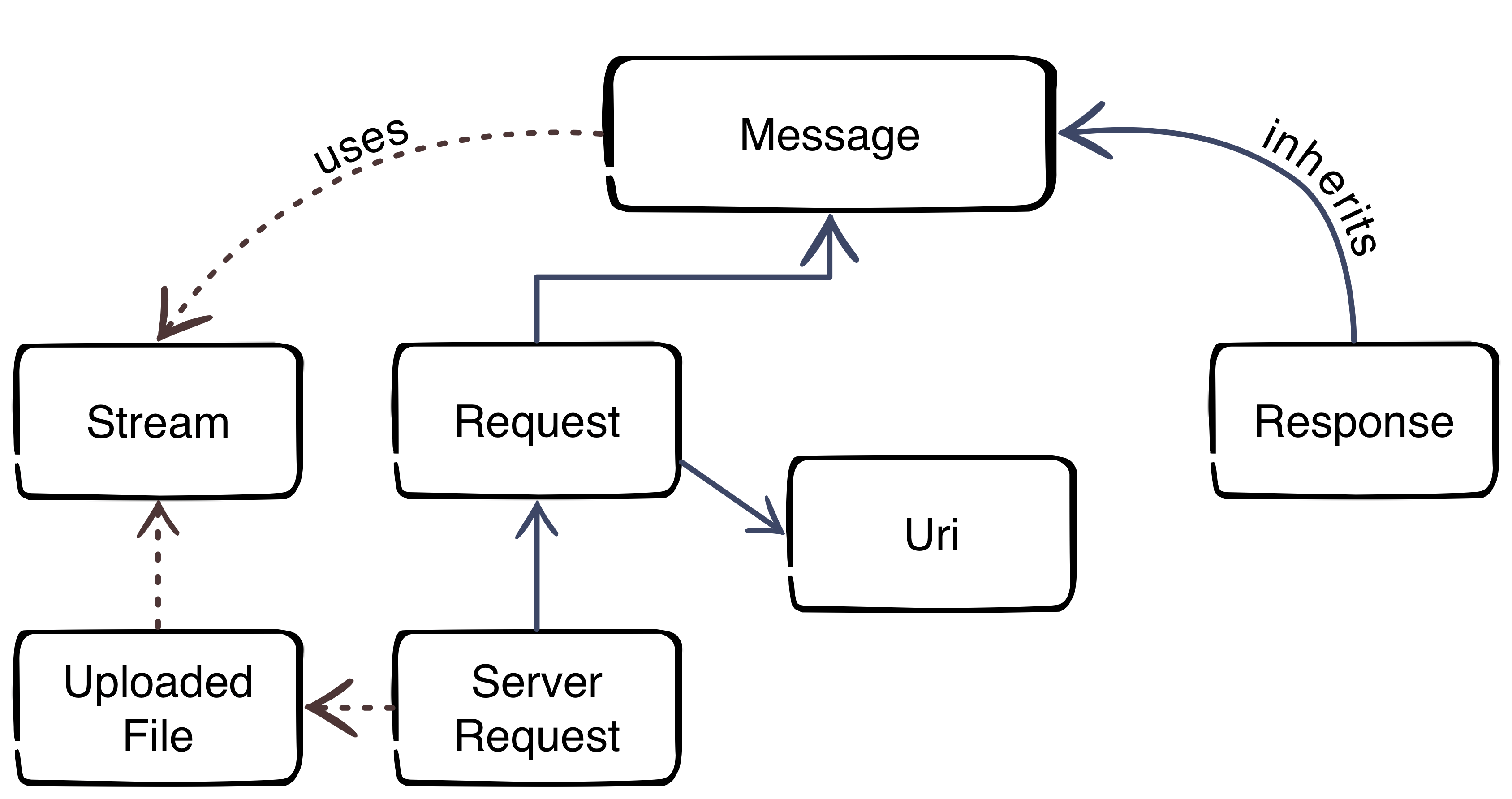
    Thanks to Beau Simensen


    The image gives us an overview about the PSR-7 interfaces. The blue color represents the inheritance. The message interface is the main interface of the standard. The request of a client and the response of the server inherit the message interface. That’s not surprising, because the message utilizes the HTTP message itself. The red dotted lines clarify the usage of other parts.

    Request-flow with PSR-7

    The main flow with PSR-7 is:

    1. Client creates an URI
    2. Client creates a request
    3. Client sends the request to server
    4. Server parses incoming request
    5. Server creates a response
    6. Server sends response to client
    7. Client receives the response

    This was the first part of the blog series. The next part will look more closely at the request and the URI.

  • Solving a 2006 MySQL error connection timeout in Magento1

    Solving a 2006 MySQL error connection timeout in Magento1

    In my recent task I was testing a web crawler script which uses Magento database information for the crawling requests. I have encountered the following error:

    Fatal error: Uncaught exception ‘PDOException’ with message ‘SQLSTATE[HY000]: General error: 2006 MySQL server has gone away’ in lib/Zend/Db/Statement/Pdo.php:228

    The Problem

    This error occured after around 45 minutes of script runtime.
    The script was written in a way that it was possible that there is no database interaction for a longer period.
    In consequence to that when the script reached a point where it was trying to save or fetch something from the database, the mysql connection ran into a timeout – unnoticed by the script.
    Thus resulting in the above mentioned MySQL error.

    mysql wait_timeout

    The variable controlling this timeout from MySQL is the wait_timeout system variable.

    Definition from MySQL Reference Manual :

    “The number of seconds the server waits for activity on a non-interactive connection before closing it.”

    As it turns out we have already had this situation in another project – thanks to the netz98 developers for the hint.

    The Solution

    The solution is to close the connection before using it – in case of long running and un-interrupted code part that does no database communication.

    We have added the following code snippet to our ResourceModel:

    /**
     * Initialize the ReadAdapter (force a re-connect)
     *
     * @param bool $useNewConnection
     * @return Varien_Db_Adapter_Pdo_Mysql
     */
    protected function _initReadAdapter($useNewConnection = false)
    {
        /** @var Varien_Db_Adapter_Pdo_Mysql $adapter */
        $adapter = $this->_getReadAdapter();
    
        /**
         * In some occasions we want to use a fresh connection to fetch table data
         * when crawling takes longer (between queries) than the configured mysql wait_timeout
         *
         */
        if ($useNewConnection === true) {
            $adapter->closeConnection();
        }
        return $adapter;
    }

    With this method the Connection within the Adapter can be closed. When it is closed the connection will be re-initialized automatically with the next Database Interaction that is triggered by our code. To do so we introduced the parameter $useNewConncetion which enforces this behaviour.

    Each time we have reached a point in our script where it could be possible that the connection hit the wait_timeout we just call this method with useNewConnection set to true.

    I hope this article is helpful for you, in case you face the same situation. Feel free to comment if you faced this issue too or if you have any additions.

    Update: Keep alive implementation by Ivan Chepurnyi (@IvanChepurnyi)

        /**
         * Zend db adapter validation, in order to get rid of possible server gone away
         *
         * @param Zend_Db_Adapter_Abstract $adapter
         * @return bool
         */
        protected function _validateConnection(Zend_Db_Adapter_Abstract $adapter)
        {
            try {
                // Execute simple non heavy query
                return $adapter->fetchOne('SELECT 1') === '1';
            } catch (Zend_Db_Statement_Exception $e) {
                $adapter->closeConnection();
            }
    
            return $adapter->getConnection() !== null;
        }


  • Deploying Magento2 – Jenkins Build-Pipeline [2/4]

    Deploying Magento2 – Jenkins Build-Pipeline [2/4]

    This post is part of series:

    Recap

    In the post Deploying Magento2 & History / Overview [1/4] we showed an overview of our deployment for Magento2 and this post will go into more detail on what is happing on the Build-Server and how it is done. So to get you up to speed, this is the overview of our process and what this post will cover:

    Jenkins Build-Pipeline

    Our Build Server is basically a Jenkins running on a dedicated server. The Jenkins Server is the main actor in the whole deployment process.
    It will control the specific phases of the deployment and provide an overview and a detailed monitoring of the output of each phase.

    We are using the Jenkins Build Pipeline feature to organize and control our deployment.
    The Magento2 deployment is split up into the following stages:

    • Tool Setup – ensuring all tools are installed
    • Magento Setup – updating the source-code and update composer dependencies
    • Asset Generation – generating the assets in pub/static var/di var/generation and providing them as packages
    • Deployment – delivering the new release to the production server

    The Jenkinsfile

    There are different ways to create a Jenkins Build-Pipeline, one is to create a Jenkinsfile that defines the stages and the commands to run. We are using just that approach and put that Jenkinsfile into a git repository separate from our magento2 repository. Though this is an approach we have been following for years now, I still think it is best to have your deployment separate from the actual project. But as so often that depends on the individual needs.
    We will add some more dependencies to this repository later.

    Next you will see a skeleton for the Jenkinsfile we are using. I left out the details for the stages for now and will show those further down the post.

    node {
        // ENV variables
        env.PWD = pwd()
        env.STAGE = STAGE
        env.TAG = TAG
        env.REINSTALL_PROJECT = REINSTALL_PROJECT
        env.DELETE_VENDOR = DELETE_VENDOR
        env.GENERATE_ASSETS = GENERATE_ASSETS
        env.DEPLOY = DEPLOY
    
        try {
            // Update Deployment
            checkout scm
    
            stage 'Tool Setup'
            // Setup tools here
    
            stage 'Magento Setup'
            // Setup and update Magento
            
            stage 'Asset Generation'
            if (GENERATE_ASSETS == 'true') {
                // Generate and package assets
            }
    
            stage 'Deployment'
            if (DEPLOY == 'true') {
                // Trigger deployment and start release
            }
    
        } catch (err) {
            currentBuild.result = 'FAILURE'
            throw err
        }
    }
    

    The stage keyword defines a new stage and takes a string as a parameter. You can see the stages I mentioned earlier defined here. The update of our deployment itself is not included as a stage.
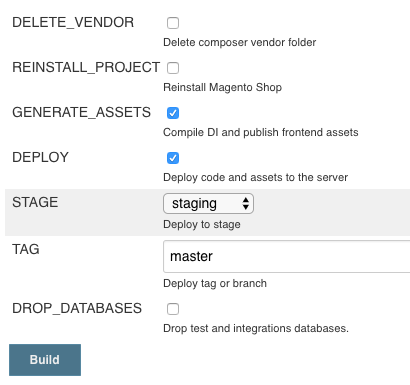
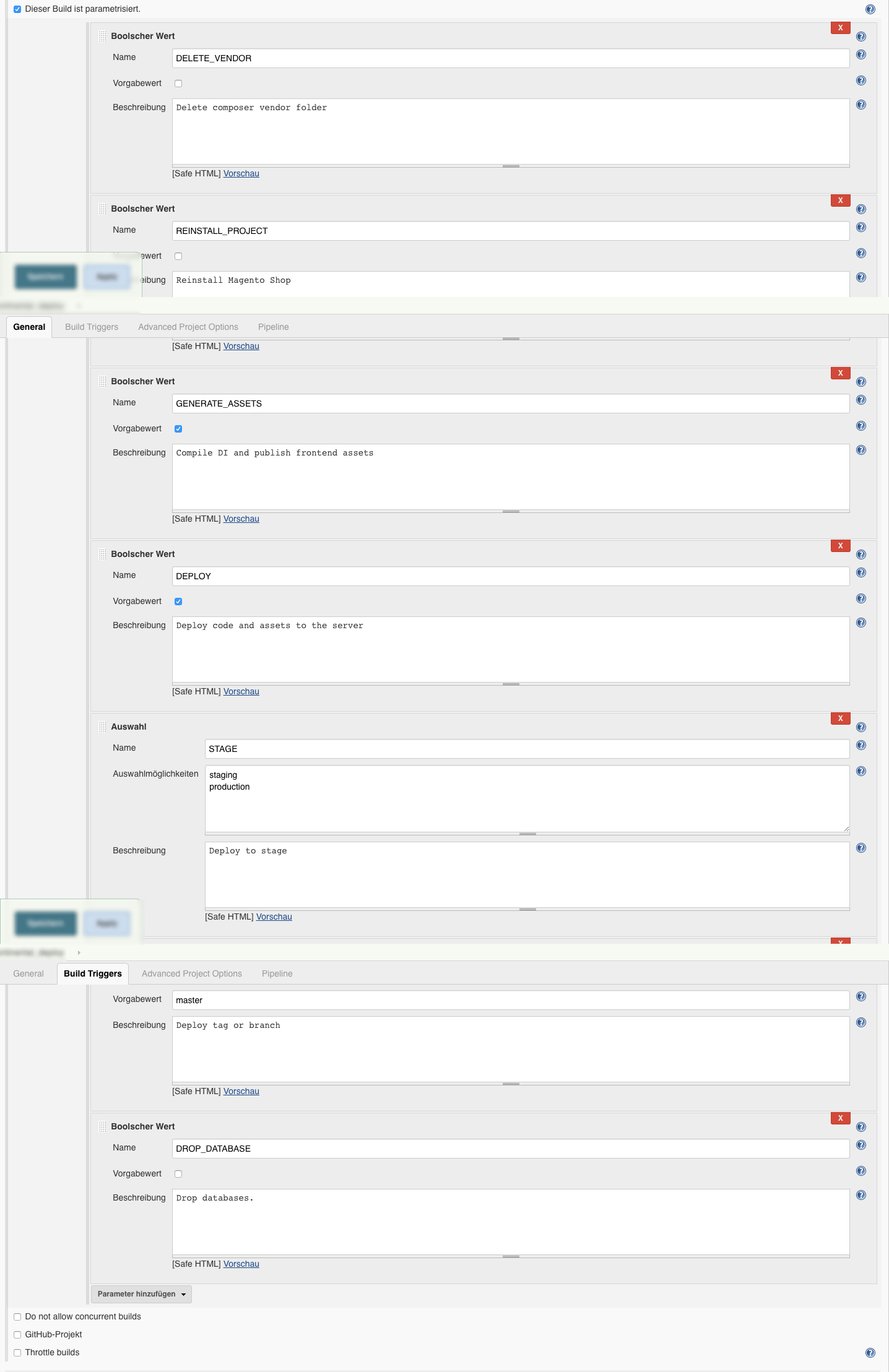
    We are using multiple ENV variables that are defined when starting the build. By default DEPLOY and GENERATE_ASSETS are set to true , but we could choose to leave out on of them. So in case there was an error during the Deployment we don’t need to re-generate all the assets.
    The ENV variables REINSTALL_PROJECT and DELETE_VENDOR are used within the stage Magento Setup.

    The ENV variable STAGE is used to identify the server environment we are deploying to, like staging or production. This variable is to be selected when starting the Build and can be individualized to the needs in the project at hand.
    The ENV variable TAG is defining the git branch or git tag where are deploying with this build. It is used later on in the process multiple times.

    Stage Tool Setup

    stage 'Tool Setup'
    sh "${phpBin} -v"
    // Composer deps like deployer
    sh "composer.phar install"
    // Phing
    if (!fileExists('phing-latest.phar')) {
        sh "curl -sS -O https://www.phing.info/get/phing-latest.phar -o ${phingBin}"
    }
    sh "${phingCall} -v"
    sh "printenv"
    

    The first stage “Tool Setup” will install or update the tools needed through out the deployment.
    As you can see we are using composer here to pull in our tools like for example deployer.
    Also we are using phing for some parts during the deployment process, so we are ensuring that the latest phing version is present.

    Stage Magento Setup

    stage 'Magento Setup'
    if (!fileExists('shop')) {
        sh "git clone ${magentoGitUrl} shop"
    } else {
        dir('shop') {
            sh "git fetch origin"
            sh "git checkout -f ${TAG}"
            sh "git reset --hard origin/${TAG}"
        }
    }
    dir('shop') {
        sh "${phingCall} jenkins:flush-all"
        sh "${phingCall} jenkins:setup-project"
        sh "${phingCall} jenkins:flush-all"
    }

    In this stage we are updating the Magento Setup the Build needs to create the assests.
    It basically consists of two steps:

    • Setup or Update the Source-Code of the Magento Shop
    • Setup or Update the Magento-Database

    We are cloning the repository containing the customer project in the directory shop. If we have already cloned the repository we will just update to the tag or branch that is to be deployed.

    Next-up is the project setup using the phing-call jenkins:setup-project. This phing-call is defined by the phing scripts inside our shop repository.
    This call will

    • install the magento composer dependencies,
    • re-install the project therefore deleting the app/etc/env.php, (using REINSTALL_PROJECT )
    • create the database if necessary
    • run setup:upgrade

    Up until recently a database was necessary to create the assests. As far as I know, there is plan to remove the requirement of having a database during the assets creation.

    The phing tasks called in this stage are re-used from our Continous Build Jobs that we run on develop, master, feature and release branches for all of our projects.
    Those Build Jobs are automatically running the Unit and Integration Tests, generating the documentation, Running Code Analyzers and summarizing all this information in a nice little Dashboard.
    Maybe we will have a blog-post about that too. Let’s move on to the next stage.

    Stage Asset Generation

    stage 'Asset Generation'
    dir('shop') {
        if (GENERATE_ASSETS == 'true') {
            sh "${phingCall} deploy:switch-to-production-mode"
            sh "${phingCall} deploy:compile"
            sh "${phingCall} deploy:static-content"
            sh "bash bin/build_artifacts_compress.sh"
    
            archiveArtifacts 'config.tar.gz'
            archiveArtifacts 'var_di.tar.gz'
            archiveArtifacts 'var_generation.tar.gz'
            archiveArtifacts 'pub_static.tar.gz'
            archiveArtifacts 'shop.tar.gz'
        }
    }

    During this stage the deploy job will compile all assets needed for running Magento2 in production-mode.
    Therefore we ensure we are in production-mode and basically call php bin/magento setup:di:compile  and php bin/magento setup:static-content:deploy .
    Those phing-calls you see above are executing the following commands:

    php bin/magento deploy:mode:set --skip-compilation production
    
    rm -Rf var/di
    rm -Rf var/generation
    
    php bin/magento setup:di:compile
    
    bin/magento setup:static-content:deploy --theme=NAMESPACE/base --theme=Magento/backend --language=en_US --language=de_DE
    

    The Bash-Script bin/build_artifacts_compress.sh  creates 5 tar files for

    • shop – containing the Magento Source-Code
    • pub_static – containing the contents of pub/static directory
    • var_generation – containing the contents of var/generation directory
    • var_di – containing the contents of var/di directory
    • config – containing config yaml-files that can be imported using config:data:import

    The config:data:import  command is provided by the Semaio_ConfigImportExport which we are using to manage our systems configuration through.  https://github.com/semaio/Magento2-ConfigImportExport
    After the artifacts have been created, we use the Jenkins archiveArtifacts command to archive the latest artifacts for this build and make them available per HTTP-link in a consistent directory.

    At the moment we are thinking about just creating one artifact instead of 5 and using that from here on. This will have some more advantages that we will cover in our post: “Future Prospect (cloud deployment, artifacts)”

    Now we have prepared all the artifacts we need and are ready to create the new release on our servers and publish it. So now for the final stage “Deployment”.

    Stage Deployment

    stage 'Deployment'
    if (DEPLOY == 'true') {
        sshagent (credentials: [jenkinsSshCredentialId]) {
            sh "./dep deploy --tag=${TAG} ${STAGE}"
        }
    }

    This Stage has probably the shortest content as far as the code in the Jenkinsfile is concerned. We are just triggering the Deployer while passing the STAGE and the TAG to it.

    Deployer is a Deployment Tool for php and is more or less based upon capistrano and following the same concepts applied in capistrano.

    We have defined quite some Magento2 related Deployer Tasks and created some adjustments to the core-tasks fixing bugs or adjusting them to our needs.

    The details what we have done and on how we are using deployer to release the code and pushing the assets to the server environment will be covered in the upcoming post.

    The Stage View of the Pipeline

    At this point we have defined the Build-Pipeline and are ready to execute it.
    We do so by configuring the parameters as needed in this form:

    You can see the Environment Variables used in the above mentioned code samples. The image shows the default form with pre-selected variables.
    In some cases it is necessary to delete the vendor directory completely or to drop the jenkins database.

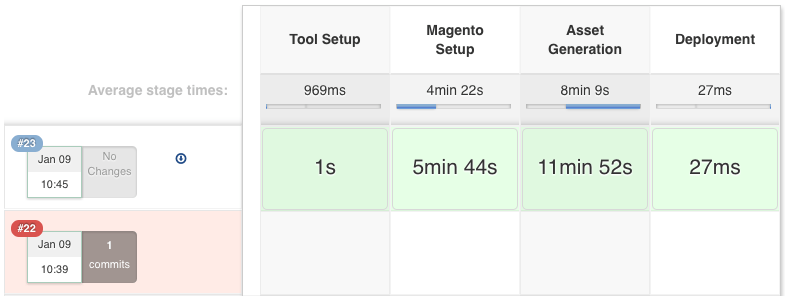
    When running the introduced Build-Pipeline, you are presented with an informative stage view that shows the stages and their completion.
    We can evaluate how our Deployment is progressing and get an estimate how long it will take to finish the stage(s).

    The Jenkins Job Configuration

    We are creating our projects based on the pipeline project.
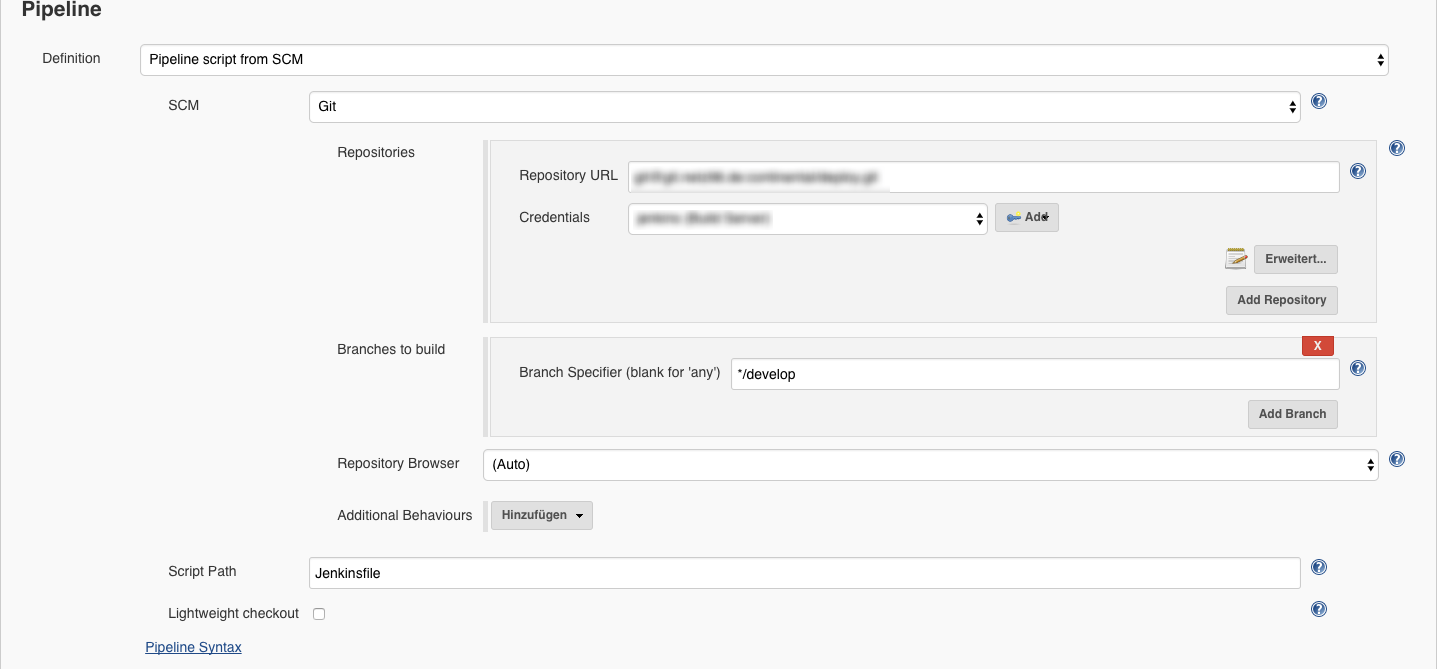
    Then the parameters are added and the git repository url and that’s basically it.

    Here are some screenshots:

    Repository Configuration
    Build Job Parameters


    Summary

    This is the end of the introduction to our Build-Pipeline Setup for Deployments. The next post will cover details to our php-deployer setup.

    I really like the automated and centralized way of Deploying our Magento Shops and of course the resulting advantages. Whenever somethings automated you don’t need to explicitly know or remember all the details of the deployment. It just takes so much of your mind and you can focus on more important tasks.

    Well, that’s it for this post. I hope you enjoyed it and you find it informative. As always, if there any questions or if you’d like to know more about specific details, please feel free to comment or ask us directly on twitter or any other social plattform.

    UPDATE 23-FEB-2017

    Add Screenshot of the Build Form.

    UPDATE 29-MAR-2017

    Add Screenshot of the Build Configuration Parameters and Pipeline

  • Deploying Magento2 – History & Overview [1/4]

    Quite recently we have updated the deployment of our Magento2 projects to a more flexible and reusable way.
    Originally I wanted to create one post to present you our deployment setup, the systems involved, the workflow & process and some code that might be interesting.
    While describing this subject I decided to create a series of posts to cover those parts as it was just getting to extensive for one post.

    I am planing to cover the following topics in separate posts:


    Then let’s get started with a brief introduction of our former setup for Magento1 and Magento2. You might have a similar solution to this one.

    History Magento 1

    When we were starting with our first Magento 2 project in June 2016, we ported the workflow we had established for our Magento 1 projects.

    Our Magento 1 projects are deployed using capistrano and are using a pull approach, where the server fetches the Magento source-code and the composer dependencies using git and composer.
    This approach has some draw backs as we have to have tools installed (git, composer) and we needed a transfer channel back to our gitlab server.

    First Magento 2 Deployment

    At first, we followed the same approach with the Magento 2 projects.
    We applied some minor adjustments to the process, as Magento 2 has some requirement in terms of pre-compilation.


    The solution was to generate the static assets and the di on the build server and pushing that to the production server during the deployment.
    You should not generate those assets on the production server. The actions performed on the production server should be kept to a minimum, to keep the load down and when thinking about a setup with multiple nodes it just does not seem right to this kind of task on each server.
    We ended up with a mixture of a PULL and PUSH deployment, the source-code being pulled by git / composer and the assets being pushed.
    We still had the drawbacks from our Magento 1 deployment, as we basically just extended that to fit the needs of the Magento 2 compilation.

    Current Magento 2 Deployment

    Our goal was to create a pure PUSH deployment where the production server does not need direct access to our git repositories.

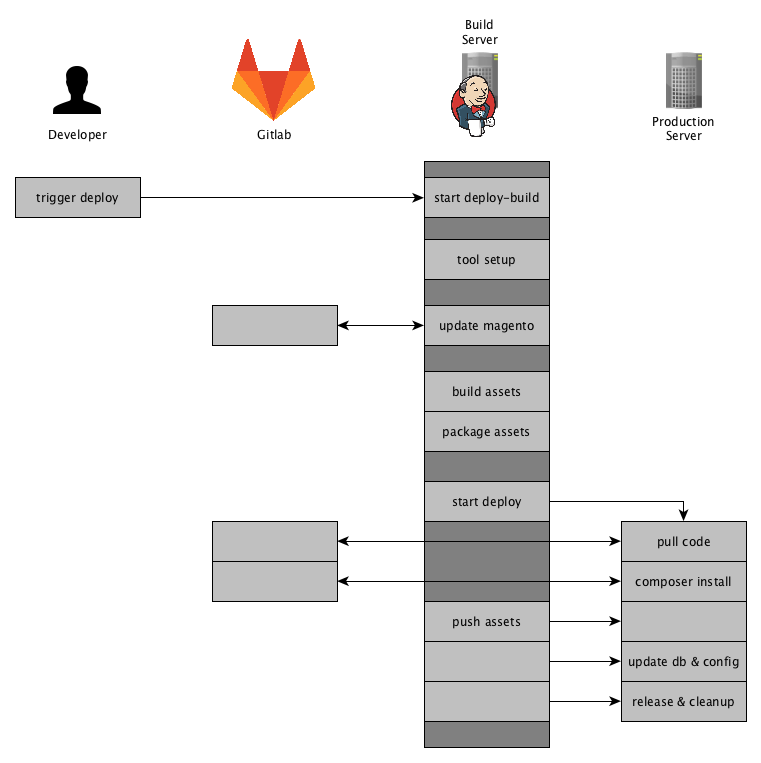
    So here is an Overview of how our current deployment for Magento 2 projects works:

    Jenkins will fetch the source-code using git and composer and update its Magento 2 instance database. It will then generate & package the assets and finally pushes the code and the assests to production server.
    To achieve those steps we have setup a Jenkins Pipeline that we will have a look at next.

    Summary

    This setup comes in handy when any callback (e.g. PULL) is prohibited by a firewall.
    Or even a more restrictive environment where a VPN-Tunnel is to be opened which prevents any other network connections to other system except the server.
    We were faced with that kind of situations recently, but with using the above mentioned approach we had little effort in terms of adjusting our deployment.

    Furthermore following this approach we are flexible where we push to and it is easy to extend and reusable.
    In the post “Future Prospect (cloud deployment, artifacts)” we will shed some light on our future plans on how to extend that deployment for different hosting environments.

    This was a brief overview of how we got to our current Magento2 Deployment and how it works in general.
    The next posts will be about the tool-stack we use and we will share some insights with code samples.

    If you have any feedback or questions, as always, feel free to leave a comment or contact us directly.

  • How to add alternative HTTP headers to Magento 2?

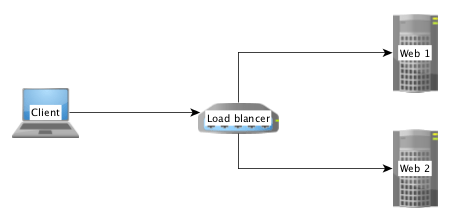
    If you have more than one frontend server running in your business, it’s needed to load balance the traffic between the nodes. In this case we have a new instance between the browser and the web-server.

    Often it’s a system like HAProxy or Varnish.

    Simple load balancer/proxy setup

    If the load balancer or proxy receives a request from a browser, it forwards it to backend server in the internal network. The IP address of the client is than added to a forward header which contains the IP address of a forward chain.

    Example:

    X-Forwarded-For: client, proxy1, proxy2

    In some situation i.e. for GEO-IP checks, you need the real IP address of a client. If you don’t configure Magento the remote address is always 127.0.0.1.

    That’s not what we want. We need the first part of the comma separated list of the IP chain. Magento offers us a mechanism to solve this issue.

    Remote Address

    The key to solve the issue is the class Magento\Framework\HTTP\PhpEnvironment\RemoteAddress which is provided by the Magento 2 framework.

    In Magento 2 it’s prohibited to call the $_SERVER['REMOTE_ADD'] directly. The RemoteAddress class is a wrapper to deal with the remote address.

    The correct way to get the remote address is this:
    use Magento\Framework\HTTP\PhpEnvironment\RemoteAddress;

    use Magento\Framework\HTTP\PhpEnvironment\RemoteAddress;
    
    class MyClass
    {
        /**
         * @var RemoteAddress
         */
        private $remoteAddress;
    
        public function __construct(RemoteAddress $remoteAddress)
        {
            $this->remoteAddress = $remoteAddress;
        }
    
        public function doSomething()
        {
            $ipAddressOfTheClient = $this->remoteAddress->getRemoteAddress();
        }
    }
    

    Configuration

    It’s possible to inject a list of alternative headers to the RemoteAddress class by Dependency Injection. This config isn’t related to any module. It’s a special config for a production server setup.

    It’s important to know that Magento 2 will load any „di.xml“ file from any subfolder of the „app/etc“ folder!

    With this information we can create a subfolder like „app/etc/myproject/di.xml“ with the following content:

    <?xml version="1.0"?>
    <config xmlns:xsi="http://www.w3.org/2001/XMLSchema-instance"
            xsi:noNamespaceSchemaLocation="urn:magento:framework:ObjectManager/etc/config.xsd">
    
        <type name="Magento\Framework\HTTP\PhpEnvironment\RemoteAddress">
            <arguments>
                <argument name="alternativeHeaders" xsi:type="array">
                    <item name="x-forwarded-for" xsi:type="string">HTTP_X_FORWARDED_FOR</item>
                </argument>
            </arguments>
        </type>
    </config>


    After that Magento will look into the given HTTP header „X-Forwarded-For“. The name of the header is normalized by PHP.
    X-Forwarded-For is available as $_SERVER['HTTP_XFORWARDED_FOR'].

    It’s possible to add more than one header to alternative header list.

    That’s it. Have fun with Magento 2. 🙂