Tag: HTTP

  • Request data through a proxy with GuzzleHttp – PSR-7 compliant

    Request data through a proxy with GuzzleHttp – PSR-7 compliant

    When a Magento shop – or any other PHP application – is required to request data from or transmit data to a remote server, it is often necessary to redirect the traffic through a Http-proxy server. In my case this was essential because the called endpoint allows only certain IP addresses to access the requested ressource. Since I am working from various locations, each having a different IP address, I had to find a way that certain Http-requests are routed through the company’s proxy server. This article is going to describe what a proxy actually does for us, why I cannot and should not use PHP’s environment variables and what the best solution is for scenarios where PSR-7 / PHP-Http in combination with GuzzleHttp might be.

    What about PSR-15?

    Good point! This text will discuss Http middleware components on client side with the example of adding proxy configurations to a request. The relatively new PSR-15 standard handles the server side and focuses mainly on manipulating the response which is sent back to the calling host. Nevertheless you will get a lot of useful information from the standard and the explanation.

    Why don’t you simply use the the HTTP_PROXY environment variable?

    Guzzle indeed accesses the PHP environment variable HTTP_PROXY and routes every request through the specified proxy, if this value is actually configured in php.ini or by using the setenv()-command. But for security reasons this feature is only available when the script is called from the shell (checked using method php_sapi_name()). More information on the vulnerability and the reason why GuzzleHttp declines to use the settings from environment variables can be found at httpoxy.org.

    GuzzleHttp offers a proxy-configuration within the request()-method – why not use this?

    Because it it not PSR-7 compliant! The HTTP message interface simply does not provide a method with name request that allows the developer to pass an options-array in which we could add our proxy-configuration. Instead the interface does only declare a method sendRequest that accepts an object of type \Psr\Http\Message\RequestInterface which also does not offer any proxy configuration.

    Middleware and Handlers

    Middleware components are a powerful – and PSR-7 compliant – way to manipulate Http requests before they’re sent to a remote server.

    In an example scenario where it would be required to send authentication data in each server call, it’d sure be exhausting to update the credentials for each method call all over your application’s code. Adding a middleware layer that automatically adds the necessary data to each request, before it is transmitted, will reduce the code lines to be updated to just a single one (maybe two).

    A middleware is simply a method that resides between the command for sending a request and the actual transmittion. It allows to add, remove or modify data, the target-URL or any other property of the \Psr\Http\Message\RequestInterface as well as additional configuration, that is important for data transfer.

    More information on the PSR-7 standard is given in our in-depth series.

    Create a middleware and add it to the HandlerStack

    The diagram below sketches on the top half the classical way of sending a request: The developer adds a a sendRequest command along with the connection and data settings hold by $request and passes it to a various transmittion mechanism, e.g. GuzzleHttp.
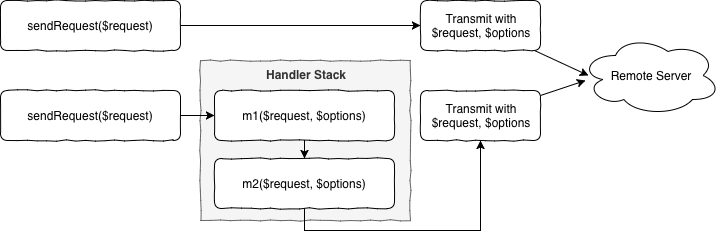
    In the bottom half of the diagram two sample middleware methods m1 and m2 are added to stack that resides between sending the request and the actual transmittion. Both methods are free to modify the request or the configuration hold by $options and are executed one after another, as described by the chain of responsibility, part of the infamous Gang of Four.

    The following implementation has proven to be stable but might be a bit more complex than what is actually necessary to create a middleware method. The reason for that is because of a better test-ability and more flexibility for future add-ons.

    Class ProxyMiddleware

    First step is to create a new class called ProxyMiddleware that is responsible to prepare the concrete middleware method for the handler stack, managed by GuzzleHttp. This class has static method, which holds the proxy settings (URL and port) and will return a closure that will be pushed onto the handler stack later.

    public static function getProxyMiddleware($serverUrl): callable
    {
        self::$proxyUrl = $serverUrl;
    ​
        return function (callable $handler) {
            return new ProxyMiddleware($handler);
        };
    }

    As soon as the closure is called during data transmittion a new instance of the ProxyMiddleware-class is created and invoked by the stack dispatcher. Therefore we need to implement the actual middleware-call inside of the magic __invoke-method:

    public function __invoke(RequestInterface $request, array $options)
    {
       $fn = $this->nextHandler;

       $options['proxy'] = [
           'http'  => self::$proxyUrl,
           'https' => self::$proxyUrl,
      ];

       return $fn($request, $options);
    }

    It’s that simple! We just add the proxy information to the $options-array and pass the new information onto the method described by $nextHandler. That was easy!

    Add our middleware to the handler stack

    After we have created the middleware handler, we need to tell GuzzleHttp to actually execute it after the sendRequest-command is executed. For this second step we need to instantiate a new HandlerStack-object using the class’ static create-method.

    $handlerStack = \GuzzleHttp\HandlerStack::create();
    $handlerStack->push(ProxyMiddleware::getProxyMiddleware('proxy_url'), 'middleware_id');

    $options['handler'] = $handlerStack;

    $httpClient = \Http\Adapter\Guzzle6\Client::createWithConfig($options);

    Now we simply push the previously described closure onto the stack together with an identifier-string. Allthough this ID is optional, it will be more than helpful for debugging your application, since Guzzle adds a couple of default middlewares to the stack and you would end up in a unmanageable mess.

    After we have created and configured the handler stack, we simply use the static createWithConfig-method that allows us to inject a options-array into the instantiation of a new Guzzle PSR-7 compliant Http client.

    From now on, all requests that are sent using this Http client will be transmitted with your middleware executed inbetween and having the proxy setting configured!

    Caveat: Unit Testing

    Testing your new middleware-class might be a little bit tricky. I just want you to know that closures, like the class member $nextHandler can be mocked using PHP’s pre-defined core class \stdClass and the magic __invoke method. In case you’re using PHPUnit, the following snippet might be helpful:

    $nextHandlerMock = $this->createPartialMock(\stdClass::class, ['__invoke']);

    More information

  • PSR-7 Standard  – Part 5  – HTTP Client

    PSR-7 Standard – Part 5 – HTTP Client

    This post is part of series:


    The fifth part of the PSR-7 series describes the HTTP Client.

    The HTTP client is tool which sends a request to a server and returns the response.

    Sadly PSR-7 does not contain an interface for the HTTP client. The Standard contains only the HTTP messages. The client itself is part of the proposed PSR-18.

    PSR-18 is very small. It contains only an Interface with one method and some exception classes. The important part is the sendRequest method. It is easy as pie. A request has to be passed and the client should return a response or throw an ClientException exception.

    interface ClientInterface
    {
        /**
         * Sends a PSR-7 request and returns a PSR-7 response. 
         * 
         * @param RequestInterface $request
         *
         * @return ResponseInterface
         *
         * @throws \Psr\Http\Client\ClientException If an error happens during processing the request.
         */
        public function sendRequest(RequestInterface $request): ResponseInterface;
    }
    

    At the moment we cannot use PSR-18 in a production environment until it is accepted by the FIG. Fortunately there is an other project which tries to close the gap until the PSR-18 is accepted. The project is the father of the PSR-18. We talk about the HTTPPlug Project (former PHP-HTTP).

    HTTPPlug Project

    The project’s homepage is http://httplug.io/. The main idea is to decouple a PHP package/library from implementation by providing a HTTP client abstraction and some standard implementations.

    It provides a Composer meta package. You don’t know what a Composer meta package is? Think of it as a kind of interface for packages.

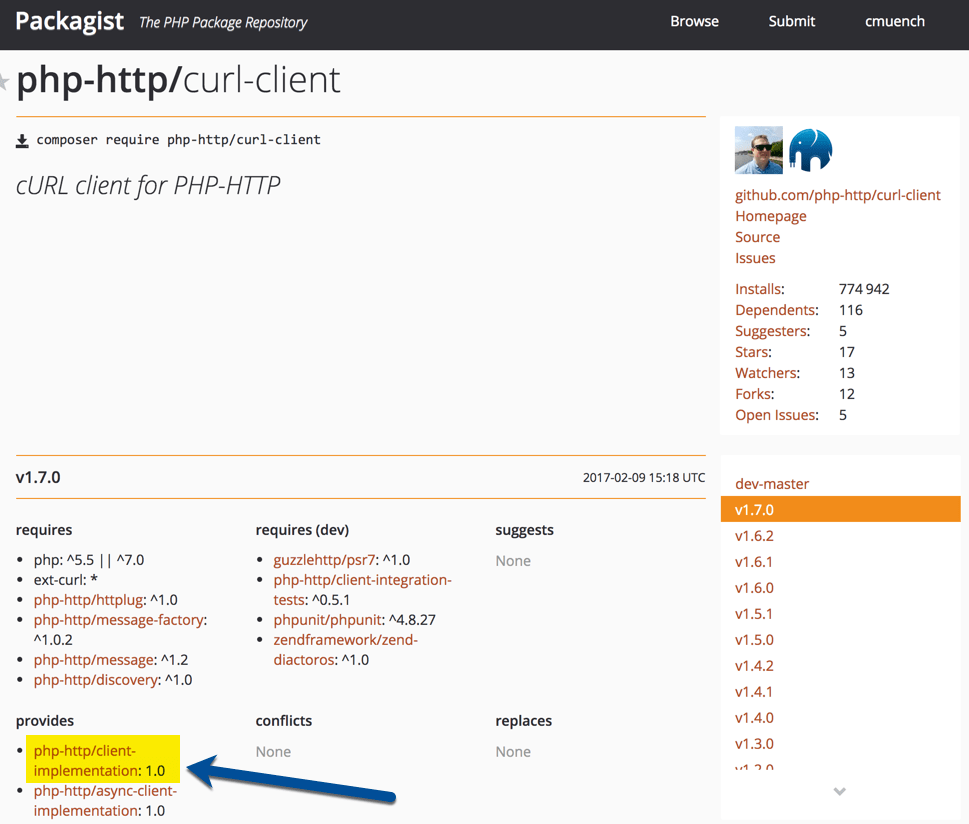
    This meta package can be added as requirements in your composer.json. Any compatible package can “provide” an implementation for the meta package.

    If you need a HTTP Client Implementation in your project, you should relay on the meta package instead of an real implementation.

    The implementation can be fulfilled in a project where the PHP library should be used. It is possible to pick any implementation from a huge list of existing implementations.

    An Example Library

    First we need a composer.json which requires a client implementation. For testing purposes we can add a development requirement to add some example scripts to the library. The HTTP-Plug project comes with a small and handy CURL based implementation which provides an implementation for the meta package. For the message implementation i.e. the Request, we make use of Guzzle’s PSR-7 implementation (see previous posts).

    {
      "name": "acme/my-super-php-library",
      "require": {
        "php-http/client-implementation": "^1.0",
        "guzzlehttp/psr7": "^1.4"
      },
      "autoload": {
        "psr-4": {
          "Acme\\MyLibrary\\": "src"
        }
      },
      "require-dev": {
        "php-http/curl-client": "^1.7"
      }
    }
    

    After a composer install  we are ready to create a sample service which uses the HTTP client. Let’s try to fetch the XML feed from dev98.de.

    We create a service class to fetch the XML feed. The service has a dependency to the HTTP Client interface. The file should be placed in the “src” sub-directory according to our PSR4 autoloading setting in composer.json file.

    <?php
    
    namespace Acme\MyLibrary;
    
    use GuzzleHttp\Psr7\Request;
    
    class FetchXmlFeedService
    {
        /**
         * @var \Http\Client\HttpClient
         */
        private $client;
    
        /**
         * ExampleService constructor.
         * @param \Http\Client\HttpClient $client
         */
        public function __construct(\Http\Client\HttpClient $client)
        {
            $this->client = $client;
        }
    
        /**
         * @return \SimpleXMLElement
         * @throws \Exception
         */
        public function fetch(): \SimpleXMLElement
        {
            $request = (new Request('GET', 'https://dev98.de/feed/'))
                ->withHeader('Accept', 'application/xml');
    
            $response = $this->client->sendRequest($request);
    
            if ($response->getStatusCode() !== 200) {
                throw new \Exception('Could not fetch XML feed');
            }
    
            return simplexml_load_string($response->getBody()->getContents());
        }
    }

    The service does not rely on a real implementation. The \Http\Client\HttpClient  is only an interface.

    Now we create a sample script which calls our service in the sub-directory “examples”.

    <?php
    
    require_once __DIR__ . '/../vendor/autoload.php';
    
    $httpClient = new \Http\Client\Curl\Client();
    $service = new \Acme\MyLibrary\FetchXmlFeedService($httpClient);
    $xmlData = $service->fetch();
    
    foreach ($xmlData->channel->item as $item) {
        echo (string) $item->title . "\n";
    }
    

    That’s our simple library with an example script. Testing this library is also not a big deal. We can easily mock the Interface.

    Use the Library

    If we want to use the library in a real project, we need to add the library in our project’s composer.json file. Then we add an implementation for the http client. This must not be the same as the development requirements in our library. This is a big advantage. If our PHP framework comes with an implementation which fits, we can re-use it.

    The complete source of the blog post is available on Github: https://github.com/cmuench/psr7-example-library

    The next blog post in this series describes the Server-Request.

  • PSR-7 Standard  – Part 4 – File Uploads

    PSR-7 Standard – Part 4 – File Uploads

    This post is part of series:


    After we learned what a Request and a Response are, let’s now look how we can send files to the server. Then have a look on how we can process them with Guzzle on the server side.

    Client Side Script

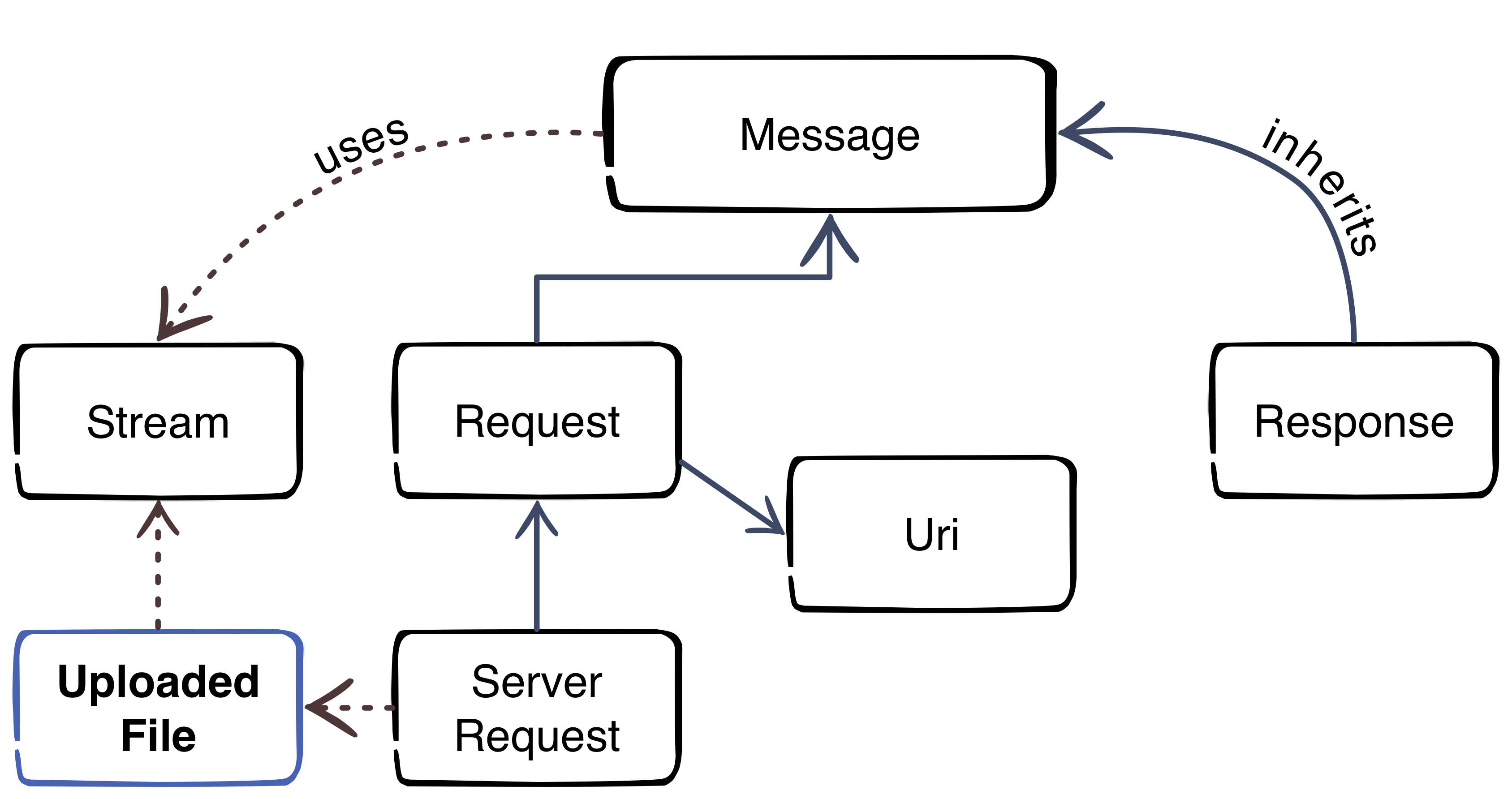
    As you can see in the diagram, a file upload is also handled as stream.

    First we create script “file_upload.php” with this content which initializes the autoloader and creates a sample file for the upload test.

    <?php
    require_once 'vendor/autoload.php';
      
    // create a test file
    file_put_contents('foo.txt', '"Foo" is the content of the file');
    

    After we have a text file, we can create our stream with the Guzzle PSR-7 component. Please add the code to the existing file.

    // put test file into multipart stream
    $multipart = new \GuzzleHttp\Psr7\MultipartStream([
        [
            'name' => 'upload_file',
            'contents' => fopen('foo.txt', 'r')
        ],
    ]);
    

    The MultipartStream gives us the ability to send more than once file to the server. As last part of the script we need to create a Request to send the MultipartStream to the server.

    $request = new \GuzzleHttp\Psr7\Request('POST', 'http://127.0.0.1:8080');
    $request = $request->withBody($multipart);
    
    $client = new \GuzzleHttp\Client();
    $response = $client->send($request);
    echo $response->getBody();

    Server Side Script

    Please create the script “server_file.php” to receive the files.

    <?php
    
    require_once __DIR__ . '/vendor/autoload.php';
    
    $request = \GuzzleHttp\Psr7\ServerRequest::fromGlobals();
    $files = $request->getUploadedFiles();
    
    $response = new \GuzzleHttp\Psr7\Response();
    $response = $response->withStatus(200, 'OK');
    
    $uploadedFiles = $request->getUploadedFiles();
    
    $uploadedFileInfos = [];
    foreach ($uploadedFiles as $uploadedFile) {
        /** @var $uploadedFile \GuzzleHttp\Psr7\UploadedFile */
        $uploadedFileInfos[] = [
            'file_name' => $uploadedFile->getClientFilename(),
            'mime_type' => $uploadedFile->getClientMediaType(),
            'size'      => $uploadedFile->getSize(),
            'content'   => (string) $uploadedFile->getStream()
        ];
    }
    
    $response = $response->withBody(
        \GuzzleHttp\Psr7\stream_for(print_r($uploadedFileInfos))
    );
    
    echo \GuzzleHttp\Psr7\str($response);
    

    The script is very simple. It creates a ServerRequest (we talk about this in a future blog post). The ServerRequest can handle the MultipartStream and return the files with the handy method method getUploadedFiles. This methods is now a standard to get all data of the uploaded files. If you know how files are handled without PSR-7 you know that this is a really enhancement.

    For debugging we collect all data of the uploaded files and return them back as response to the client.

    Test the Upload

    Run the server in console:

    php -S 127.0.0.1:8080 server_file.php

    Run the client script in a second console:

    php file_upload.php

    If you did everything correct you should now see the result of the server script:

    HTTP/1.1 200 OK
    
    Array
    (
        [0] => Array
            (
                [file_name] => foo.txt
                [mime_type] => text/plain
                [size] => 32
                [content] => "Foo" is the content of the file
            )
    
    )


    That’s it. The next blog post will give you some inside into the HTTP Client.

  • PSR-7 Standard – Part 2 – Request and URI

    PSR-7 Standard – Part 2 – Request and URI

    This post is part of series:


    In the last blog post we described the history of PSR-7. The standard contains only interfaces. Today we start with the first two interfaces. The RequestInterface and the UriInterface.

    What is a HTTP Request?

    To start we create a little server simulation script with this content:

    <?php
    print_r($_REQUEST);
    

    After the creation we start the server script with PHP’s internal server by running this in our command line:

    php -S 127.0.0.1:8080 server.php

    This will start a server on our local machine listening on port 8080. Now, we have a little server to test some example requests.

    Example GET Request

    GET Requests are really simple. We can call the URL /mypath?foo=bar&baz=zoz with this simple text snippet.

    GET /mypath?foo=bar&baz=zoz HTTP/1.1
    Host: example.com
    

    To simulate a call we can make use of the popular command line tool “curl”. If it is not installed on your machine, you should install it.

    curl 'http://127.0.0.1:8080/mypath?foo=bar&baz=zoz'

    If our server is running, we should see the response in the command line:

    Array
    (
        [foo] => bar
        [baz] => zoz
    )

    Curl command to simulate:

    curl -X POST -d foo=bar -d baz=zoz 'http://127.0.0.1:8080/mypath'

    Example POST Request

    We can also post data. This is mostly done in HTML forms. The parameters are now part of a body. We need to tell the server the length of the data like in this snippet:

    POST /mypath HTTP/1.1
    Host: example.com
    Content-Type: application/x-www-form-urlencoded
    Content-Length: 15
    
    foo=bar&baz=zoz´
    

    As you can see, sending requests to a HTTP server is quite simple.

    Sending Requests in PHP

    In PHP we have several possibilities to send data to a remote server. The simplest way is to use one of the build-in functions like fopen, file_get_contents.

    Let’s create a file named client.php and this content:

    <?php
    echo file_get_contents('http://127.0.0.1:8080/mypath?foo=bar&baz=zoz');
    

    The output of the server should be the same as in our previous curl example. That was easy, but the usage of this functions has one drawback. The function was build to make calls to a local filesystem. It is possible to prohibit calls to remote servers by disabling it with the php.ini directive allow_url_fopen.

    Another popular way is the CURL PHP Module which adds additional PHP functions.

    <?php
    
    $ch = curl_init();
    
    curl_setopt($ch, CURLOPT_URL, 'http://127.0.0.1:8080/mypath?foo=bar&baz=zoz');
    $result = curl_exec($ch);
    print_r($result);
    
    curl_close($ch);

    But what if the module is not installed?

    To deal with this issues there are a lot of userland PHP clients in the wild. Most of the clients have an own abstraction of the request. That’s where the PSR-7 standards can help us in several ways.

    1. Harmonize the way how a request is built.
    2. Re-use code across applications.
    3. Dealing with the local environment (available PHP-Modules).

    RequestInterface

    The following code snippet shows the RequestInterface. The RequestInterface allows us to describe a RFC 7230 HTTP message.

    <?php
    
    namespace Psr\Http\Message;
    
    interface RequestInterface extends MessageInterface
    {
        /**
         * Retrieves the message's request target.
         * @return string
         */
        public function getRequestTarget();
    
        /**
         * Return an instance with the specific request-target.
         *
         * @param mixed $requestTarget
         * @return static
         */
        public function withRequestTarget($requestTarget);
    
        /**
         * Retrieves the HTTP method of the request.
         *
         * @return string Returns the request method.
         */
        public function getMethod();
    
        /**
         * Return an instance with the provided HTTP method.
         *
         * @param string $method Case-sensitive method.
         * @return static
         * @throws \InvalidArgumentException for invalid HTTP methods.
         */
        public function withMethod($method);
    
        /**
         * Retrieves the URI instance.
         * 
         * @return UriInterface Returns a UriInterface instance
         *     representing the URI of the request.
         */
        public function getUri();
    
        /**
         * Returns an instance with the provided URI.
         *
         * @param UriInterface $uri New request URI to use.
         * @param bool $preserveHost Preserve the original state of the Host header.
         * @return static
         */
        public function withUri(UriInterface $uri, $preserveHost = false);
    }

    Every library that creates an implementation of this interfaces should be used to create a HTTP request for every HTTP (1.1) server on the planet.

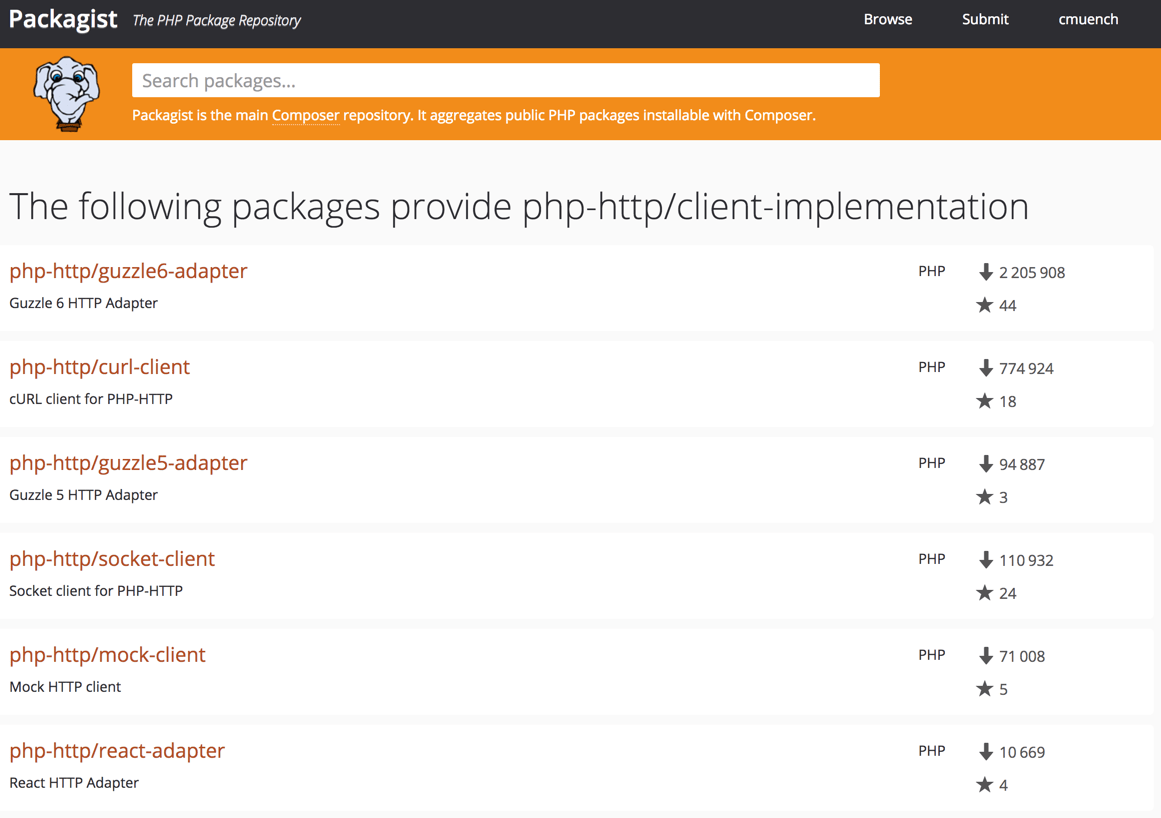
    To find an existing implementation we can use packagist.org. There is a virtual package with the name “psr/http-message-implementation” available. Feel free to use one of the implementations. As PHP developers we do not like to reinvent the wheel. https://packagist.org/providers/psr/http-message-implementation

    In our example at the end of the article we use the Guzzle Guzzle library. It is also possible to only install the PSR-7 implementation of the library (package: guzzlehttp/psr7) which implements the virtual package. If you are not familiar what a virtual package is, think of it like an interface for Composer packages. There is a good article which describes virtual packages.

    UriInterface

    The UriInterface describes the URI which should be called by our Request.

    <?php
    
    namespace Psr\Http\Message;
    
    /**
     * Value object representing a URI.
     */
    interface UriInterface
    {
        /**
         * Retrieve the scheme component of the URI.
         *
         * @return string The URI scheme.
         */
        public function getScheme();
    
        /**
         * Retrieve the authority component of the URI.
         *
         * @return string The URI authority, in "[user-info@]host[:port]" format.
         */
        public function getAuthority();
    
        /**
         * Retrieve the user information component of the URI.
         *
         * @return string The URI user information, in "username[:password]" format.
         */
        public function getUserInfo();
    
        /**
         * Retrieve the host component of the URI.
         *
         * @return string The URI host.
         */
        public function getHost();
    
        /**
         * Retrieve the port component of the URI.
         *
         * @return null|int The URI port.
         */
        public function getPort();
    
        /**
         * Retrieve the path component of the URI.
         *
         * @return string The URI path.
         */
        public function getPath();
    
        /**
         * Retrieve the query string of the URI.
         *
         * @return string The URI query string.
         */
        public function getQuery();
    
        /**
         * Retrieve the fragment component of the URI.
         *
         * @return string The URI fragment.
         */
        public function getFragment();
    
        /**
         * Return an instance with the specified scheme.
         *
         * @param string $scheme The scheme to use with the new instance.
         * @return static A new instance with the specified scheme.
         * @throws \InvalidArgumentException for invalid schemes.
         * @throws \InvalidArgumentException for unsupported schemes.
         */
        public function withScheme($scheme);
    
        /**
         * Return an instance with the specified user information.
         *
         * @param string $user The user name to use for authority.
         * @param null|string $password The password associated with $user.
         * @return static A new instance with the specified user information.
         */
        public function withUserInfo($user, $password = null);
    
        /**
         * Return an instance with the specified host.
         *
         * @param string $host The hostname to use with the new instance.
         * @return static A new instance with the specified host.
         * @throws \InvalidArgumentException for invalid hostnames.
         */
        public function withHost($host);
    
        /**
         * Return an instance with the specified port.
         *
         * @param null|int $port The port to use with the new instance; a null value
         *     removes the port information.
         * @return static A new instance with the specified port.
         * @throws \InvalidArgumentException for invalid ports.
         */
        public function withPort($port);
    
        /**
         * Return an instance with the specified path.
         *
         * @param string $path The path to use with the new instance.
         * @return static A new instance with the specified path.
         * @throws \InvalidArgumentException for invalid paths.
         */
        public function withPath($path);
    
        /**
         * Return an instance with the specified query string.
         *
         * @param string $query The query string to use with the new instance.
         * @return static A new instance with the specified query string.
         * @throws \InvalidArgumentException for invalid query strings.
         */
        public function withQuery($query);
    
        /**
         * Return an instance with the specified URI fragment.
         *
         * @param string $fragment The fragment to use with the new instance.
         * @return static A new instance with the specified fragment.
         */
        public function withFragment($fragment);
    
        /**
         * Return the string representation as a URI reference.
         *
         * @see http://tools.ietf.org/html/rfc3986#section-4.1
         * @return string
         */
        public function __toString();
    }

    One important thing you should know is that the implementation of the URI is always immutable. This means that every method returns a new instance of the object instead of a reference to the existing object.

    Wrong script:

    <?php
    $uri = new Uri();
    $uri->withHost(‘127.0.0.1’);
    $uri->withPort(8080);
    echo $uri; // empty output

    Correct script:

    <?php
    $uri = new Uri();
    $uri = $uri->withHost(‘127.0.0.1’);
    $uri = $uri->withPort(8080);
    echo $uri; // output: http://127.0.0.1:8080
    
    // or by using fluent interface
    
    $uri = (new Uri())->withHost('127.0.0.1')->withPort(8080);

    Using Guzzle

    As last part of this article we make use of the popular HTTP client library Guzzle. The library offers all the stuff HTTP provides. In our example we explicitly make use of the Guzzle PSR-7 implementation of the RequestInterface. The class we use is \GuzzleHttp\Psr7\Request.

    If you like to test the script, please feel free to install Guzzle using composer in your local directory (where all the other files mentioned above are) :

    composer.phar require guzzlehttp/guzzle:~6.0

    The code we use is this:

    <?php
    
    require_once 'vendor/autoload.php';
    
    $request = new \GuzzleHttp\Psr7\Request('GET', 'http://127.0.0.1:8080/mypath?foo=bar&baz=zoz');
    
    $client = new \GuzzleHttp\Client();
    $response = $client->send($request);
    echo $response->getBody();

    The Response of the script should be the same as before. What are the advantages of this approach?

    1. We create a PSR-7 compatible Request with Guzzle.
    2. The Guzzle HTTP Client follows the standard. So the Request must not be created by the Guzzle library. Use whatever you want.

    The next part of the series describes the HTTP Response.

  • PSR-7 Standard  – Part 1  – Overview

    PSR-7 Standard – Part 1 – Overview

    This post is part of series:


    This is the first post of my new PSR-7 series. If you already use PSR-7 in your daily life as programmer you can skip the first part of this post.

    What is PSR-7?

    PSR-7 is a standard defined by the PHP-FIG. It don’t like to repeat the standard documents in my blog post. The idea is to give you some real world examples how you can use PSR-7 in your PHP projects. If you investigate the standard you can determine that it doesn’t contain any implementation.

    Like the other standard of the FIG it only defines PHP interfaces as contracts. The concrete title of the standard is HTTP message interfaces. And that’s all what it defines. It defines a convenient way to create and consume HTTP messages. A client sends a request and a server processes it. After processing it, the server sends a response back to the client.

    Nothing new? Yes, that is how any PHP server application works. But without PSR-7 every big framework or application implements it’s own way to handle requests and responses. Our dream is that we can share HTTP related source code between applications. The main goal is: interoperability.

    History

    Before any PSR standard we had standalone PHP applications. There were some basic PHP libraries to use. Most of the code was incompatible. With PSR-0 we got an autoload standard to connect all the PHP libraries.

    The PSR-7 is a standard to connect an application on HTTP level. The first draft for PSR-7 was submitted by Michael Dowling in 2014. Michael is the creator of Guzzle, a famous PHP HTTP client library. He submitted his idea. After that the group discussed the idea behind a standardized way to communicate with messages. Matthew Weier O’Phinney (the man behind Zend Framework) took over the work of Michael.

    In May 2015 we had an officially accepted PSR-7. After that the most big frameworks adopted the standard or created some bridge/adapter code to utilize the new standard.

    Overview

    Thanks to Beau Simensen


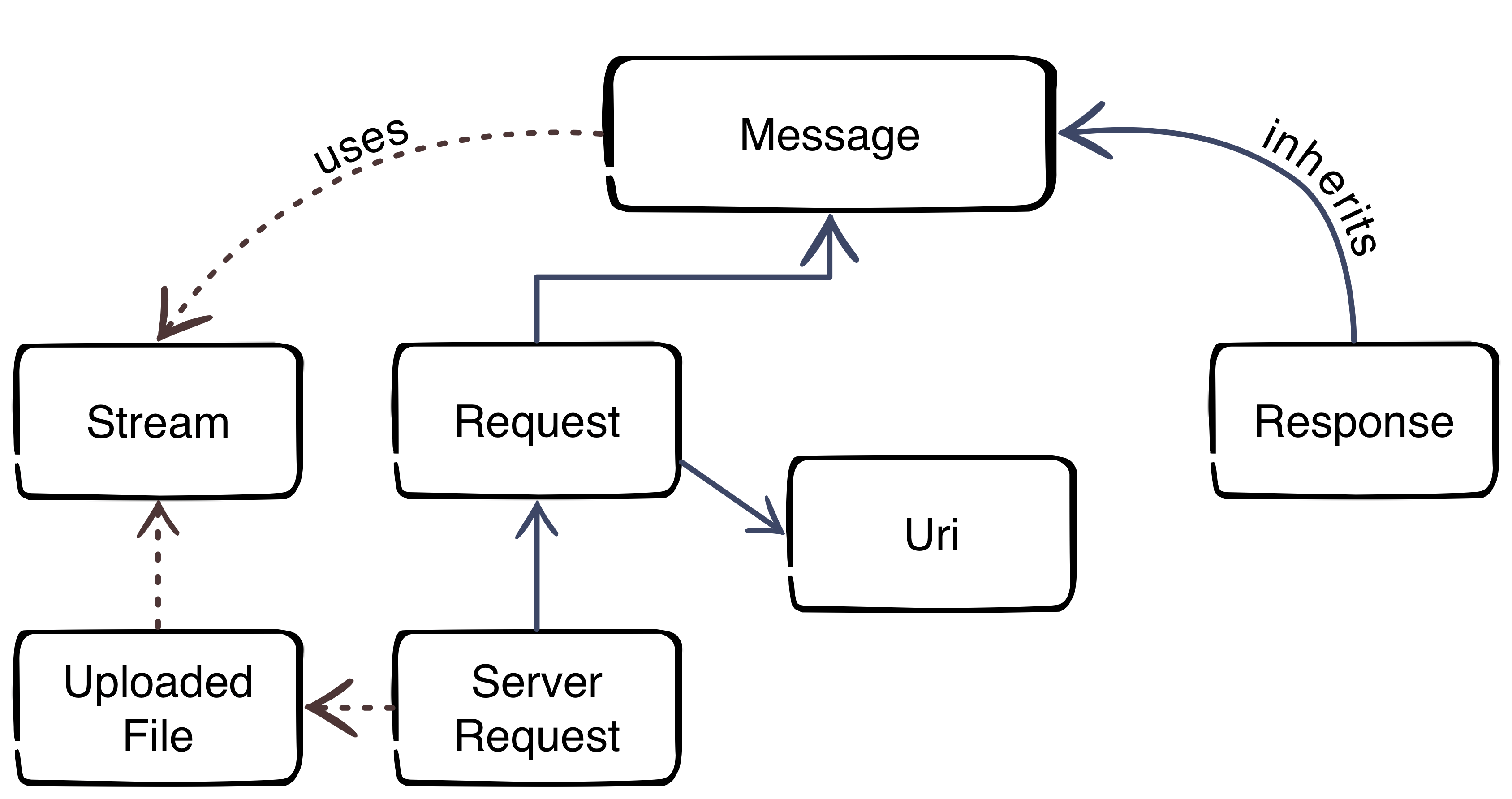
    The image gives us an overview about the PSR-7 interfaces. The blue color represents the inheritance. The message interface is the main interface of the standard. The request of a client and the response of the server inherit the message interface. That’s not surprising, because the message utilizes the HTTP message itself. The red dotted lines clarify the usage of other parts.

    Request-flow with PSR-7

    The main flow with PSR-7 is:

    1. Client creates an URI
    2. Client creates a request
    3. Client sends the request to server
    4. Server parses incoming request
    5. Server creates a response
    6. Server sends response to client
    7. Client receives the response

    This was the first part of the blog series. The next part will look more closely at the request and the URI.

  • How to add alternative HTTP headers to Magento 2?

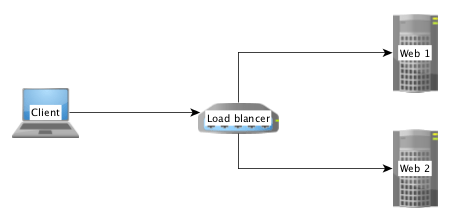
    If you have more than one frontend server running in your business, it’s needed to load balance the traffic between the nodes. In this case we have a new instance between the browser and the web-server.

    Often it’s a system like HAProxy or Varnish.

    Simple load balancer/proxy setup

    If the load balancer or proxy receives a request from a browser, it forwards it to backend server in the internal network. The IP address of the client is than added to a forward header which contains the IP address of a forward chain.

    Example:

    X-Forwarded-For: client, proxy1, proxy2

    In some situation i.e. for GEO-IP checks, you need the real IP address of a client. If you don’t configure Magento the remote address is always 127.0.0.1.

    That’s not what we want. We need the first part of the comma separated list of the IP chain. Magento offers us a mechanism to solve this issue.

    Remote Address

    The key to solve the issue is the class Magento\Framework\HTTP\PhpEnvironment\RemoteAddress which is provided by the Magento 2 framework.

    In Magento 2 it’s prohibited to call the $_SERVER['REMOTE_ADD'] directly. The RemoteAddress class is a wrapper to deal with the remote address.

    The correct way to get the remote address is this:
    use Magento\Framework\HTTP\PhpEnvironment\RemoteAddress;

    use Magento\Framework\HTTP\PhpEnvironment\RemoteAddress;
    
    class MyClass
    {
        /**
         * @var RemoteAddress
         */
        private $remoteAddress;
    
        public function __construct(RemoteAddress $remoteAddress)
        {
            $this->remoteAddress = $remoteAddress;
        }
    
        public function doSomething()
        {
            $ipAddressOfTheClient = $this->remoteAddress->getRemoteAddress();
        }
    }
    

    Configuration

    It’s possible to inject a list of alternative headers to the RemoteAddress class by Dependency Injection. This config isn’t related to any module. It’s a special config for a production server setup.

    It’s important to know that Magento 2 will load any „di.xml“ file from any subfolder of the „app/etc“ folder!

    With this information we can create a subfolder like „app/etc/myproject/di.xml“ with the following content:

    <?xml version="1.0"?>
    <config xmlns:xsi="http://www.w3.org/2001/XMLSchema-instance"
            xsi:noNamespaceSchemaLocation="urn:magento:framework:ObjectManager/etc/config.xsd">
    
        <type name="Magento\Framework\HTTP\PhpEnvironment\RemoteAddress">
            <arguments>
                <argument name="alternativeHeaders" xsi:type="array">
                    <item name="x-forwarded-for" xsi:type="string">HTTP_X_FORWARDED_FOR</item>
                </argument>
            </arguments>
        </type>
    </config>


    After that Magento will look into the given HTTP header „X-Forwarded-For“. The name of the header is normalized by PHP.
    X-Forwarded-For is available as $_SERVER['HTTP_XFORWARDED_FOR'].

    It’s possible to add more than one header to alternative header list.

    That’s it. Have fun with Magento 2. 🙂