Tag: MySQL

  • Workaround for Magento 2 Issue #5418 – Product Grid does not work after Import

    Workaround for Magento 2 Issue #5418 – Product Grid does not work after Import

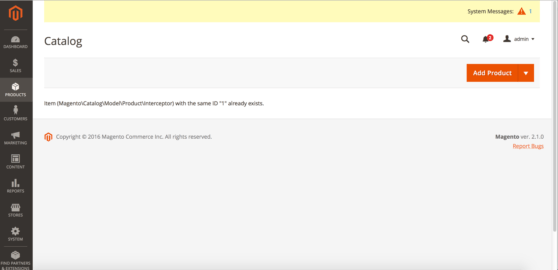
    The Magento 2 Importer is a simple way to import and update Product Data and many more. Since July 2016, an Import will throw an Exception at the Product Grid. Today, I added a small script as a Workaround, which I want to share.

    It is actually simple and based on the Yonn-Trimoreau‘s SQL Query. I setup a bashscript, which enters the working dir and executes the query via n98-magerun2. After that, I added a CronJob to call the Script every Minute(In case someone starts the Import manually).

    This is the Bash Script:

    #!/usr/bin/env bash
    cd to/your/working/dir/ && /usr/local/bin/n98-magerun2.phar db:query 'DELETE FROM cataloginventory_stock_item WHERE product_id IN ( SELECT * FROM( SELECT product_id FROM cataloginventory_stock_item GROUP BY product_id HAVING COUNT( product_id ) >1 )tblTMP WHERE website_id = 1 )'

    My CronJob Configuration looks like this:

    # Job 1 by David Lambauer <d.lambauer@netz98.de>
    # This is a little Workaround for the following Magneto 2 Issue:
    # https://github.com/magento/magento2/issues/5418
    # This should be removed after the fix was applied.
    * * * * * www-data /path/to/your/bash/script/magento2-issue-workarround.sh

    It is pretty dirty, but it’ll work until Magento applied a Fix.


  • Fixing issues after changing product attribute type from varchar to text

    Fixing issues after changing product attribute type from varchar to text

    In some cases there is a need to change the backend type of a catalog product attribute from varchar to text. The purpose of this change is to get more than 255 characters space for a string value.

    In this article I will cover the situation when problems occur after changing the backend type of an attribute.

    The Problem

    If the backend type of an attribute is changed, e.g. via install/upgrade script, Magento does not automatically copy and clean up old values. The consequence of that is that there are rudiments in the EAV value tables which cause some side effects. One of the side effects I was facing is editing a product which had a value for the affected attribute before the backend type change (in admin area). No values are displayed and there is no possibility to set a new value.

    So what to do if the change already happened and there is a mix between old value table rudiments and new value table entries?

    The Solution

    One possible solution to solve the issue are the following SQL Statements, here is an example for changing from varchar to text (you need to find out the id of the attribute from the eav_attribute table – here {attribute_id}):

    1. Copy the “value” from varchar table to text table for the case an entry for a product entity exists in both tables, but only if the “value” in the text table is null:

    UPDATE catalog_product_entity_varchar, catalog_product_entity_text 
    SET catalog_product_entity_text.value = catalog_product_entity_varchar.value 
    WHERE catalog_product_entity_varchar.attribute_id = catalog_product_entity_text.attribute_id 
    AND catalog_product_entity_varchar.entity_id = catalog_product_entity_text.entity_id 
    AND catalog_product_entity_text.store_id = catalog_product_entity_varchar.store_id 
    AND catalog_product_entity_text.entity_type_id = catalog_product_entity_varchar.entity_type_id 
    AND catalog_product_entity_text.value is null
    AND catalog_product_entity_varchar.attribute_id = {attribute_id};

     2. Copy entries which do not exist in text value table, but exist in the varchar table

    INSERT IGNORE INTO catalog_product_entity_text 
    (entity_type_id, store_id, attribute_id, entity_id, value)
    select entity_type_id, store_id, attribute_id, entity_id, value 
    from catalog_product_entity_varchar 
    where catalog_product_entity_varchar.attribute_id = {attribute_id} 
    and catalog_product_entity_varchar.value is not null;

    3. Delete entries from the varchar table

    DELETE FROM catalog_product_entity_varchar where attribute_id = {attribute_id};

    Important note

    Please verify the SQL, whether it is suitable for your purpose. Best practice is also to test it in a local / staging system and to back up the live database before applying the SQL on production. The solution is not perfect: I myself faced the issue, that the enterprise indexer cronjob took about 4h after applying the SQL, which blocked other cronjobs to be executed (about 50K products in DB). Possible way to avoid this is to separate “malways” (enterprise indexer) and “mdefault” cronjobs.

    I hope this  can be helpful. Feel free to comment if you faced this issue too or if you have any additions or a better solution.

  • Solving a 2006 MySQL error connection timeout in Magento1

    Solving a 2006 MySQL error connection timeout in Magento1

    In my recent task I was testing a web crawler script which uses Magento database information for the crawling requests. I have encountered the following error:

    Fatal error: Uncaught exception ‘PDOException’ with message ‘SQLSTATE[HY000]: General error: 2006 MySQL server has gone away’ in lib/Zend/Db/Statement/Pdo.php:228

    The Problem

    This error occured after around 45 minutes of script runtime.
    The script was written in a way that it was possible that there is no database interaction for a longer period.
    In consequence to that when the script reached a point where it was trying to save or fetch something from the database, the mysql connection ran into a timeout – unnoticed by the script.
    Thus resulting in the above mentioned MySQL error.

    mysql wait_timeout

    The variable controlling this timeout from MySQL is the wait_timeout system variable.

    Definition from MySQL Reference Manual :

    “The number of seconds the server waits for activity on a non-interactive connection before closing it.”

    As it turns out we have already had this situation in another project – thanks to the netz98 developers for the hint.

    The Solution

    The solution is to close the connection before using it – in case of long running and un-interrupted code part that does no database communication.

    We have added the following code snippet to our ResourceModel:

    /**
     * Initialize the ReadAdapter (force a re-connect)
     *
     * @param bool $useNewConnection
     * @return Varien_Db_Adapter_Pdo_Mysql
     */
    protected function _initReadAdapter($useNewConnection = false)
    {
        /** @var Varien_Db_Adapter_Pdo_Mysql $adapter */
        $adapter = $this->_getReadAdapter();
    
        /**
         * In some occasions we want to use a fresh connection to fetch table data
         * when crawling takes longer (between queries) than the configured mysql wait_timeout
         *
         */
        if ($useNewConnection === true) {
            $adapter->closeConnection();
        }
        return $adapter;
    }

    With this method the Connection within the Adapter can be closed. When it is closed the connection will be re-initialized automatically with the next Database Interaction that is triggered by our code. To do so we introduced the parameter $useNewConncetion which enforces this behaviour.

    Each time we have reached a point in our script where it could be possible that the connection hit the wait_timeout we just call this method with useNewConnection set to true.

    I hope this article is helpful for you, in case you face the same situation. Feel free to comment if you faced this issue too or if you have any additions.

    Update: Keep alive implementation by Ivan Chepurnyi (@IvanChepurnyi)

        /**
         * Zend db adapter validation, in order to get rid of possible server gone away
         *
         * @param Zend_Db_Adapter_Abstract $adapter
         * @return bool
         */
        protected function _validateConnection(Zend_Db_Adapter_Abstract $adapter)
        {
            try {
                // Execute simple non heavy query
                return $adapter->fetchOne('SELECT 1') === '1';
            } catch (Zend_Db_Statement_Exception $e) {
                $adapter->closeConnection();
            }
    
            return $adapter->getConnection() !== null;
        }