Tag: webapi

  • Get PDF files by Magento Webapi

    Get PDF files by Magento Webapi

    Magento 2 comes with a modern REST interface. One of the advantages of the REST interface is that it can handle multiple response types. A client can request data from the server with a list of acceptable response formats. Out of the box Magento 2 supports two types. It comes with JSON and XML support.

    You can test it with a simple call to your local store.

    curl -X GET --header "Accept: application/json" "http://<store-baseurl>/rest/default/V1/categories"

    If you omit the accept header the server will return JSON as default. Let’s change the accept header to “application/json”.
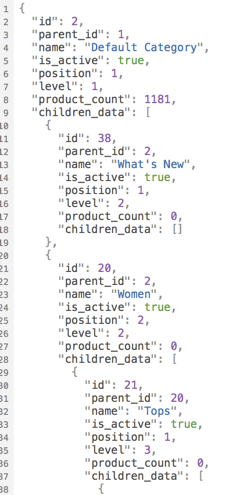
    curl -X GET --header "Accept: application/xml" "http://<store-baseurl>/rest/default/V1/categories"

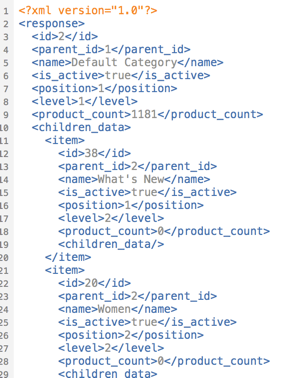
    Now you should see a well formed XML document:
    Extend the list of acceptable mime types

    Magento 2 can handle JSON and XML. What if we want to add an alternative return format? The bad news… it cannot handle it by default. The good news… You can add the support by yourself.
    The response is generated internally by response renderers which must implement the RendererInterface.

    interface RendererInterface
    {
        /**
         * Render content in a certain format.
         *
         * @param object|array|int|string|bool|float|null $data
         * @return string
         */
        public function render($data);
    
        /**
         * Get MIME type generated by renderer.
         *
         * @return string
         */
        public function getMimeType();
    }
    

    The interface is really simple. A mime type must be defined. In our example we intend to handle the mime type “application/pdf”. The main idea of this demo is to return an existing invoice directly as printable PDF document instead of the JSON or XML data.

    ## Request Workflow

    A request by a browser or a HTTP client (i.e. curl) is sent to the server. The request is dispatched by a special REST FrontController. The FrontController executes some business logic and passes the generated output data to a response object. The response object is generated by a RendererFactory which creates a renderer object based on the mime types of the request accept header.
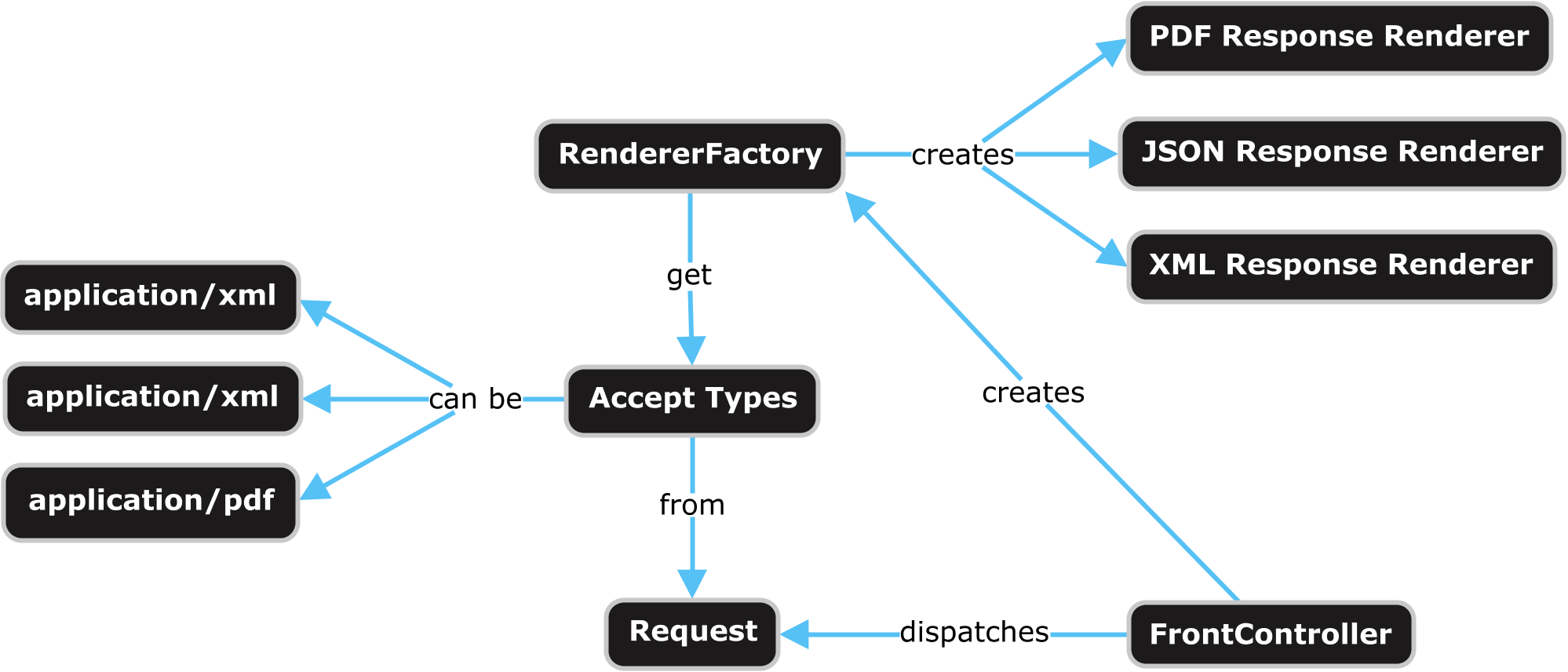
    Webapi Response Rendering Overview

    If we want to add our own renderer for a specific mime type we can use the Magento 2 Dependency Injection for that. The RendererFactory gets a list of available renderers via di.xml. The next thing we need to do is to create an own module and to add the di.xml in our module with following content:

    <?xml version="1.0"?>
    <config xmlns:xsi="http://www.w3.org/2001/XMLSchema-instance"
            xsi:noNamespaceSchemaLocation="urn:magento:framework:ObjectManager/etc/config.xsd">
    
        <type name="Magento\Framework\Webapi\Rest\Response\RendererFactory">
            <arguments>
                <argument name="renders" xsi:type="array">
                    <item name="application_pdf" xsi:type="array">
                        <item name="type" xsi:type="string">application/pdf</item>
                        <item name="model" xsi:type="string">\N98\WebapiRestPdf\Response\Renderer\PdfRenderer</item>
                    </item>
                </argument>
            </arguments>
        </type>
    
    </config>
    

    Now our response renderer must be created. It must implement the renderer interface. Firstly we add the getMimeType method and let them return the value “application/pdf”. Secondly we implement the render method which returns the PDF data. In our example we only support the REST URL “/V1/invoices”.

    <?php
    namespace N98\WebapiRestPdf\Response\Renderer;
    
    use Magento\Framework\Webapi\Exception;
    use Magento\Framework\Webapi\Rest\Request;
    use Magento\Framework\Webapi\Rest\Response\RendererInterface;
    use Magento\Sales\Api\InvoiceRepositoryInterface;
    use N98\WebapiRestPdf\Service\InvoicePdfGeneratorService;
    
    class PdfRenderer implements RendererInterface
    {
        /**
         * @var \Magento\Framework\Webapi\Rest\Request
         */
        private $request;
    
        /**
         * @var \N98\WebapiRestPdf\Service\InvoicePdfGeneratorService
         */
        private $invoicePdfGeneratorService;
    
        /**
         * @var \Magento\Sales\Api\InvoiceRepositoryInterface
         */
        private $invoiceRepository;
    
        /**
         * Pdf constructor.
         * @param \Magento\Framework\Webapi\Rest\Request $request
         * @param \N98\WebapiRestPdf\Service\InvoicePdfGeneratorService $invoicePdfGeneratorService
         * @param \Magento\Sales\Api\InvoiceRepositoryInterface $invoiceRepository
         */
        public function __construct(
            Request $request,
            InvoicePdfGeneratorService $invoicePdfGeneratorService,
            InvoiceRepositoryInterface $invoiceRepository
        ) {
            $this->request = $request;
            $this->invoicePdfGeneratorService = $invoicePdfGeneratorService;
            $this->invoiceRepository = $invoiceRepository;
        }
    
        /**
         * Render content in a certain format.
         *
         * @param object|array|int|string|bool|float|null $data
         * @return string
         * @throws \Magento\Framework\Webapi\Exception
         */
        public function render($data)
        {
            if (!strstr($this->request->getPathInfo(), '/V1/invoices')) {
                throw new Exception(__('PDF rendering is not supported for this URI'));
            }
    
            if (isset($data['entity_id'])) {
                $invoice = $this->invoiceRepository->get($data['entity_id']);
                $pdf = $this->invoicePdfGeneratorService->execute($invoice);
    
                return $pdf->render();
            }
         
            return null;
        }
    
        /**
         * Get MIME type generated by renderer.
         *
         * @return string
         */
        public function getMimeType()
        {
            return 'application/pdf';
        }
    }
    

    For a better software architecture we place the PDF generation code in an own InvoicePdfGeneratorService class.

    <?php
    namespace N98\WebapiRestPdf\Service;
    
    use Magento\Sales\Api\Data\InvoiceInterface;
    
    class InvoicePdfGeneratorService
    {
        /**
         * @var \Magento\Sales\Model\Order\Pdf\Invoice
         */
        private $invoicePdf;
    
        /**
         * PdfGeneratorService constructor.
         * @param \Magento\Sales\Model\Order\Pdf\Invoice $invoicePdf
         */
        public function __construct(\Magento\Sales\Model\Order\Pdf\Invoice $invoicePdf)
        {
            $this->invoicePdf = $invoicePdf;
        }
    
        /**
         * @param \Magento\Sales\Api\Data\InvoiceInterface $invoice
         * @return \Zend_Pdf
         */
        public function execute(InvoiceInterface $invoice)
        {
            return $this->invoicePdf->getPdf([$invoice]);
        }
    }
    

    That’s all we need to code. As you can see Magento 2 is very extendable. If you have ideas for additional formats, create your own renderer.

    Testing

    Before we start a test of the new functionality, we need an invoice in the database. Simply create a new order in your shop and create an invoice for it in the Magento admin.

    To test the new renderer we can use CURL again. To fetch an invoice you need API credentials. The simplest way to do that, is to get an “Access Token”.

    Have a look in the documentation to see how you can obtain an access token: http://devdocs.magento.com/guides/v2.1/get-started/authentication/gs-authentication-token.html

    On my local machine this CURL command looks like this:

    curl -o invoice.pdf -X GET \
    --header "Accept: application/pdf" \
    --header "Authorization: Bearer 0b4sdr02nis73md8qsg3y3b6uk4hi5k4" \
    "http://magento.dev/rest/default/V1/invoices/1"

    This command calls the Magento Shop, which should now return the content of a PDF file. The PDF content is written to the file “invoice.pdf”.

    My PDF looks like this:
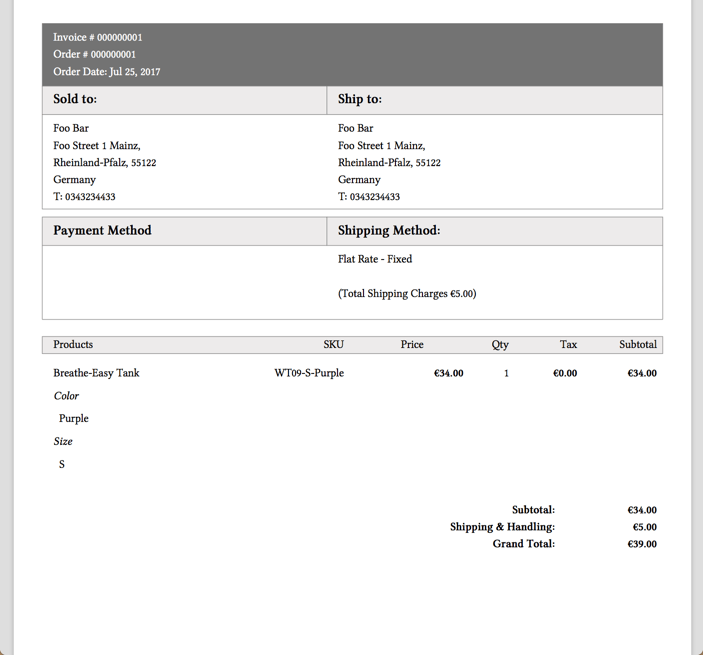
    Great! We can now get PDF invoices by the REST API!

    Conclusion

    Magento 2 can be extended in an easy way. If you like to play a little bit with the code of this blog post, checkout our demo module on Github.

    https://github.com/netz98/N98_WebapiRestPdf

  • Think outside the box: Magento 2 as API framework

    Think outside the box: Magento 2 as API framework

    In this article, we will cover the web-API and how to use Magento 2 as a standalone API-framework.

    If the web-API is new to you, I recommend to read the development documentation of it first: Magento 2 API documentation

    Why should I do this?

    Short answer: Because you can!

    Not really, there is no reason why you shouldn’t try it at least and have some fun with it – you might get used to it 😉

    With Magento 2, the whole web-API was rebuild from scratch to compete with state of the art frameworks. Together with the well working dependency injection approach, it absolutely makes sense to take a deeper look at it.

    Also, one big advantage of Magento’s implementation of the API is the easy wiring between the request-routing and the executed code that handles the request.

    Compared to Symfony, for example, the creation of new endpoints is easier and more intuitive.

    In the simplest possible case, the definition of a endpoint only contains 6 lines of code:

    <route url="/V1/modules" method="GET">
         <service class="Magento\Backend\Service\V1\ModuleServiceInterface" method="getModules"/>
         <resources>
             <resource ref="Magento_Backend::admin"/>
         </resources>
    </route>

    Aside from the easy definition of a new API endpoint, you can also use Magento’s build-in features such as ACL resources for access management, plugins/interceptors, automatically generated factories and proxies.

    You see, beside the basic shop functionality you also have a well designed toolset to create APIs at your fingertips, no matter of the size or complexity of your project.

    Challenge accepted

    So, what do we need to modify the default Magento installation in order to get this working?

    In fact, it isn’t as much as you might think. We only need to hide the Magento storefront to the public and that’s it (more or less).

    For sure, you also could hide the administration backend and the API endpoints, that comes along with Magento by default, but in our case we are absolutely fine with them. We keep them for now, because of we will need them later.

    Hide the shop

    For hiding the shop, there is a wide range of multiple options that starts with modifying the webserver’s request-resolving and ends with rewriting the entire routing component of the Magento core.

    In our case, we did something in between and created a module with a very low footprint to achieve this.

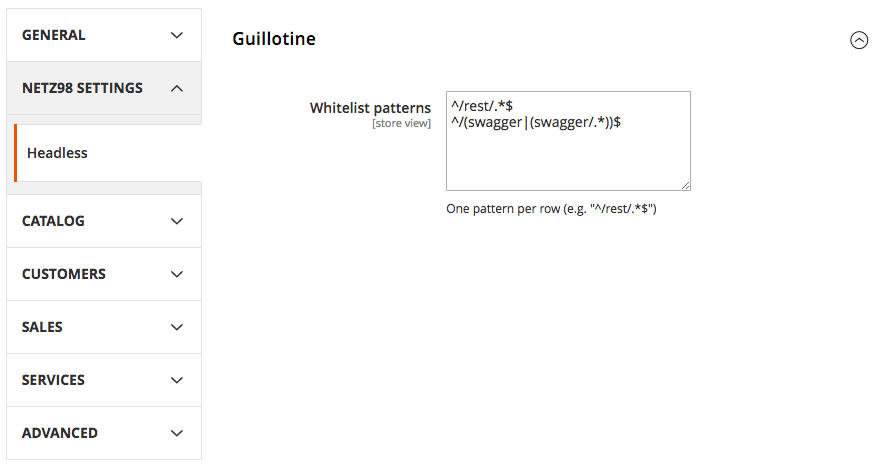
    By installing thins module, all storefront requests will be blocked except the REST, Swagger and the administration backend related ones.

    If you want to allow more pages to be accessible, you can simply modify the whitelist-patterns using the system configuration settings.

    To hide the default frontend of Magento, simply install the following module according to it’s installation guide: netz98/headless-guillotine

    Example Usage

    After installing the module, you will find a new system-configuration setting:

    This will rise an exception in case a blocked route is requested. The printed error will do the trick while you are testing, but I would recommend to add a configuration for handling the exception in a proper way later on – so the customer won’t get a blank page with cryptic informations in case he directly accesses the page  😉

    Summary

    You see, with a very view steps you can use Magento 2 as a API framework, that implements state of the art techniques and supports the modern web-development.

    The module provided by netz98 makes it really simple to quickly hide your storefront and to start your backend development.

    Final Words

    Have you implemented similar things or have you tested the setup as described in this post?

    Let me know about it in the comments below, I’d really like to chat with you about your approaches and ideas – your feedback is highly appreciated!

  • Use Swagger to generate a full functional Magento API Client

    Use Swagger to generate a full functional Magento API Client

    Magento 2 comes with a nice swagger schema which describes the Webapi. The Magento guys were very clever to choose swagger. It not only comes with a schema, but moreover it is a complete interactive API client as well.

    A swagger schema is a JSON document to formalize the REST API. Formalized documents have the big advantage that you can process the data with a machine. One idea I had was to create a PHP API for the Magento 2 API. Fortunately the swagger guys created a code generator tool. I really like the idea to generate code out of the schema. The swagger code-gen tool comes with support for multiple languages. PHP is one of the standard languages.

    The code generator tool can be found here: http://swagger.io/swagger-codegen/

    If you are on a mac it’s possible to install the code generator with homebrew.

    brew install swagger-codegen

    After the installation you can test the tool with the help command.

    swagger-codegen help

    On my machine i can see this help output. Works!

    usage: swagger-codegen-cli <command> [<args>]
    
    The most commonly used swagger-codegen-cli commands are:
        config-help   Config help for chosen lang
        generate      Generate code with chosen lang
        help          Display help information
        langs         Shows available langs
        meta          MetaGenerator. Generator for creating a new template set and configuration for Codegen.  The output will be based on the language you specify, and includes default templates to include.
        version       Show version information
    
    See 'swagger-codegen-cli help <command>' for more information on a specific
    command.

    Run the generator

    Now we are able to run the code generator. I used the schema from public developer documentation. You can also use your own schema from an existing installation.

    swagger-codegen generate -i http://devdocs.magento.com/swagger/schemas/latest-2.1.schema.json -l php
    cd SwaggerClient-php
    composer install --prefer-dist

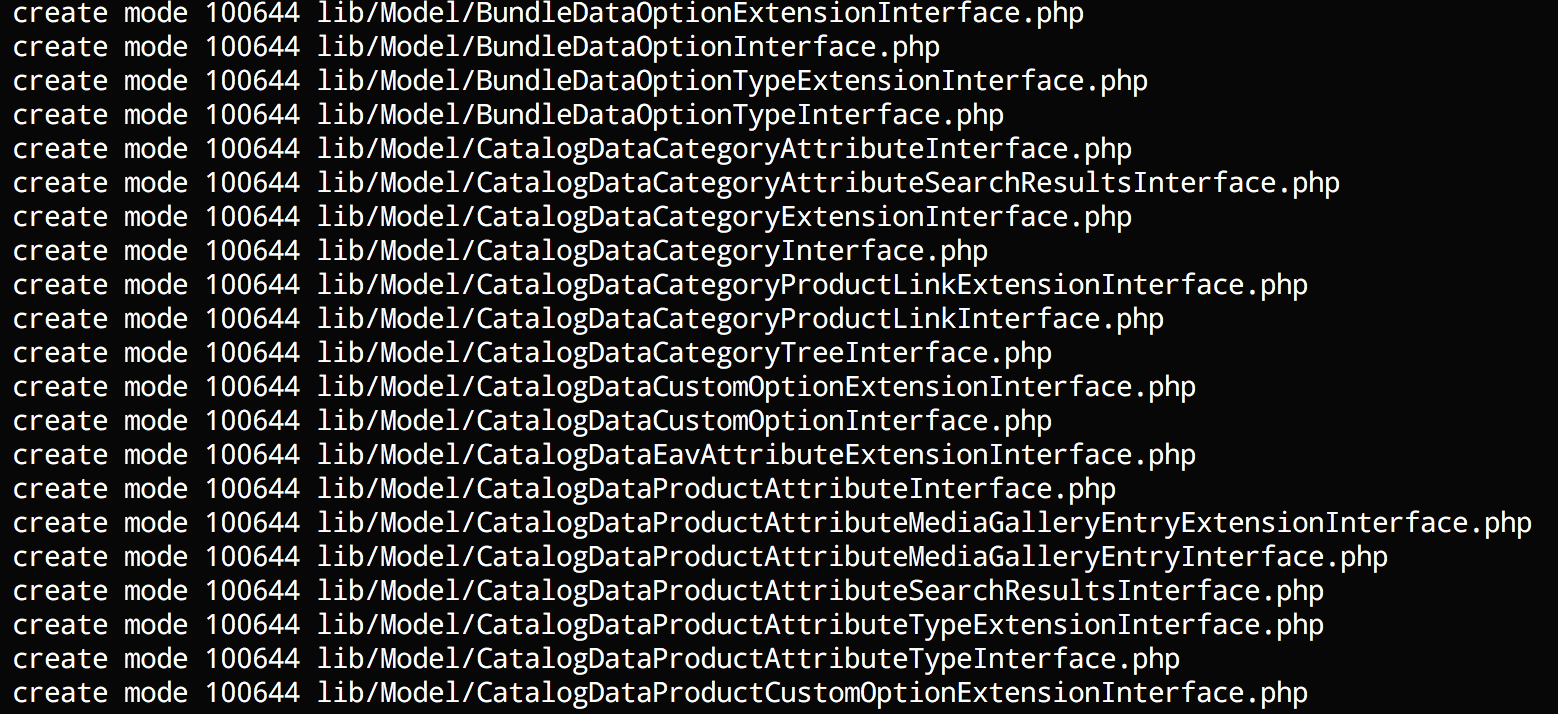
    You should see a long list of generated classes like this:

    Run test unit tests

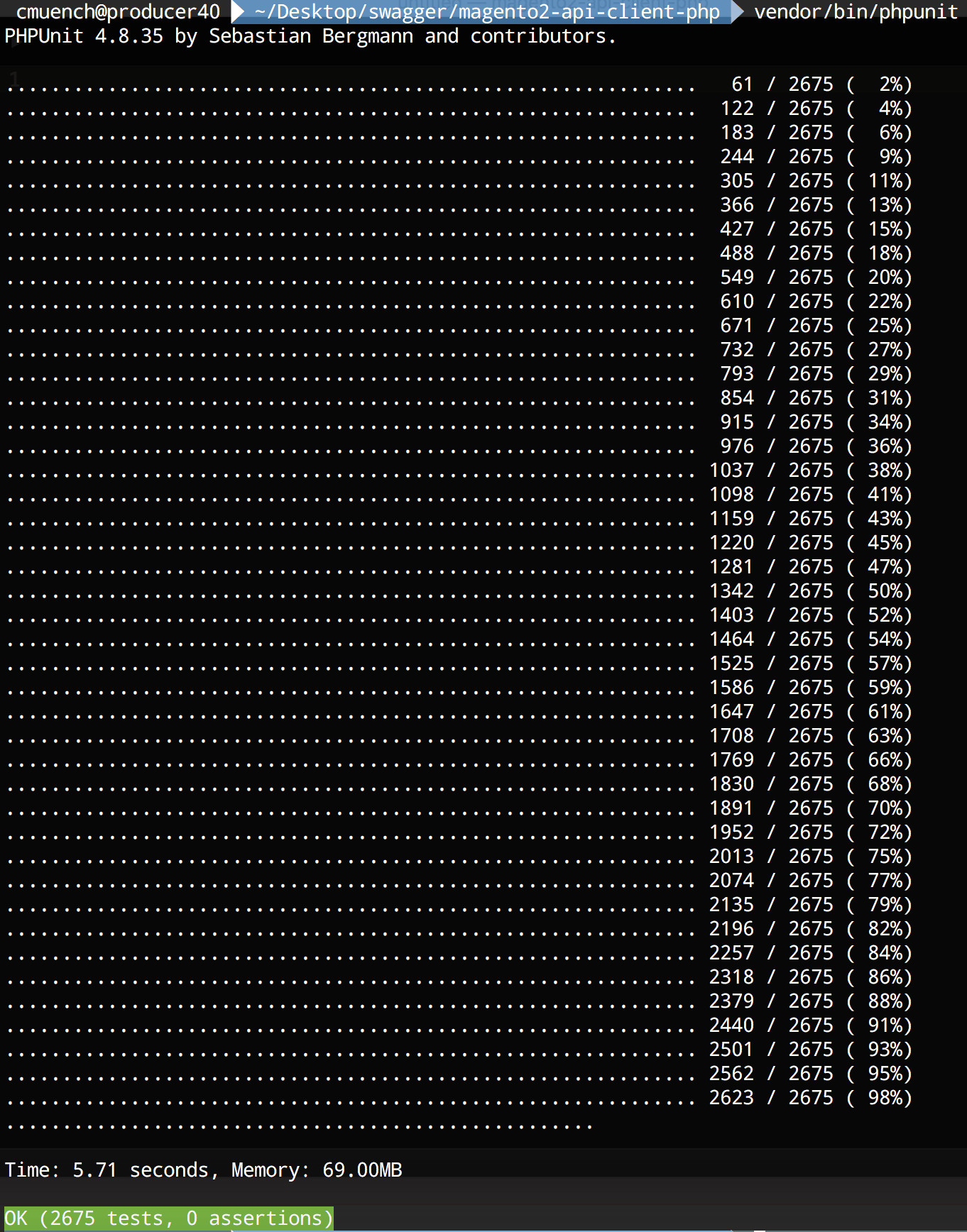
    After the code generation is done, we should run the generated unit tests. You can run the tests by typing vendor/bin/phpunit in the project folder.

    Test the new generated client

    After that we can try our freshly generated API client library.

    As an example we will fetch all the installed Magento modules of our shop instance.

    <?php
    require_once __DIR__ . '/vendor/autoload.php';
    
    $baseUrl = '{{YOUR_SHOP_URL}}/rest';
    $token = 'bearer {{YOUR_API_TOKEN}}';
    
    $config = new \Swagger\Client\Configuration();
    $config->setHost($baseUrl);
    $config->addDefaultHeader('Authorization', $token);
    
    $apiClient = new \Swagger\Client\ApiClient($config);
    
    $apiInstance = new \Swagger\Client\Api\BackendModuleServiceV1Api($apiClient);
    
    try {
        $result = $apiInstance->backendModuleServiceV1GetModulesGet();
        print_r($result);
    } catch (Exception $e) {
        echo $e->getMessage();
    }

    Save the script as installed_modules.php and replace {{YOUR_SHOP_URL}}  with a local or remote shop url and {{YOUR_API_TOKEN}} with a API bearer token of your user. A brief description about the generation of API-Tokens can be found in the developer documentation topic “Token-based authentication“.

    Now run the script with php installed_modules.php.

    On my local machine I am getting this output:

    Array
    (
        [0] => Magento_Store
        [1] => Magento_AdvancedPricingImportExport
        [2] => Magento_Directory
        [3] => Magento_Theme
        [4] => Magento_Backend
        [5] => Magento_Backup
        [6] => Magento_Eav
        [7] => Magento_Customer
        [8] => Magento_BundleImportExport
        [9] => Magento_AdminNotification
        [10] => Magento_CacheInvalidate
        [11] => Magento_Indexer
        [12] => Magento_Cms
        [13] => Magento_CatalogImportExport
        [14] => Magento_Catalog
        [15] => Magento_Rule
        [16] => Magento_Msrp
        [17] => Magento_Search
        [18] => Magento_Bundle
        [19] => Magento_Quote
        [20] => Magento_CatalogUrlRewrite
        [21] => Magento_Widget
        [22] => Magento_SalesSequence
        [23] => Magento_CheckoutAgreements
        [24] => Magento_Payment
        [25] => Magento_Downloadable
        [26] => Magento_CmsUrlRewrite
        [27] => Magento_Config
        [28] => Magento_ConfigurableImportExport
        [29] => Magento_CatalogInventory
        [30] => Magento_SampleData
        [31] => Magento_Contact
        [32] => Magento_Cookie
        [33] => Magento_Cron
        [34] => Magento_CurrencySymbol
        [35] => Magento_CatalogSearch
        [36] => Magento_CustomerImportExport
        [37] => Magento_CustomerSampleData
        [38] => Magento_Deploy
        [39] => Magento_Developer
        [40] => Magento_Dhl
        [41] => Magento_Authorization
        [42] => Magento_User
        [43] => Magento_ImportExport
        [44] => Magento_Sales
        [45] => Magento_CatalogRule
        [46] => Magento_Email
        [47] => Magento_EncryptionKey
        [48] => Magento_Fedex
        [49] => Magento_GiftMessage
        [50] => Magento_Checkout
        [51] => Magento_GoogleAnalytics
        [52] => Magento_GoogleOptimizer
        [53] => Magento_GroupedImportExport
        [54] => Magento_GroupedProduct
        [55] => Magento_Tax
        [56] => Magento_DownloadableImportExport
        [57] => Magento_Braintree
        [58] => Magento_Integration
        [59] => Magento_LayeredNavigation
        [60] => Magento_Marketplace
        [61] => Magento_MediaStorage
        [62] => Magento_ConfigurableProduct
        [63] => Magento_MsrpSampleData
        [64] => Magento_Multishipping
        [65] => Magento_NewRelicReporting
        [66] => Magento_Newsletter
        [67] => Magento_OfflinePayments
        [68] => Magento_SalesRule
        [69] => Magento_OfflineShipping
        [70] => Magento_PageCache
        [71] => Magento_Captcha
        [72] => Magento_Paypal
        [73] => Magento_Persistent
        [74] => Magento_ProductAlert
        [75] => Magento_Weee
        [76] => Magento_ProductVideo
        [77] => Magento_CatalogSampleData
        [78] => Magento_Reports
        [79] => Magento_RequireJs
        [80] => Magento_Review
        [81] => Magento_BundleSampleData
        [82] => Magento_Rss
        [83] => Magento_DownloadableSampleData
        [84] => Magento_Authorizenet
        [85] => Magento_OfflineShippingSampleData
        [86] => Magento_ConfigurableSampleData
        [87] => Magento_SalesSampleData
        [88] => Magento_ProductLinksSampleData
        [89] => Magento_ThemeSampleData
        [90] => Magento_ReviewSampleData
        [91] => Magento_SendFriend
        [92] => Magento_Ui
        [93] => Magento_Sitemap
        [94] => Magento_CatalogRuleConfigurable
        [95] => Magento_Swagger
        [96] => Magento_Swatches
        [97] => Magento_SwatchesSampleData
        [98] => Magento_GroupedProductSampleData
        [99] => Magento_TaxImportExport
        [100] => Magento_TaxSampleData
        [101] => Magento_GoogleAdwords
        [102] => Magento_CmsSampleData
        [103] => Magento_Translation
        [104] => Magento_Shipping
        [105] => Magento_Ups
        [106] => Magento_UrlRewrite
        [107] => Magento_CatalogRuleSampleData
        [108] => Magento_Usps
        [109] => Magento_Variable
        [110] => Magento_Version
        [111] => Magento_Webapi
        [112] => Magento_SalesRuleSampleData
        [113] => Magento_CatalogWidget
        [114] => Magento_WidgetSampleData
        [115] => Magento_Wishlist
        [116] => Magento_WishlistSampleData
        [117] => N98_Tutorial
        [118] => N98_Tutorial2
    )

    Conclusion

    That’s it. We have a full functional REST API client in PHP to call Magento 2 instances. The generated code is not perfect but very usable.

    You can try it by yourself. For all lazy developers we pushed the code in a public github repository.

    https://github.com/netz98/magento2-swagger-api-client-demo

    Have fun!

  • Array does not exist in webapi

    The Magento 2 webapi is very useful to publish entities to the world.
    One big advantages of the new webapi is the automatic generation of a swagger schema for RESTful API.
    If you prefer SOAP over REST you should also be happy to heat that Magento 2 will automatically generate all the WSDL stuff.

    Magento 2 analyses all the published classes/methods via PHP reflection.
    Any generated WSDL file contains a XSD with all the types used in the webservices.

    In some cases the generation stops with the following error message:

    Class "array" does not exist. Please note that namespace must be specified.

    What’s up with this message?

    (more…)