Author: Christian Münch

  • Celebrating 5 Years of ddev

    Celebrating 5 Years of ddev

    Today marks a significant milestone for us at Valantic CEC (formerly known as netz98) as we celebrate five fruitful years of utilizing ddev. Our journey with this remarkable tool has not only streamlined our development processes but also brought about a transformation in how we approach our projects. As we reflect on the past five years, it’s a perfect opportunity to share insights into how ddev has benefited our team, enhanced our workflows, and contributed to our overall success.

    A Game Changer in Development

    When we first adopted ddev, our development landscape was cluttered and chaotic. Developers struggled to set up their environments consistently, leading to inefficiencies and frustrations. We needed a solution that would simplify our workflow and empower our team to focus on what really matters: delivering high-quality e-commerce solutions for our clients.

    ddev emerged as that solution. As a powerful local development environment, it allows developers to quickly spin up and manage complex applications with little configuration required. The ease of use and robust capabilities made it an instant favorite within our team. Our developers can now set up projects with just a few commands, eliminating the days spent wrestling with environment configurations.

    Supporting the Community

    Our commitment to ddev extends beyond our internal use; we actively support the tool and its community. We maintain the official OpenSearch addon, which enhances ddev’s capabilities and ensures that our development environment is equipped with the latest features. Additionally, we’re proud to provide an n8n addon, allowing for seamless integration of workflows and automation in our projects. You can check it out here: ddev-n8n.

    Moreover, our contributions to ddev are not just about the tools we support. Over the years, we have shared our knowledge through various articles and demonstrations, making it easier for other developers to adopt ddev in their own workflows. For instance, our demo setup for Magento Open Source, available at ddev-magento-demo, serves as a valuable resource for those looking to get started with ddev and Magento.

    Streamlining Development Processes

    One of the most significant impacts of ddev on our organization has been its ability to streamline developer setups. By establishing a standardized development environment, we have drastically reduced onboarding times for new team members. They no longer need to spend hours configuring their local machines; instead, they can dive straight into development. This uniformity not only boosts productivity but also enhances collaboration, as everyone works within the same framework.

    Furthermore, the flexibility offered by ddev facilitates the use of numerous services tailored to our clients’ needs. Whether it’s managing databases or running background jobs, our developers can configure the environment to suit the specific demands of a project with ease.

    We can easily transfer configurations for several commonly used services between projects. In the meantime, most of the developers are experienced enough to modify or extend the setup.

    A Heartfelt Thanks to Randy Fay

    As we celebrate our fifth anniversary with ddev, we want to extend our heartfelt congratulations to Randy Fay, the maintainer of this exceptional tool. Your vision and commitment have made ddev a cornerstone of our development processes. Knowing that we have a dedicated maintainer behind ddev gives us confidence in its ongoing evolution. We genuinely appreciate the hard work and dedication that goes into maintaining such a powerful tool.

    We also do not forget Stas Zhuk for all the help as Co-Maintainer of the project.

    Looking Ahead

    As we move forward, we remain excited about the possibilities that ddev presents. The landscape of e-commerce development is constantly evolving, and so are the needs of our clients. Embracing tools like ddev allows us to stay agile, respond to market changes, and ultimately deliver better solutions for our customers.
    For those who have yet to explore what ddev can offer, I encourage you to give it a try. Experience the benefits of a streamlined development process, enhanced collaboration, and a supportive community. With ddev in your toolkit, tackling complex e-commerce challenges becomes not just achievable but enjoyable.

    In conclusion, let us celebrate not only our past with ddev but also the exciting future ahead. As we continue to leverage its capabilities, we invite you to join us on this journey. Together, we can build efficient, scalable, and powerful e-commerce solutions that empower businesses to thrive in the digital marketplace. Here’s to many more years of innovation and success!

  • Building and Deploying with Adobe App Builder

    Building and Deploying with Adobe App Builder

    Adobe App Builder is an innovative platform designed to streamline the development and integration of custom applications for Adobe Experience Cloud. Leveraging this robust tool, developers can create tailored solutions that meet the unique needs of their business operations. In this blog post, we will explore the key features of Adobe App Builder, delve into its operational mechanics, and provide a step-by-step guide on building and deploying projects using the aio-cli tool.

    What is Adobe App Builder?

    Adobe App Builder is a cloud-native extensibility platform for Adobe Experience Cloud. It enables developers to build and deploy custom web apps, microservices, and automation workflows. The platform provides a comprehensive suite of development tools, including a CLI, SDKs, and a flexible runtime environment.

    Key Features

    1. Seamless Integration: Easily integrate with Adobe Experience Cloud products and services.
    2. Cloud-Native: Build scalable and reliable applications with cloud-native capabilities.
    3. Development Tools: Utilize a range of tools, including aio-cli, to streamline the development process.
    4. Flexibility: Create custom solutions that can adapt to specific business requirements.

    How It Works

    Adobe App Builder leverages Adobe I/O Runtime, a serverless platform, to execute code in response to events. This ensures that your applications are both scalable and cost-effective, as you only pay for the compute resources you use.

    Core Components

    • Adobe I/O Runtime: A serverless platform for running custom code.
    • aio-cli: A command-line interface for managing projects and deployments.
    • SDKs: Software Development Kits for various programming languages to interact with Adobe services.

    Getting Started with Adobe App Builder

    To get started with Adobe App Builder, you need to set up your development environment and create your first project. Follow these steps to get started:

    Prerequisites

    • Node.js (version 12 or later)
    • aio-cli (Adobe I/O CLI)

    Installation

    1. Install aio-cli:
    npm install -g @adobe/aio-cli
    1. Log in to Adobe I/O CLI:
    aio login
    1. Create a new project:
    aio app init my-app

    Building and Deploying Your Project

    Once you have initialized your project, you can proceed to build and deploy it using aio-cli. Here’s a step-by-step guide:

    1. Navigate to your project directory:
    cd my-app
    1. Build the project:
    aio app build
    1. Deploy the project:
    aio app deploy

    Code Samples

    Adobe provides various code samples to help you get started with common tasks. You can find these samples in the official GitHub repository. These examples demonstrate how to integrate with different Adobe Experience Cloud services and build custom solutions.

    Benefits of Using Adobe App Builder

    1. Speed: Accelerate development cycles by leveraging pre-built integrations and cloud-native tools.
    2. Scalability: Effortlessly scale your applications to meet growing business demands.
    3. Cost-Effectiveness: Only pay for the resources you use, reducing overhead costs.
    4. Customization: Tailor applications to meet specific business requirements, enhancing operational efficiency.

    Conclusion

    Adobe App Builder is a powerful platform that simplifies the process of developing and deploying custom applications for Adobe Experience Cloud. By utilizing tools like aio-cli and the provided SDKs, developers can create scalable and flexible solutions that meet their specific business needs. With this guide, you should be well on your way to building and deploying your first Adobe App Builder project.

    This blog post describes only the absolute basics to start with Adobe App Builder.
    There is much more behind the scenes. We will publish additional posts for more topics in the future e.g. to deploy the App Builder application within a CI/CD environment.

    For more detailed information and resources, visit the Adobe App Builder documentation. Happy coding!

  • Run n98-magerun2 from everywhere

    Are you still copying the n98-magerun2.phar to your project root? There is a better way to run the tool. I created a small video to show you your options.

  • Create a GraphQL Mesh from scratch

    Create a GraphQL Mesh from scratch

    GraphQL Mesh is a powerful tool that allows you to use GraphQL query language, regardless of the source’s original format. It can be used with REST APIs, gRPC, SOAP, and more. In this blog post, we’ll explore how to set up and use GraphQL Mesh in your projects.

    Warning: The article requires a bit of NodeJS knowledge. The examples are tested with NodeJS 16.
    We also define a environment variable MAGENTO_ACCESS_TOKEN containing a a Magento Bearer Token. to access the API. If you don’t have a Magento system available the then replace it with another GraphQL endpoint and modify the examples here.

    Setting Up GraphQL Mesh

    To get started with GraphQL Mesh, you’ll first need to install the necessary dependencies. You can do this by adding the following to your package.json file:

    {
      "dependencies": {
        "@graphql-mesh/cli": "^0.82.35",
        "@graphql-mesh/graphql": "^0.22.7",
        "@graphql-mesh/openapi": "^0.24.13",
        "@graphql-mesh/transform-filter-schema": "^0.14.115",
        "@graphql-mesh/transform-prefix": "^0.93.1",
        "graphql": "^16.6.0"
      }
    }
    

    Once you’ve added these dependencies, you can install them using your package manager of choice.

    Install the dependencies with yarn or npm. We use yarn here:

    yarn install

    Writing a GraphQL Query

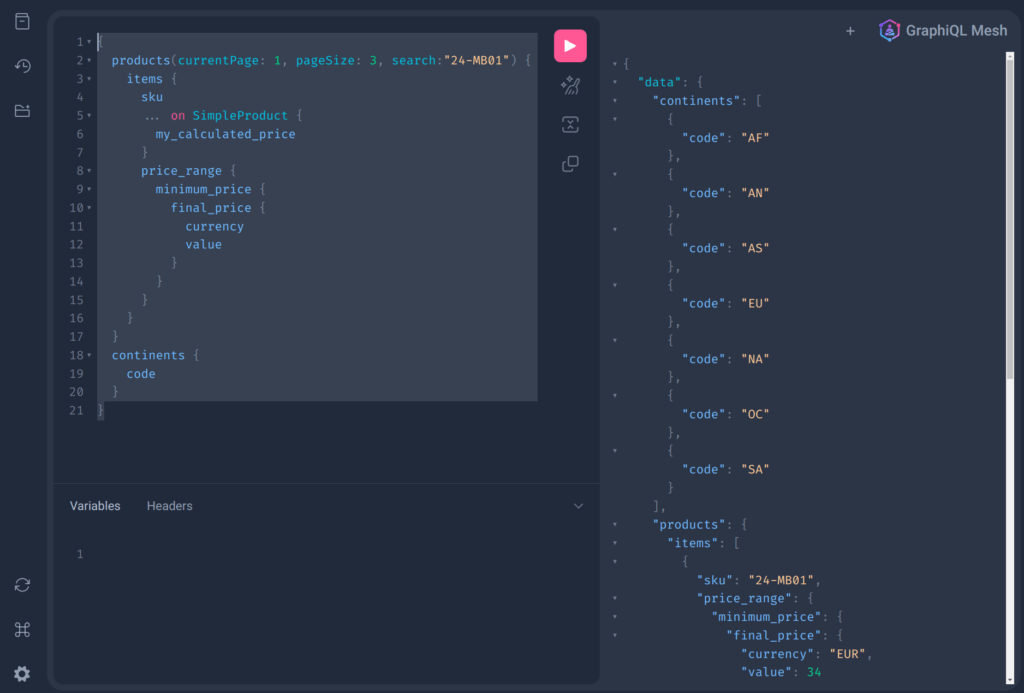
    With GraphQL Mesh, you can write queries that fetch data from multiple sources. Here’s an example of a GraphQL query that fetches product data and station data (yes, it’s a wild mix of APIs):

    {
      products(currentPage: 1, pageSize: 3, search:"24-MB01") {
        items {
          sku
          ... on SimpleProduct {
            my_calculated_price
          }
          price_range {
            minimum_price {
              final_price {
                currency
                value
              }
            }        
          }
        }
      }
      continents {
        code
      }
    }

    In this example, products and continents are two different queries that fetch data from different sources. The products query fetches product data, while continents fetches geographical information. Both queries are fired agains two different backend systems and APIs. As a developer you don’t see the backend systems. You see only one unified APIs. That’s one of the big advantages.

    Creating Resolvers

    Resolvers in GraphQL are functions that resolve data for your queries. In GraphQL Mesh, you can create resolvers that fetch data from your sources and return it in the format you need. Here’s an example of a resolver for the SimpleProduct type:

    import { Resolvers } from './.mesh'
    
    const resolvers: Resolvers = {
        SimpleProduct: {
            my_calculated_price: {
                selectionSet: /* GraphQL */`
                {
                    id,
                    price_range {
                        minimum_price {
                            final_price {
                                value
                            }
                        }        
                    }
                }
                `,
                resolve: async (root, _args, context, info) => {
                    console.log(root)
                    return (99.98 + root.price_range.minimum_price.final_price.value).toFixed(4)
                }
            }
        }
    }
    
    export default resolvers

    In this example, the my_calculated_price resolver fetches the price of a product and adds a fixed amount to it as example of a price calculation. We added a console.log here. If you query the products with the my_calculated_price field then you should see the value in your running console.

    Configuring GraphQL Mesh

    Finally, you’ll need to configure GraphQL Mesh to use your sources and resolvers. You can do this in the .meshrc.yaml file:

    serve:
      port: 5000
      browser: false
      playground: true
    sources:
      - name: Magento
        handler:
          graphql:
            endpoint: https://magento-demo.example.com/graphql
            operationHeaders:
              Authorization: Bearer {env.MAGENTO_ACCESS_TOKEN}
    
      - name: Countries
        handler:
          graphql:
            endpoint: https://countries.trevorblades.com
    
    transforms:
      - filterSchema:
          mode: wrap
          filters:
            - Query.!giftCardAccount
    
    additionalTypeDefs: |
      extend type SimpleProduct {
    
    
        sap_price: Float
      }
    
    
    additionalResolvers:
        - "./resolvers"

    In this configuration file, we’ve defined two sources: Magento and Countries. Each source has a GraphQL endpoint that GraphQL Mesh will fetch data from. We’ve also defined a transform that filters out the giftCardAccount query from the schema.

    The additionalTypeDefs section allows us to extend existing types with our own fields. In this case, we’re extending the SimpleProduct type with a my_calculated_price field.

    The additionalResolvers section is where we specify the path to our resolvers file.

    The library can do a lot of more stuff. One important feature is filtering the schema. Sometimes you don’t want publish everything in your schema. We then use a filter transformer to strip some meta data (giftCardAccount query in our example). It’s then not possible anymore to fetch this entities.

    You can find a brief documentation here: https://the-guild.dev/graphql/mesh

    Now you can try to run the mesh:

    yarn mesh build
    yarn mesh start
    // or dev mode -> yarn mesh dev

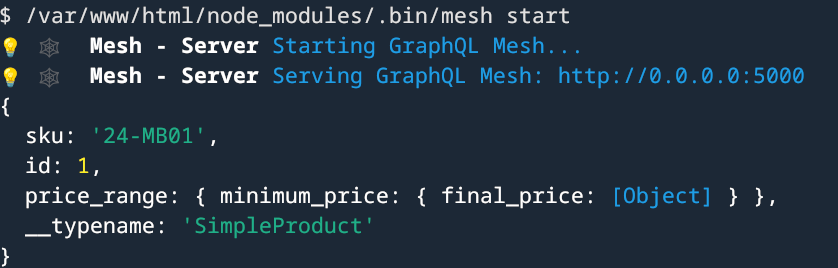
    This should build and run the mesh.

    If you open the printed url in your browser you should see a nice API playground.

    Conclusion

    GraphQL Mesh is a powerful tool that allows you to use GraphQL with any source, regardless of its original format. By setting up your dependencies, writing your queries, creating your resolvers, and configuring GraphQL Mesh, you can start fetching data from multiple sources with ease.

    Remember, the examples provided in this blog post are just that – examples. Your actual implementation may vary based on your specific needs and the sources you’re working with. However, these examples should provide a solid foundation for you to start working with GraphQL Mesh. Happy coding!

  • A visit at our friends of Atwix in Lviv/Ukraine

    A visit at our friends of Atwix in Lviv/Ukraine

    Last month we received an invitation by our friends of Atwix to attend their Barcamp in Lviv/Ukraine. My colleague Oleksandr and me were happy to join it. Oleksandr was the perfect mate, because he was grown up in Ukraine and so he knows everything about the traditions and local specialities.

    Our journey started in Frankfurt. After a stopover in Munich we arrived on site with enough energy to explore the beautiful city of Lviv.
    Oleksandr introduced me to the local delicacies like Borsch (Борщ), Blini (млинці) with Cherry and Varenyky (вареники).

    Traditional Ukraine Food

    After an delicious meal we met among others Slava Kravchuk (CEO of Atwix), Yaroslav, Maria Zayak, Tomislav Bilić (CEO of Inchoo) and Max Yekaterynenko (Director of Community Engineering at Adobe).

    Barcamp

    The Barcamp started with a breakfast where the attendees already had the chance to get to know each other.

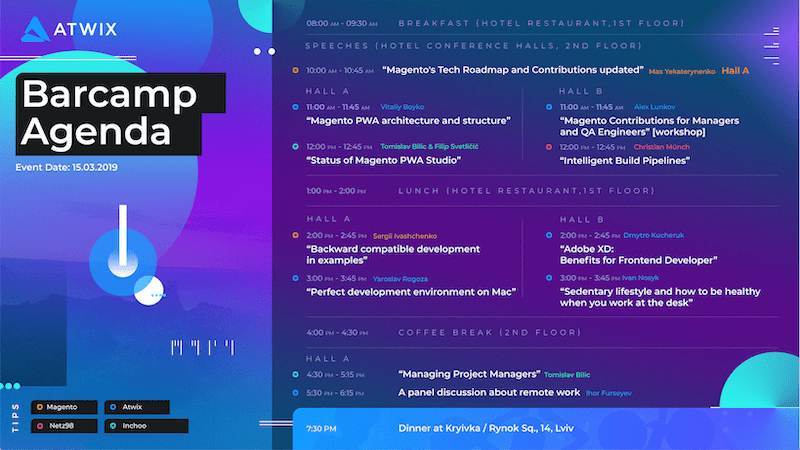
    The agenda of the Barcamp was created in different way compared to previous Barcamps I attended. There were two parallel tracks with already defined talks and discussions. I had the honor to have a talk about Gitlab CI Build Pipelines.

    Agenda

    As you can see, there were a lot of interesting talks about all the hot Magento stuff like PWA. Also non Magento related topics like Remote Working were part of the agenda.

    After a long day with a lot of good content and discussions the day ended with a party at a very cool location where we tasted local food and drinks together with the Atwix and Inchoo guys.

    Magento Contribution Day

    Atwix as No. 1 Contributor had organized a Magento Contribution Day. A Contribution Day is a good chance to dive into the source code of the Magento Core.

    The procedure is very easy. Pick some topics from Magento Contribution backlog and try to fix, solve or invent stuff. If you do not know what you can do, visit the portal to start your way to contribute.

    https://opensource.magento.com/

    It is also possible to contribute to non code related topics like the developer documentation. I personally picked up an old bug ticket which was not edited since 2016.

    Conclusion

    We had a lot of good discussions with Atwix and Inchoo developers and project managers about PWA, Magento, Certification and a lot of more topics. I was able to share some insights about Gitlab-CI pipelines which shows the netz98 way of building projects.
    The evening event was great. The Contribution Day, too…

    Thank you for the hospitality. See you next time in Lviv.

  • PSR-7 Standard  – Part 6 – Server Requests

    PSR-7 Standard – Part 6 – Server Requests

    This post is part of series:


    In Part 3 we already discovered the RequestInterface which is used on client side. In this part, we have a more detailed look on the server side.

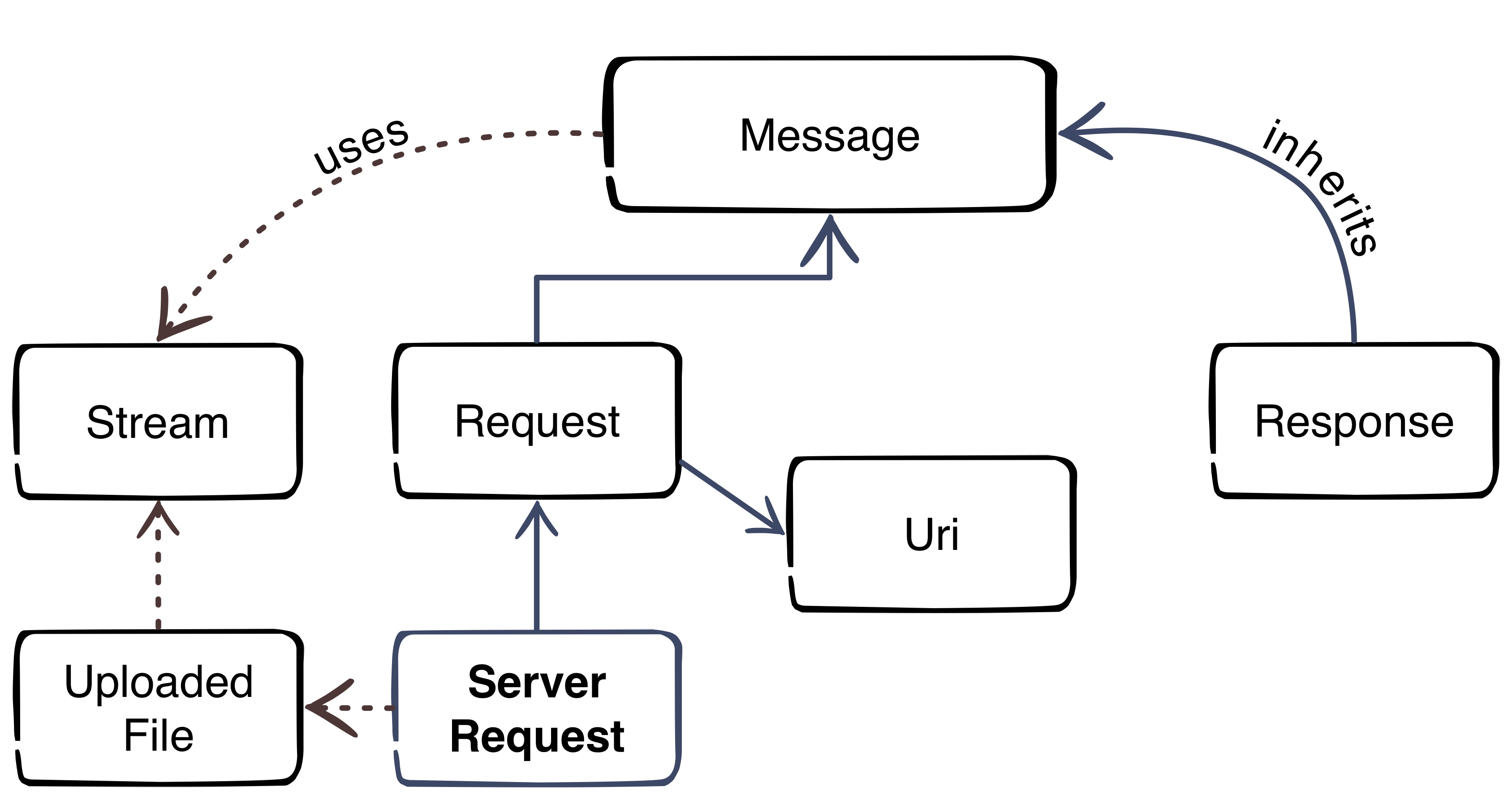
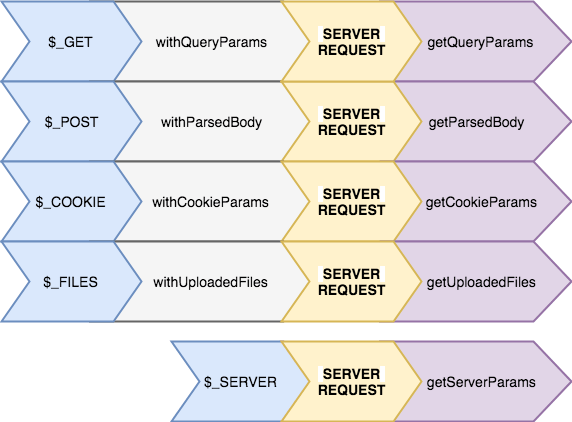
    The Server Request inherits all methods of the RequestInterface and has 13 additional methods. Six methods are available to setup the request object:

    • withCookieParams
    • withQueryParams
    • withUploadedFiles
    • withParsedBody
    • withAttribute
    • withoutAttribute

    Like on client side we have to be careful. The Server Request is designed to be immutable (see Part 3). If we look in the code of the Guzzle\Psr7 implementation of the Server Request, we can see that all this methods are needed to create complete request from all global variables

    ($_SERVER, $_COOKIE, $_GET, $_POST, $_FILES) which we will get from PHP.

    
    /**
      * Return a ServerRequest populated with superglobals:
      * $_GET
      * $_POST
      * $_COOKIE
      * $_FILES
      * $_SERVER
      *
      * @return ServerRequestInterface
      */
    public static function fromGlobals()
    {
        //.... skipped code
    
        $serverRequest = new ServerRequest($method, $uri, $headers, $body, $protocol, $_SERVER);
    
        return $serverRequest
            ->withCookieParams($_COOKIE)
            ->withQueryParams($_GET)
            ->withParsedBody($_POST)
            ->withUploadedFiles(self::normalizeFiles($_FILES));
    }
    

    (ServerRequestInterface on Github)

    The other methods are to consume the same data:

    • getServerParams
    • getCookieParams
    • getQueryParams
    • getParsedBody
    • getAttributes
    • getAttribute

    So we have “setter” and matching “getter” methods.

    What’s up with the “getAttributes” and “getAttribute” methods? This methods are important for the next part of our blog series. The Middleware.

  • PSR-7 Standard  – Part 5  – HTTP Client

    PSR-7 Standard – Part 5 – HTTP Client

    This post is part of series:


    The fifth part of the PSR-7 series describes the HTTP Client.

    The HTTP client is tool which sends a request to a server and returns the response.

    Sadly PSR-7 does not contain an interface for the HTTP client. The Standard contains only the HTTP messages. The client itself is part of the proposed PSR-18.

    PSR-18 is very small. It contains only an Interface with one method and some exception classes. The important part is the sendRequest method. It is easy as pie. A request has to be passed and the client should return a response or throw an ClientException exception.

    interface ClientInterface
    {
        /**
         * Sends a PSR-7 request and returns a PSR-7 response. 
         * 
         * @param RequestInterface $request
         *
         * @return ResponseInterface
         *
         * @throws \Psr\Http\Client\ClientException If an error happens during processing the request.
         */
        public function sendRequest(RequestInterface $request): ResponseInterface;
    }
    

    At the moment we cannot use PSR-18 in a production environment until it is accepted by the FIG. Fortunately there is an other project which tries to close the gap until the PSR-18 is accepted. The project is the father of the PSR-18. We talk about the HTTPPlug Project (former PHP-HTTP).

    HTTPPlug Project

    The project’s homepage is http://httplug.io/. The main idea is to decouple a PHP package/library from implementation by providing a HTTP client abstraction and some standard implementations.

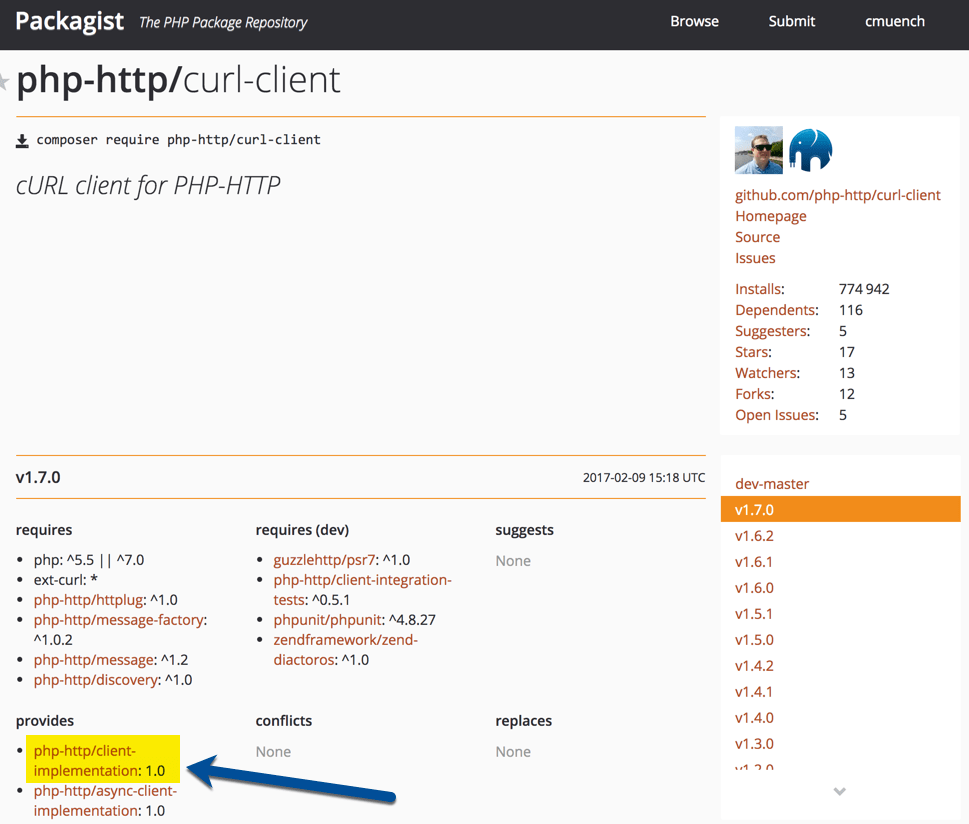
    It provides a Composer meta package. You don’t know what a Composer meta package is? Think of it as a kind of interface for packages.

    This meta package can be added as requirements in your composer.json. Any compatible package can “provide” an implementation for the meta package.

    If you need a HTTP Client Implementation in your project, you should relay on the meta package instead of an real implementation.

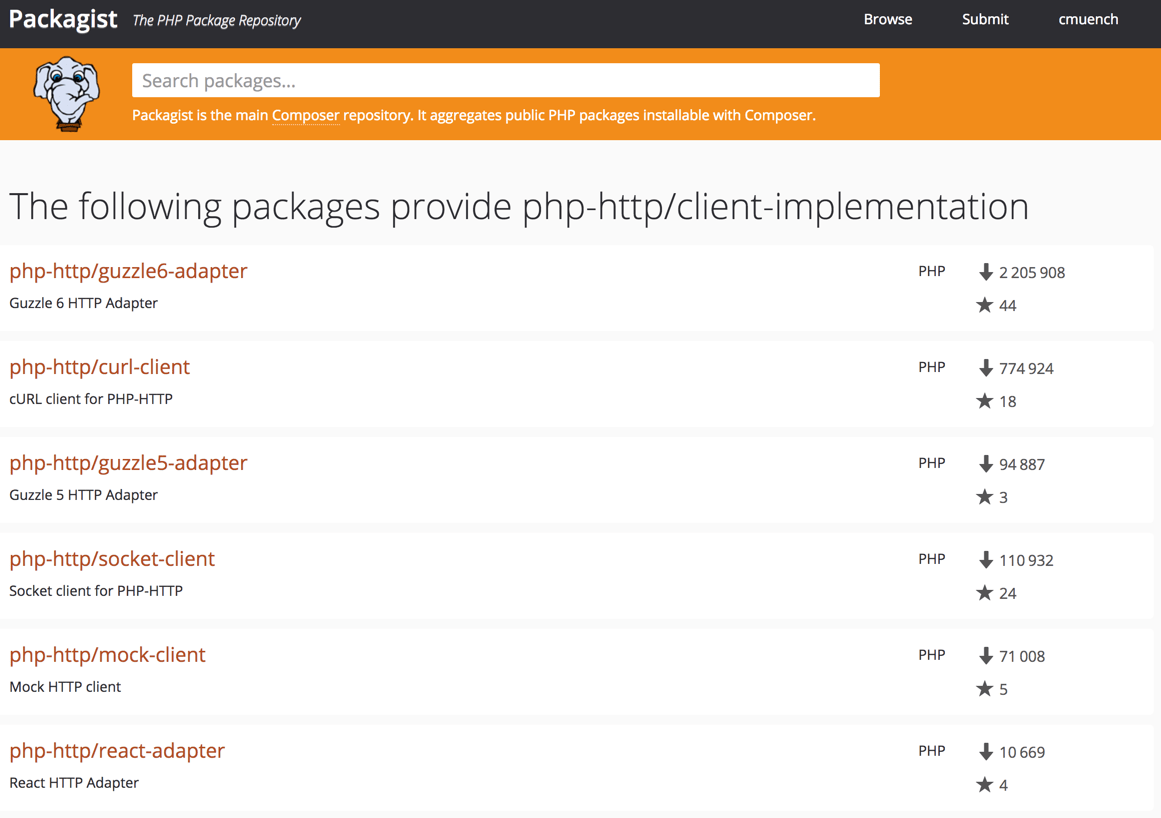
    The implementation can be fulfilled in a project where the PHP library should be used. It is possible to pick any implementation from a huge list of existing implementations.

    An Example Library

    First we need a composer.json which requires a client implementation. For testing purposes we can add a development requirement to add some example scripts to the library. The HTTP-Plug project comes with a small and handy CURL based implementation which provides an implementation for the meta package. For the message implementation i.e. the Request, we make use of Guzzle’s PSR-7 implementation (see previous posts).

    {
      "name": "acme/my-super-php-library",
      "require": {
        "php-http/client-implementation": "^1.0",
        "guzzlehttp/psr7": "^1.4"
      },
      "autoload": {
        "psr-4": {
          "Acme\\MyLibrary\\": "src"
        }
      },
      "require-dev": {
        "php-http/curl-client": "^1.7"
      }
    }
    

    After a composer install  we are ready to create a sample service which uses the HTTP client. Let’s try to fetch the XML feed from dev98.de.

    We create a service class to fetch the XML feed. The service has a dependency to the HTTP Client interface. The file should be placed in the “src” sub-directory according to our PSR4 autoloading setting in composer.json file.

    <?php
    
    namespace Acme\MyLibrary;
    
    use GuzzleHttp\Psr7\Request;
    
    class FetchXmlFeedService
    {
        /**
         * @var \Http\Client\HttpClient
         */
        private $client;
    
        /**
         * ExampleService constructor.
         * @param \Http\Client\HttpClient $client
         */
        public function __construct(\Http\Client\HttpClient $client)
        {
            $this->client = $client;
        }
    
        /**
         * @return \SimpleXMLElement
         * @throws \Exception
         */
        public function fetch(): \SimpleXMLElement
        {
            $request = (new Request('GET', 'https://dev98.de/feed/'))
                ->withHeader('Accept', 'application/xml');
    
            $response = $this->client->sendRequest($request);
    
            if ($response->getStatusCode() !== 200) {
                throw new \Exception('Could not fetch XML feed');
            }
    
            return simplexml_load_string($response->getBody()->getContents());
        }
    }

    The service does not rely on a real implementation. The \Http\Client\HttpClient  is only an interface.

    Now we create a sample script which calls our service in the sub-directory “examples”.

    <?php
    
    require_once __DIR__ . '/../vendor/autoload.php';
    
    $httpClient = new \Http\Client\Curl\Client();
    $service = new \Acme\MyLibrary\FetchXmlFeedService($httpClient);
    $xmlData = $service->fetch();
    
    foreach ($xmlData->channel->item as $item) {
        echo (string) $item->title . "\n";
    }
    

    That’s our simple library with an example script. Testing this library is also not a big deal. We can easily mock the Interface.

    Use the Library

    If we want to use the library in a real project, we need to add the library in our project’s composer.json file. Then we add an implementation for the http client. This must not be the same as the development requirements in our library. This is a big advantage. If our PHP framework comes with an implementation which fits, we can re-use it.

    The complete source of the blog post is available on Github: https://github.com/cmuench/psr7-example-library

    The next blog post in this series describes the Server-Request.

  • PSR-7 Standard  – Part 4 – File Uploads

    PSR-7 Standard – Part 4 – File Uploads

    This post is part of series:


    After we learned what a Request and a Response are, let’s now look how we can send files to the server. Then have a look on how we can process them with Guzzle on the server side.

    Client Side Script

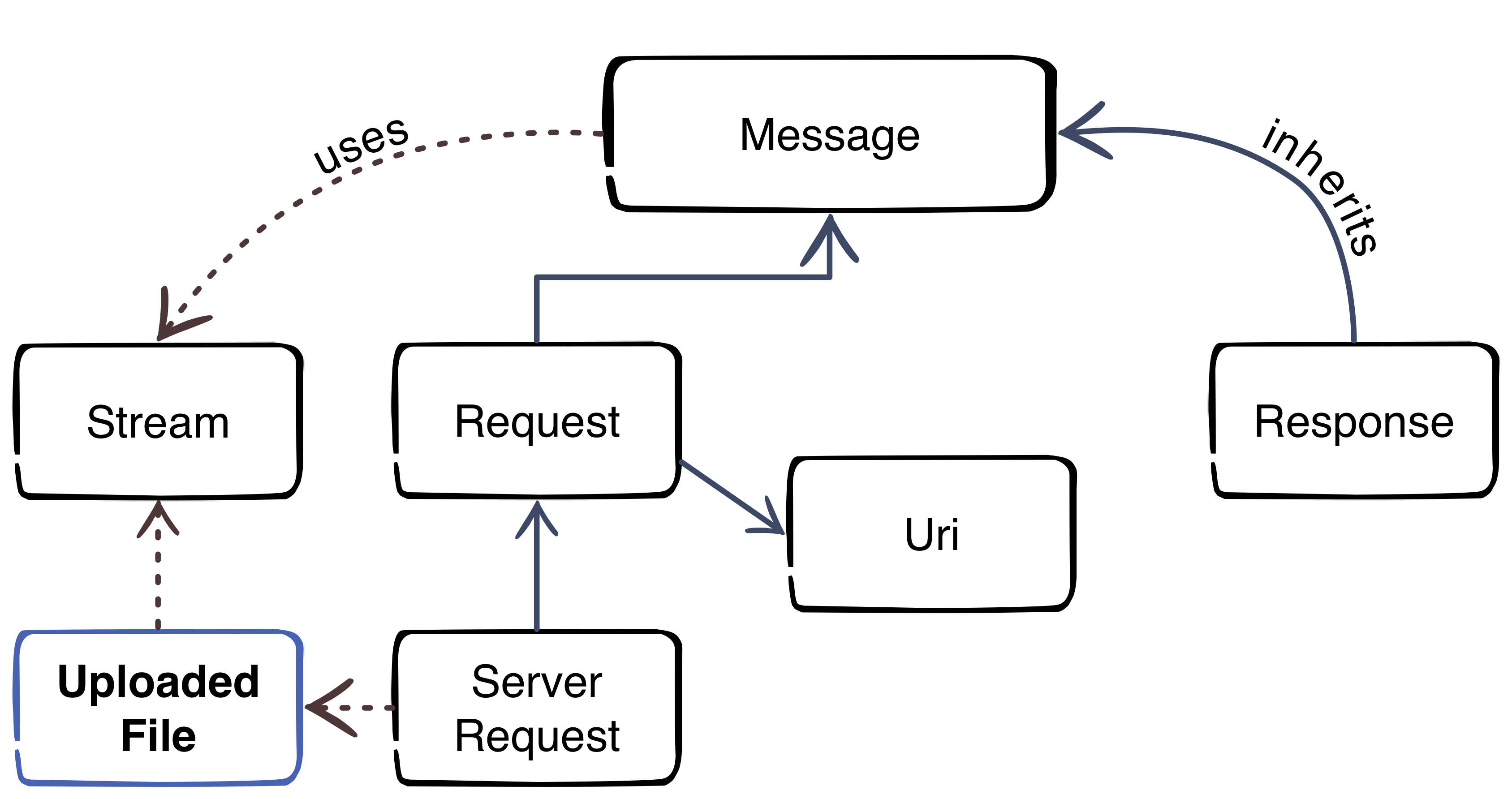
    As you can see in the diagram, a file upload is also handled as stream.

    First we create script “file_upload.php” with this content which initializes the autoloader and creates a sample file for the upload test.

    <?php
    require_once 'vendor/autoload.php';
      
    // create a test file
    file_put_contents('foo.txt', '"Foo" is the content of the file');
    

    After we have a text file, we can create our stream with the Guzzle PSR-7 component. Please add the code to the existing file.

    // put test file into multipart stream
    $multipart = new \GuzzleHttp\Psr7\MultipartStream([
        [
            'name' => 'upload_file',
            'contents' => fopen('foo.txt', 'r')
        ],
    ]);
    

    The MultipartStream gives us the ability to send more than once file to the server. As last part of the script we need to create a Request to send the MultipartStream to the server.

    $request = new \GuzzleHttp\Psr7\Request('POST', 'http://127.0.0.1:8080');
    $request = $request->withBody($multipart);
    
    $client = new \GuzzleHttp\Client();
    $response = $client->send($request);
    echo $response->getBody();

    Server Side Script

    Please create the script “server_file.php” to receive the files.

    <?php
    
    require_once __DIR__ . '/vendor/autoload.php';
    
    $request = \GuzzleHttp\Psr7\ServerRequest::fromGlobals();
    $files = $request->getUploadedFiles();
    
    $response = new \GuzzleHttp\Psr7\Response();
    $response = $response->withStatus(200, 'OK');
    
    $uploadedFiles = $request->getUploadedFiles();
    
    $uploadedFileInfos = [];
    foreach ($uploadedFiles as $uploadedFile) {
        /** @var $uploadedFile \GuzzleHttp\Psr7\UploadedFile */
        $uploadedFileInfos[] = [
            'file_name' => $uploadedFile->getClientFilename(),
            'mime_type' => $uploadedFile->getClientMediaType(),
            'size'      => $uploadedFile->getSize(),
            'content'   => (string) $uploadedFile->getStream()
        ];
    }
    
    $response = $response->withBody(
        \GuzzleHttp\Psr7\stream_for(print_r($uploadedFileInfos))
    );
    
    echo \GuzzleHttp\Psr7\str($response);
    

    The script is very simple. It creates a ServerRequest (we talk about this in a future blog post). The ServerRequest can handle the MultipartStream and return the files with the handy method method getUploadedFiles. This methods is now a standard to get all data of the uploaded files. If you know how files are handled without PSR-7 you know that this is a really enhancement.

    For debugging we collect all data of the uploaded files and return them back as response to the client.

    Test the Upload

    Run the server in console:

    php -S 127.0.0.1:8080 server_file.php

    Run the client script in a second console:

    php file_upload.php

    If you did everything correct you should now see the result of the server script:

    HTTP/1.1 200 OK
    
    Array
    (
        [0] => Array
            (
                [file_name] => foo.txt
                [mime_type] => text/plain
                [size] => 32
                [content] => "Foo" is the content of the file
            )
    
    )


    That’s it. The next blog post will give you some inside into the HTTP Client.

  • Run Mailhog in Docker and use it in PHP

    Run Mailhog in Docker and use it in PHP

    This post describes how you can install and configure Mailhog as SMTP Server for your local PHP development environment. This is useful to catch all outgoing emails.

    A running PHP and Docker environment is required to follow the instructions.

    Install Mailhog

    On my local machine, I have docker-compose.yml file which contains a lot of services (e.g MySQL, Elastic, Redis) which I use during the daily development.

    For our mailhog example we need only one service. Please create a docker-compose.yml with this content:

    version: '2'
    services:
        mailhog:
            container_name: mailhog
            image: mailhog/mailhog
            restart: always
            ports:
                - 1025:1025
                - 8025:8025

    Run docker-compose up -d mailhog to create and start the container. If the mailhog image does not exist, Docker will start to download the image from official Docker-Hub.

    Verify if everything is up and running.

    docker-compose ps
    Name      Command             State    Ports
    -------------------------------------------------------------------------------------
    mailhog   MailHog             Up       0.0.0.0:1025->1025/tcp, 0.0.0.0:8025->8025/tcp
    

    No you can use the TCP Port 1025 for sending email over SMTP protocol. The Port 8025 contains the Web-UI.

    Configure PHP

    Out goal is that PHP’s intern command “mail” uses our freshly installed Mailhog server. To effect this, we need to set the “sendmail_path” setting.

    Please modify your php.ini file and set the following directive:

    sendmail_path = docker exec -i mailhog sendmail -S localhost:1025

    From now, every “mail” command call uses the docker container with the name “mailhog” to send any email.

    We can test this with a simple PHP CLI call:

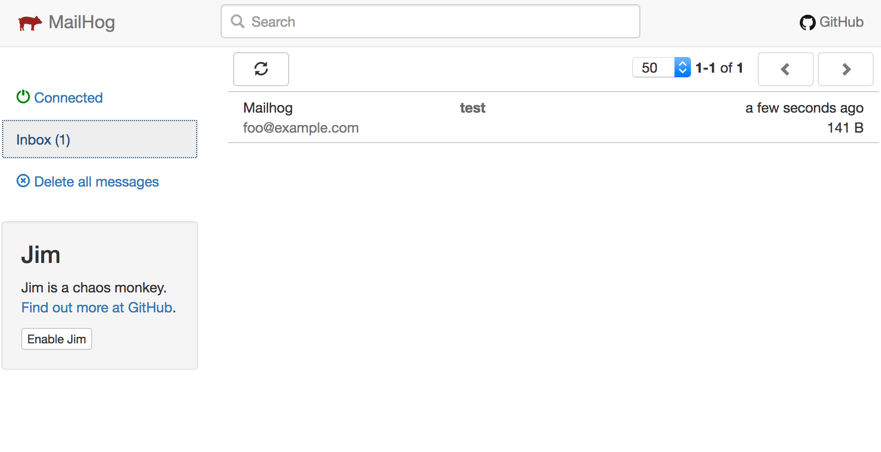
    php -r 'mail("foo@example.com", "test", time(), "From: Mailhog <mailhog@example.com>");'

    We should now be able to see the arrived message in the Web-UI. Open your browser with the address “http://localhost:8025”.

  • PSR-7 Standard  – Part 3  – Response

    PSR-7 Standard – Part 3 – Response

    This post is part of series:


    In the last blog post we described the RequestInterface of PSR-7. Every application will process this request and returns a response to the calling client. The response is the part where a backend sends a result of an server operation back to the client. Let’s view how the ResponseInterface is designed.

    /**
     * Representation of an outgoing, server-side response.
     *
     * Per the HTTP specification, this interface includes properties for
     * each of the following:
     *
     * - Protocol version
     * - Status code and reason phrase
     * - Headers
     * - Message body
     *
     * Responses are considered immutable; all methods that might change state MUST
     * be implemented such that they retain the internal state of the current
     * message and return an instance that contains the changed state.
     */
    interface ResponseInterface extends MessageInterface
    {
        /**
         * Gets the response status code.
         *
         * The status code is a 3-digit integer result code of the server's attempt
         * to understand and satisfy the request.
         *
         * @return int Status code.
         */
        public function getStatusCode();
    
        /**
         * Return an instance with the specified status code and, optionally, reason phrase.
         *
         * If no reason phrase is specified, implementations MAY choose to default
         * to the RFC 7231 or IANA recommended reason phrase for the response's
         * status code.
         *
         * This method MUST be implemented in such a way as to retain the
         * immutability of the message, and MUST return an instance that has the
         * updated status and reason phrase.
         *
         * @link http://tools.ietf.org/html/rfc7231#section-6
         * @link http://www.iana.org/assignments/http-status-codes/http-status-codes.xhtml
         * @param int $code The 3-digit integer result code to set.
         * @param string $reasonPhrase The reason phrase to use with the
         *     provided status code; if none is provided, implementations MAY
         *     use the defaults as suggested in the HTTP specification.
         * @return static
         * @throws \InvalidArgumentException For invalid status code arguments.
         */
        public function withStatus($code, $reasonPhrase = '');
    
        /**
         * Gets the response reason phrase associated with the status code.
         *
         * Because a reason phrase is not a required element in a response
         * status line, the reason phrase value MAY be null. Implementations MAY
         * choose to return the default RFC 7231 recommended reason phrase (or those
         * listed in the IANA HTTP Status Code Registry) for the response's
         * status code.
         *
         * @link http://tools.ietf.org/html/rfc7231#section-6
         * @link http://www.iana.org/assignments/http-status-codes/http-status-codes.xhtml
         * @return string Reason phrase; must return an empty string if none present.
         */
        public function getReasonPhrase();
    }
    

    Like the request, the response has to be build in an immutable way. This means that every method returns a new instance of the object instead of a reference to the existing object. The interface is a lot simpler than the RequestInterface. It contains only one method withStatus to pass a HTTP status code. All the other methods are inherited by MessageInterface which we already know from RequestInterface. This is consequent, because the Request and Response are communicating trough messages. So the Request sends a message and the Response returns a message.

    Using Guzzle

    Like in the previous article we make use of the PSR7 library of the Guzzle project.

    The installation is easy as:

    composer.phar require guzzlehttp/guzzle:~6.0

    We replace the “server.php” of the previous article with this code:

    <?php
    require_once __DIR__ . '/vendor/autoload.php';
    
    $response = new \GuzzleHttp\Psr7\Response();
    $response = $response->withStatus(200, 'OK');
    $response = $response->withBody(
        \GuzzleHttp\Psr7\stream_for(
            print_r($_SERVER, true)
        )
    );
    
    echo \GuzzleHttp\Psr7\str($response);

    The script is the equivalent of the server.php script of previous article where we simply dumped the $_SERVER array. Not it is HTTP compliant.

    We build a new response with a status code 200 and “OK” as phrase for the HTTP status header line. According to the RequestInterface we must pass a stream as parameter. To simply convert a string we can use the stream_for function of the Guzzle library.

    At the end we need to create a valid HTTP message string which can simply pushed to the client which PHP’s echo function. Guzzle provides the handy str function to convert an instance of MessageInterface to a string. We remember that the ResponseInterface extends the MessageInterface. So we can use the function and let Guzzle do the boring part.

    Let’s test the server with our previous generated client.php script. Before we can test, we start the server.php with the internal PHP HTTP server:

    php -S 127.0.0.1:8080 server.php

    Now run the client in a second console:

    php client_guzzle.php

    We should now the the output of our server:

    HTTP/1.1 200 OK
    
    Array
    (
        [DOCUMENT_ROOT] => /Users/cmuench/Desktop/psr-7
        [REMOTE_ADDR] => 127.0.0.1
        [REMOTE_PORT] => 57891
        [SERVER_SOFTWARE] => PHP 7.0.22 Development Server
        [SERVER_PROTOCOL] => HTTP/1.1
        [SERVER_NAME] => 127.0.0.1
        [SERVER_PORT] => 8080
        [REQUEST_URI] => /mypath?foo=bar&baz=zoz
        [REQUEST_METHOD] => GET
        [SCRIPT_NAME] => /mypath
        [SCRIPT_FILENAME] => server.php
        [PHP_SELF] => /mypath
        [QUERY_STRING] => foo=bar&baz=zoz
        [HTTP_HOST] => 127.0.0.1:8080
        [HTTP_USER_AGENT] => GuzzleHttp/6.2.1 curl/7.54.0 PHP/7.0.22
        [REQUEST_TIME_FLOAT] => 1508404883.1422
        [REQUEST_TIME] => 1508404883
    )

    In the next article we try to upload a file with the client to the server.