Blog

  • PSR-7 Standard  – Part 6 – Server Requests

    PSR-7 Standard – Part 6 – Server Requests

    This post is part of series:


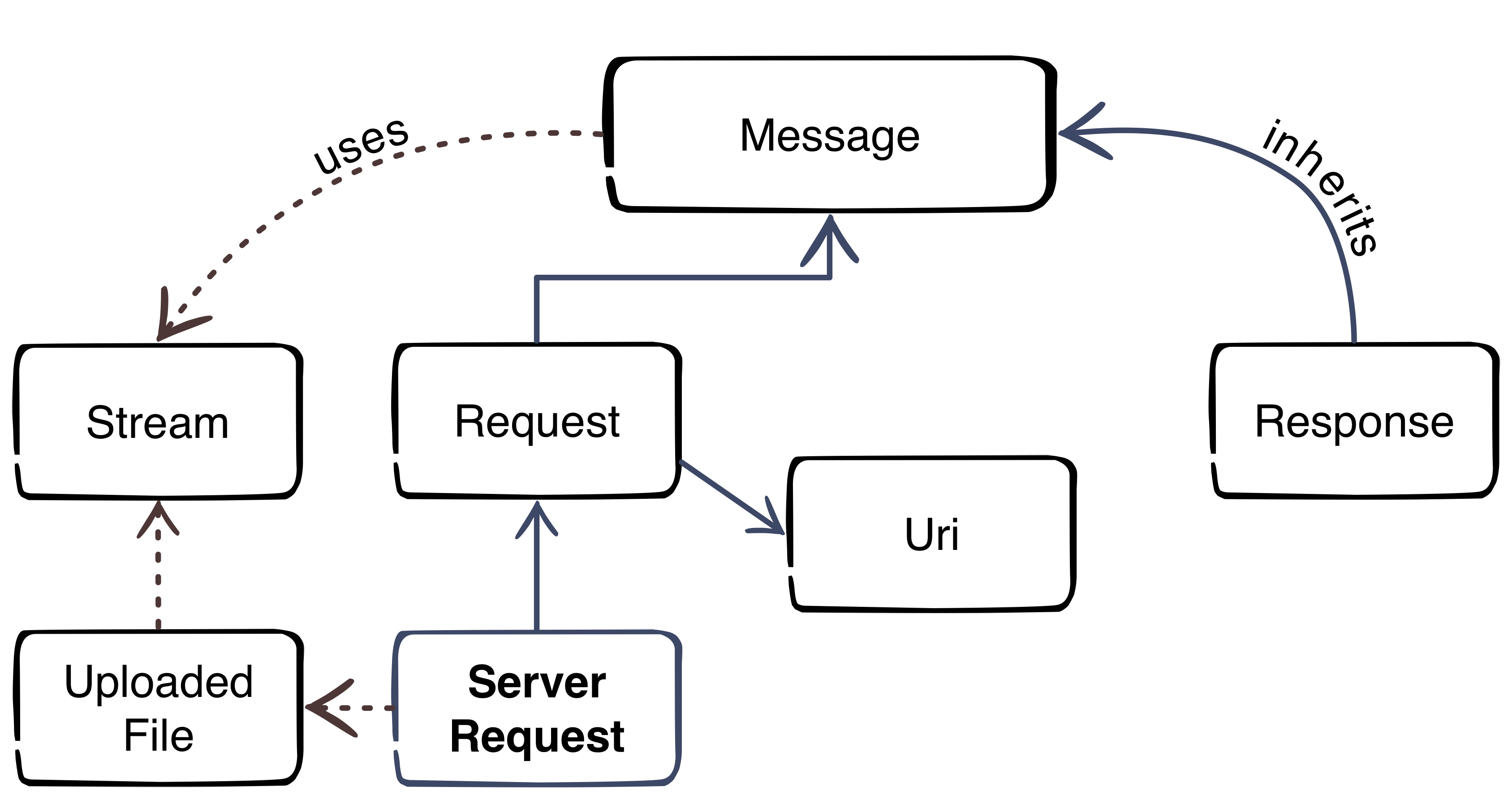
    In Part 3 we already discovered the RequestInterface which is used on client side. In this part, we have a more detailed look on the server side.

    The Server Request inherits all methods of the RequestInterface and has 13 additional methods. Six methods are available to setup the request object:

    • withCookieParams
    • withQueryParams
    • withUploadedFiles
    • withParsedBody
    • withAttribute
    • withoutAttribute

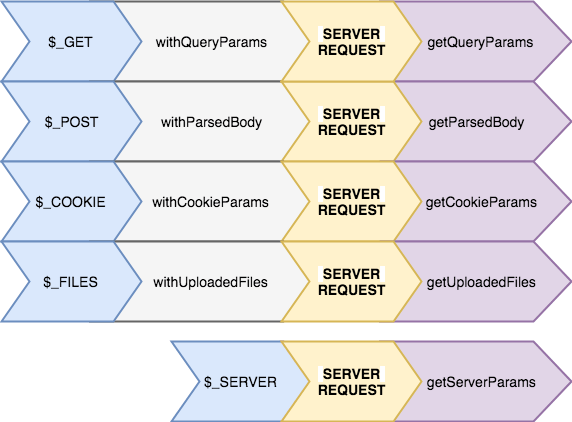
    Like on client side we have to be careful. The Server Request is designed to be immutable (see Part 3). If we look in the code of the Guzzle\Psr7 implementation of the Server Request, we can see that all this methods are needed to create complete request from all global variables

    ($_SERVER, $_COOKIE, $_GET, $_POST, $_FILES) which we will get from PHP.

    
    /**
      * Return a ServerRequest populated with superglobals:
      * $_GET
      * $_POST
      * $_COOKIE
      * $_FILES
      * $_SERVER
      *
      * @return ServerRequestInterface
      */
    public static function fromGlobals()
    {
        //.... skipped code
    
        $serverRequest = new ServerRequest($method, $uri, $headers, $body, $protocol, $_SERVER);
    
        return $serverRequest
            ->withCookieParams($_COOKIE)
            ->withQueryParams($_GET)
            ->withParsedBody($_POST)
            ->withUploadedFiles(self::normalizeFiles($_FILES));
    }
    

    (ServerRequestInterface on Github)

    The other methods are to consume the same data:

    • getServerParams
    • getCookieParams
    • getQueryParams
    • getParsedBody
    • getAttributes
    • getAttribute

    So we have “setter” and matching “getter” methods.

    What’s up with the “getAttributes” and “getAttribute” methods? This methods are important for the next part of our blog series. The Middleware.

  • PSR-7 Standard  – Part 5  – HTTP Client

    PSR-7 Standard – Part 5 – HTTP Client

    This post is part of series:


    The fifth part of the PSR-7 series describes the HTTP Client.

    The HTTP client is tool which sends a request to a server and returns the response.

    Sadly PSR-7 does not contain an interface for the HTTP client. The Standard contains only the HTTP messages. The client itself is part of the proposed PSR-18.

    PSR-18 is very small. It contains only an Interface with one method and some exception classes. The important part is the sendRequest method. It is easy as pie. A request has to be passed and the client should return a response or throw an ClientException exception.

    interface ClientInterface
    {
        /**
         * Sends a PSR-7 request and returns a PSR-7 response. 
         * 
         * @param RequestInterface $request
         *
         * @return ResponseInterface
         *
         * @throws \Psr\Http\Client\ClientException If an error happens during processing the request.
         */
        public function sendRequest(RequestInterface $request): ResponseInterface;
    }
    

    At the moment we cannot use PSR-18 in a production environment until it is accepted by the FIG. Fortunately there is an other project which tries to close the gap until the PSR-18 is accepted. The project is the father of the PSR-18. We talk about the HTTPPlug Project (former PHP-HTTP).

    HTTPPlug Project

    The project’s homepage is http://httplug.io/. The main idea is to decouple a PHP package/library from implementation by providing a HTTP client abstraction and some standard implementations.

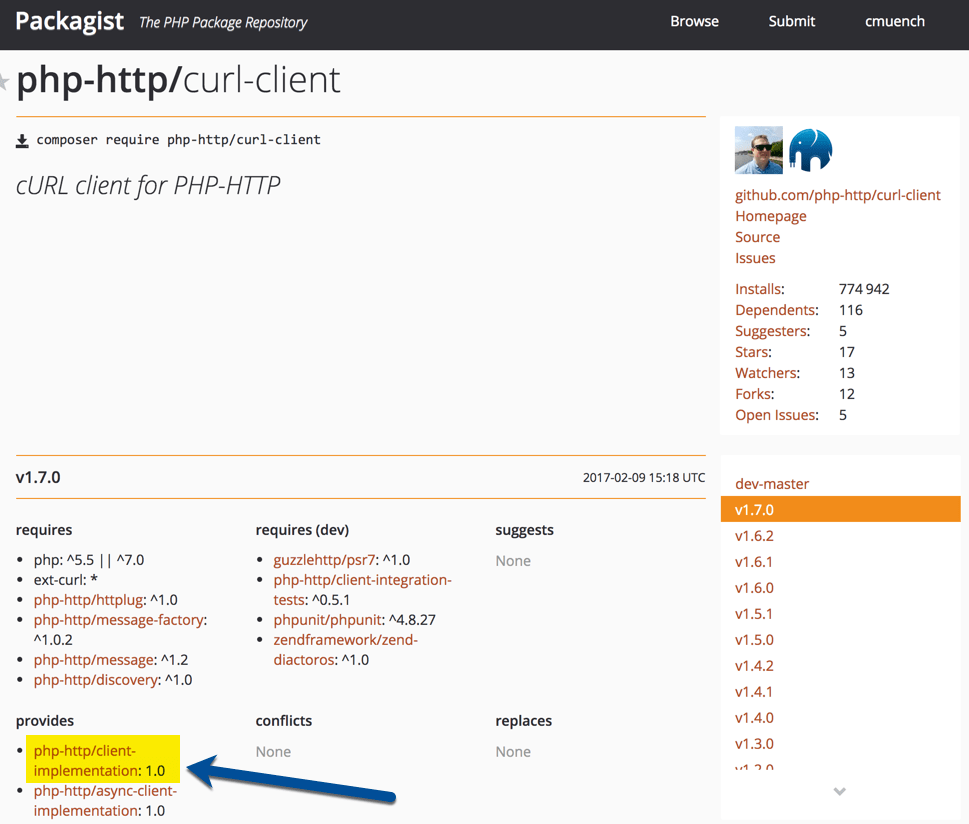
    It provides a Composer meta package. You don’t know what a Composer meta package is? Think of it as a kind of interface for packages.

    This meta package can be added as requirements in your composer.json. Any compatible package can “provide” an implementation for the meta package.

    If you need a HTTP Client Implementation in your project, you should relay on the meta package instead of an real implementation.

    The implementation can be fulfilled in a project where the PHP library should be used. It is possible to pick any implementation from a huge list of existing implementations.

    An Example Library

    First we need a composer.json which requires a client implementation. For testing purposes we can add a development requirement to add some example scripts to the library. The HTTP-Plug project comes with a small and handy CURL based implementation which provides an implementation for the meta package. For the message implementation i.e. the Request, we make use of Guzzle’s PSR-7 implementation (see previous posts).

    {
      "name": "acme/my-super-php-library",
      "require": {
        "php-http/client-implementation": "^1.0",
        "guzzlehttp/psr7": "^1.4"
      },
      "autoload": {
        "psr-4": {
          "Acme\\MyLibrary\\": "src"
        }
      },
      "require-dev": {
        "php-http/curl-client": "^1.7"
      }
    }
    

    After a composer install  we are ready to create a sample service which uses the HTTP client. Let’s try to fetch the XML feed from dev98.de.

    We create a service class to fetch the XML feed. The service has a dependency to the HTTP Client interface. The file should be placed in the “src” sub-directory according to our PSR4 autoloading setting in composer.json file.

    <?php
    
    namespace Acme\MyLibrary;
    
    use GuzzleHttp\Psr7\Request;
    
    class FetchXmlFeedService
    {
        /**
         * @var \Http\Client\HttpClient
         */
        private $client;
    
        /**
         * ExampleService constructor.
         * @param \Http\Client\HttpClient $client
         */
        public function __construct(\Http\Client\HttpClient $client)
        {
            $this->client = $client;
        }
    
        /**
         * @return \SimpleXMLElement
         * @throws \Exception
         */
        public function fetch(): \SimpleXMLElement
        {
            $request = (new Request('GET', 'https://dev98.de/feed/'))
                ->withHeader('Accept', 'application/xml');
    
            $response = $this->client->sendRequest($request);
    
            if ($response->getStatusCode() !== 200) {
                throw new \Exception('Could not fetch XML feed');
            }
    
            return simplexml_load_string($response->getBody()->getContents());
        }
    }

    The service does not rely on a real implementation. The \Http\Client\HttpClient  is only an interface.

    Now we create a sample script which calls our service in the sub-directory “examples”.

    <?php
    
    require_once __DIR__ . '/../vendor/autoload.php';
    
    $httpClient = new \Http\Client\Curl\Client();
    $service = new \Acme\MyLibrary\FetchXmlFeedService($httpClient);
    $xmlData = $service->fetch();
    
    foreach ($xmlData->channel->item as $item) {
        echo (string) $item->title . "\n";
    }
    

    That’s our simple library with an example script. Testing this library is also not a big deal. We can easily mock the Interface.

    Use the Library

    If we want to use the library in a real project, we need to add the library in our project’s composer.json file. Then we add an implementation for the http client. This must not be the same as the development requirements in our library. This is a big advantage. If our PHP framework comes with an implementation which fits, we can re-use it.

    The complete source of the blog post is available on Github: https://github.com/cmuench/psr7-example-library

    The next blog post in this series describes the Server-Request.

  • Chrome 63 vs. dev domains

    Chrome 63 vs. dev domains

    With the recent update to version 63 for Chrome they introduced a feature, that redirects all *.dev  calls from HTTP to HTTPS.

    If you are using *.dev  domains to access your development machine, this behaviour is probably not what you want for all your local urls.

    Configuring dnsmasq

    At netz98 we are using dnsmasq to redirect all *.dev  calls to our localhost.

    dnsmasq has a setting where you can easily change this to another domain like *.localhost .

    First of locate the config file for dnsmasq. If you have installed it using brew you will probably find it under /usr/local/etc/dnsmasq.conf .

    Open the file in an editor of your choice and look for the following line:

    address=/dev/127.0.0.1

    And change it to:

    address=/localhost/127.0.0.1

    If you cannot find a line setting the address like shown above, just add a new line with the setting.

    To restart dnsmasq you can use

    brew services restart dnsmasq

    Configuring apache / nginx

    Depending on your choice of setup you might be using an nginx or apache setup.

    You most likely have some virtual-hosts or server settings that might need to be adjusted to the new domain.

    This could look something like this for nginx.

    server {
      listen 80;
    
      server_name shop.dev;
    
      // ....
    }

    Locate the server_name setting and any other occurences of your *.dev  domain and change it to .localhost

    Do not forget to change your Magento1 or Magento2 Urls in the core_config_data table.

    MacOS Nameserver

    For Firefox and Safari and a working ping foo.bar.localhost , you also have to add a setting for that.

    Create the file /etc/resolver/localhost  with the following content:

    nameserver 127.0.0.1

    After doing so, you need to restart the DNS Resolver and flush caches.
    I am on the latest MacOS 10.13 so I had to run the following command:

    sudo killall -HUP mDNSResponder; sudo killall mDNSResponderHelper; sudo dscacheutil -flushcache

    If you are running a different MacOS version, you can find a great blog post over at Dreamhost where they list the commands for each MacOS version: https://help.dreamhost.com/hc/en-us/articles/214981288-Flushing-your-DNS-cache-in-Mac-OS-X-and-Linux

    UPDATE:
    You might have to do a reboot of your machine so that the resolver works.

    UPDATE 2:
    Firefox and Safari require the above mentioned resolver to work.

    If you got anything to add or there even is a better solution feel free to leave a comment below.

  • PSR-7 Standard  – Part 4 – File Uploads

    PSR-7 Standard – Part 4 – File Uploads

    This post is part of series:


    After we learned what a Request and a Response are, let’s now look how we can send files to the server. Then have a look on how we can process them with Guzzle on the server side.

    Client Side Script

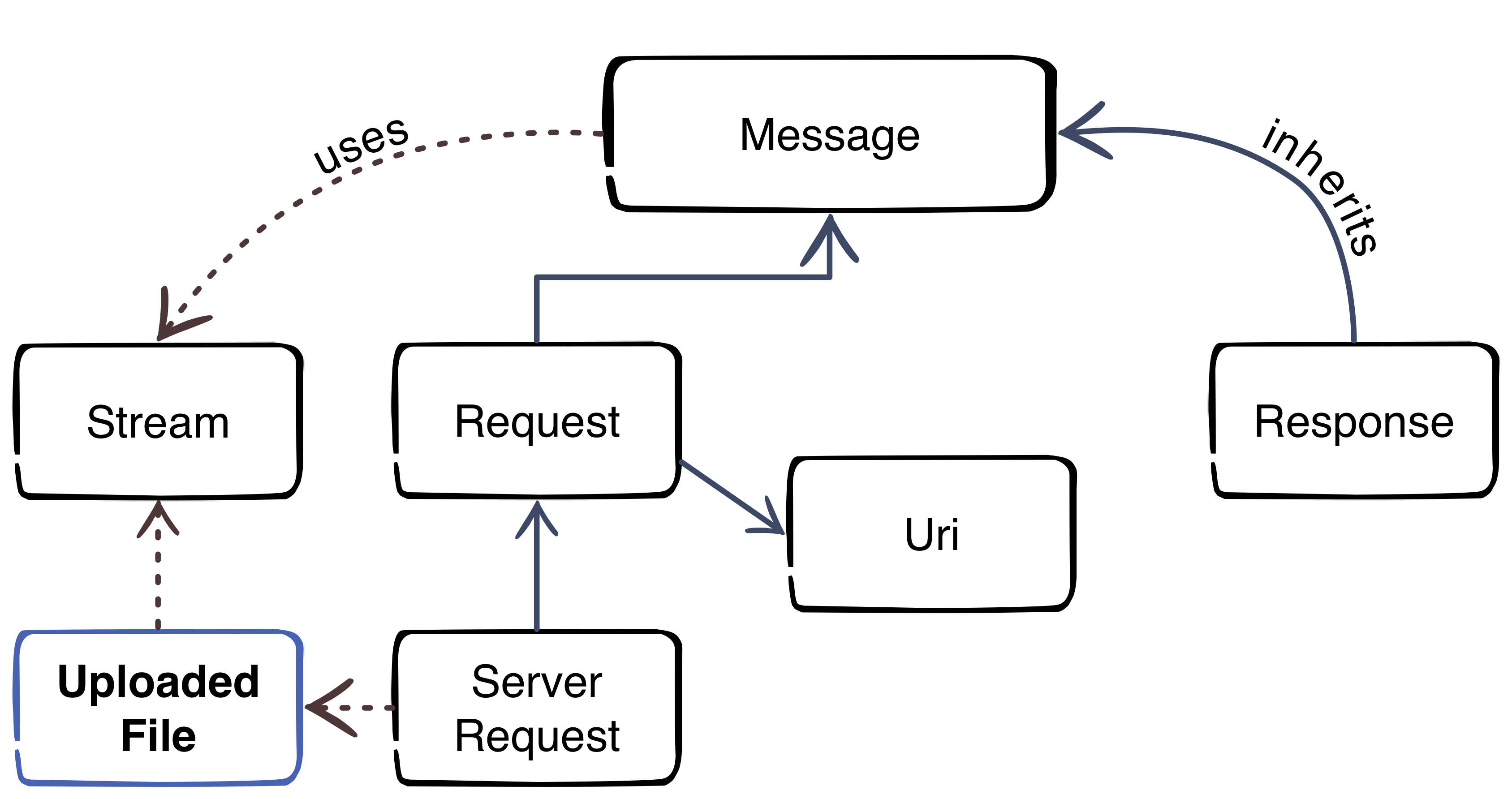
    As you can see in the diagram, a file upload is also handled as stream.

    First we create script “file_upload.php” with this content which initializes the autoloader and creates a sample file for the upload test.

    <?php
    require_once 'vendor/autoload.php';
      
    // create a test file
    file_put_contents('foo.txt', '"Foo" is the content of the file');
    

    After we have a text file, we can create our stream with the Guzzle PSR-7 component. Please add the code to the existing file.

    // put test file into multipart stream
    $multipart = new \GuzzleHttp\Psr7\MultipartStream([
        [
            'name' => 'upload_file',
            'contents' => fopen('foo.txt', 'r')
        ],
    ]);
    

    The MultipartStream gives us the ability to send more than once file to the server. As last part of the script we need to create a Request to send the MultipartStream to the server.

    $request = new \GuzzleHttp\Psr7\Request('POST', 'http://127.0.0.1:8080');
    $request = $request->withBody($multipart);
    
    $client = new \GuzzleHttp\Client();
    $response = $client->send($request);
    echo $response->getBody();

    Server Side Script

    Please create the script “server_file.php” to receive the files.

    <?php
    
    require_once __DIR__ . '/vendor/autoload.php';
    
    $request = \GuzzleHttp\Psr7\ServerRequest::fromGlobals();
    $files = $request->getUploadedFiles();
    
    $response = new \GuzzleHttp\Psr7\Response();
    $response = $response->withStatus(200, 'OK');
    
    $uploadedFiles = $request->getUploadedFiles();
    
    $uploadedFileInfos = [];
    foreach ($uploadedFiles as $uploadedFile) {
        /** @var $uploadedFile \GuzzleHttp\Psr7\UploadedFile */
        $uploadedFileInfos[] = [
            'file_name' => $uploadedFile->getClientFilename(),
            'mime_type' => $uploadedFile->getClientMediaType(),
            'size'      => $uploadedFile->getSize(),
            'content'   => (string) $uploadedFile->getStream()
        ];
    }
    
    $response = $response->withBody(
        \GuzzleHttp\Psr7\stream_for(print_r($uploadedFileInfos))
    );
    
    echo \GuzzleHttp\Psr7\str($response);
    

    The script is very simple. It creates a ServerRequest (we talk about this in a future blog post). The ServerRequest can handle the MultipartStream and return the files with the handy method method getUploadedFiles. This methods is now a standard to get all data of the uploaded files. If you know how files are handled without PSR-7 you know that this is a really enhancement.

    For debugging we collect all data of the uploaded files and return them back as response to the client.

    Test the Upload

    Run the server in console:

    php -S 127.0.0.1:8080 server_file.php

    Run the client script in a second console:

    php file_upload.php

    If you did everything correct you should now see the result of the server script:

    HTTP/1.1 200 OK
    
    Array
    (
        [0] => Array
            (
                [file_name] => foo.txt
                [mime_type] => text/plain
                [size] => 32
                [content] => "Foo" is the content of the file
            )
    
    )


    That’s it. The next blog post will give you some inside into the HTTP Client.

  • Run Mailhog in Docker and use it in PHP

    Run Mailhog in Docker and use it in PHP

    This post describes how you can install and configure Mailhog as SMTP Server for your local PHP development environment. This is useful to catch all outgoing emails.

    A running PHP and Docker environment is required to follow the instructions.

    Install Mailhog

    On my local machine, I have docker-compose.yml file which contains a lot of services (e.g MySQL, Elastic, Redis) which I use during the daily development.

    For our mailhog example we need only one service. Please create a docker-compose.yml with this content:

    version: '2'
    services:
        mailhog:
            container_name: mailhog
            image: mailhog/mailhog
            restart: always
            ports:
                - 1025:1025
                - 8025:8025

    Run docker-compose up -d mailhog to create and start the container. If the mailhog image does not exist, Docker will start to download the image from official Docker-Hub.

    Verify if everything is up and running.

    docker-compose ps
    Name      Command             State    Ports
    -------------------------------------------------------------------------------------
    mailhog   MailHog             Up       0.0.0.0:1025->1025/tcp, 0.0.0.0:8025->8025/tcp
    

    No you can use the TCP Port 1025 for sending email over SMTP protocol. The Port 8025 contains the Web-UI.

    Configure PHP

    Out goal is that PHP’s intern command “mail” uses our freshly installed Mailhog server. To effect this, we need to set the “sendmail_path” setting.

    Please modify your php.ini file and set the following directive:

    sendmail_path = docker exec -i mailhog sendmail -S localhost:1025

    From now, every “mail” command call uses the docker container with the name “mailhog” to send any email.

    We can test this with a simple PHP CLI call:

    php -r 'mail("foo@example.com", "test", time(), "From: Mailhog <mailhog@example.com>");'

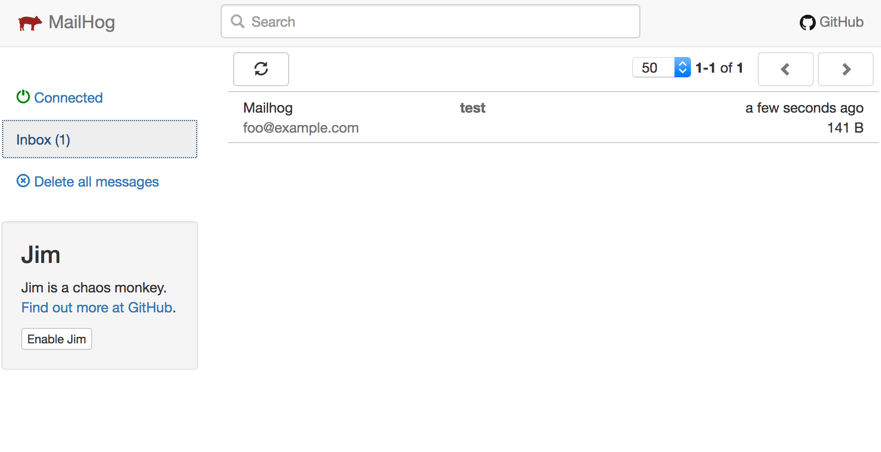
    We should now be able to see the arrived message in the Web-UI. Open your browser with the address “http://localhost:8025”.

  • Sequence of Magento 2 Install / Upgrade / Recurring scripts

    Sequence of Magento 2 Install / Upgrade / Recurring scripts

    Preamble

    In one of my last tasks I had to write an upgrade script in which an assignment of a newly created frontend theme to some of the stores should be implemented.

    The following code-part describes what I did here:

    /**
     *
     */
    protected function assignNewThemeToSelectedStores()
    {
        $storeIdsForNewTheme = [];
    
        foreach ($this->storesCodesWithNewTheme as $storeCode) {
            $storeIdsForNewTheme[] = $this->storeRepository->get($storeCode)->getId();
        }
    
        /** @var \Magento\Theme\Model\ResourceModel\Theme\Collection $themes */
        $themes = $this->themeCollectionFactory->create()->loadRegisteredThemes();
        /**
         * @var \Magento\Theme\Model\Theme $theme
         */
        foreach ($themes as $theme) {
           if ($theme->getCode() === 'Mynewly/createdtheme') {
           $this->themeConfig->assignToStore(
               $theme,
               $storeIdsForNewTheme
           );
           }
        }
    }

    As I already had an InstallData Script in the module and it already has run on some dev machines and staging systems, I put the following code to the newly created UpgradeData script.

    The problem

    The code in the upgrade script did not take any effect after running php bin/magento setup:upgrade. I found out that I could force it to take effect only after deleting the module entry from setup_module table an re-running setup:upgrade command.

    The reason

    Debugging of the setup:upgrade command revealed the fact, that at the moment of the first execution of my UpgradeData script, the new theme was not registered in the “theme” Magento DB table. It looked strange for me, because I’ve added a dependency to “Magento_Theme” module in my module.xml, as I obviously relied on this module’s code and data.

    I then found out, that the registration of newly added themes is implemented in the following script:

    vendor/magento/module-theme/Setup/RecurringData.php

    After debugging and analyzing the setup:upgrade command code, I came to the following result: in Magento the Setup Scripts are executed in the following order:

    • InstallSchema & UpgradeSchema
    • Recurring (Schema)
    • InstallData & UpgradeData
    • RecurringData

    In this scopes the dependencies of the modules affect the sequence of the script execution, but if your module’s script depends on the code which is executed in a script of another module in a later scope than the scope of your script, your code will not work.

    The solution

    As my script depends on the latest scope “RecurringData” I had no choice than to put my code also in a “RecurringData” script. As recurring means it is executed on each setup:upgrade run, I made some checks in my script, in order to execute some performance critical tasks only if the right theme isn’t already set for the relevant stores.


  • PSR-7 Standard  – Part 3  – Response

    PSR-7 Standard – Part 3 – Response

    This post is part of series:


    In the last blog post we described the RequestInterface of PSR-7. Every application will process this request and returns a response to the calling client. The response is the part where a backend sends a result of an server operation back to the client. Let’s view how the ResponseInterface is designed.

    /**
     * Representation of an outgoing, server-side response.
     *
     * Per the HTTP specification, this interface includes properties for
     * each of the following:
     *
     * - Protocol version
     * - Status code and reason phrase
     * - Headers
     * - Message body
     *
     * Responses are considered immutable; all methods that might change state MUST
     * be implemented such that they retain the internal state of the current
     * message and return an instance that contains the changed state.
     */
    interface ResponseInterface extends MessageInterface
    {
        /**
         * Gets the response status code.
         *
         * The status code is a 3-digit integer result code of the server's attempt
         * to understand and satisfy the request.
         *
         * @return int Status code.
         */
        public function getStatusCode();
    
        /**
         * Return an instance with the specified status code and, optionally, reason phrase.
         *
         * If no reason phrase is specified, implementations MAY choose to default
         * to the RFC 7231 or IANA recommended reason phrase for the response's
         * status code.
         *
         * This method MUST be implemented in such a way as to retain the
         * immutability of the message, and MUST return an instance that has the
         * updated status and reason phrase.
         *
         * @link http://tools.ietf.org/html/rfc7231#section-6
         * @link http://www.iana.org/assignments/http-status-codes/http-status-codes.xhtml
         * @param int $code The 3-digit integer result code to set.
         * @param string $reasonPhrase The reason phrase to use with the
         *     provided status code; if none is provided, implementations MAY
         *     use the defaults as suggested in the HTTP specification.
         * @return static
         * @throws \InvalidArgumentException For invalid status code arguments.
         */
        public function withStatus($code, $reasonPhrase = '');
    
        /**
         * Gets the response reason phrase associated with the status code.
         *
         * Because a reason phrase is not a required element in a response
         * status line, the reason phrase value MAY be null. Implementations MAY
         * choose to return the default RFC 7231 recommended reason phrase (or those
         * listed in the IANA HTTP Status Code Registry) for the response's
         * status code.
         *
         * @link http://tools.ietf.org/html/rfc7231#section-6
         * @link http://www.iana.org/assignments/http-status-codes/http-status-codes.xhtml
         * @return string Reason phrase; must return an empty string if none present.
         */
        public function getReasonPhrase();
    }
    

    Like the request, the response has to be build in an immutable way. This means that every method returns a new instance of the object instead of a reference to the existing object. The interface is a lot simpler than the RequestInterface. It contains only one method withStatus to pass a HTTP status code. All the other methods are inherited by MessageInterface which we already know from RequestInterface. This is consequent, because the Request and Response are communicating trough messages. So the Request sends a message and the Response returns a message.

    Using Guzzle

    Like in the previous article we make use of the PSR7 library of the Guzzle project.

    The installation is easy as:

    composer.phar require guzzlehttp/guzzle:~6.0

    We replace the “server.php” of the previous article with this code:

    <?php
    require_once __DIR__ . '/vendor/autoload.php';
    
    $response = new \GuzzleHttp\Psr7\Response();
    $response = $response->withStatus(200, 'OK');
    $response = $response->withBody(
        \GuzzleHttp\Psr7\stream_for(
            print_r($_SERVER, true)
        )
    );
    
    echo \GuzzleHttp\Psr7\str($response);

    The script is the equivalent of the server.php script of previous article where we simply dumped the $_SERVER array. Not it is HTTP compliant.

    We build a new response with a status code 200 and “OK” as phrase for the HTTP status header line. According to the RequestInterface we must pass a stream as parameter. To simply convert a string we can use the stream_for function of the Guzzle library.

    At the end we need to create a valid HTTP message string which can simply pushed to the client which PHP’s echo function. Guzzle provides the handy str function to convert an instance of MessageInterface to a string. We remember that the ResponseInterface extends the MessageInterface. So we can use the function and let Guzzle do the boring part.

    Let’s test the server with our previous generated client.php script. Before we can test, we start the server.php with the internal PHP HTTP server:

    php -S 127.0.0.1:8080 server.php

    Now run the client in a second console:

    php client_guzzle.php

    We should now the the output of our server:

    HTTP/1.1 200 OK
    
    Array
    (
        [DOCUMENT_ROOT] => /Users/cmuench/Desktop/psr-7
        [REMOTE_ADDR] => 127.0.0.1
        [REMOTE_PORT] => 57891
        [SERVER_SOFTWARE] => PHP 7.0.22 Development Server
        [SERVER_PROTOCOL] => HTTP/1.1
        [SERVER_NAME] => 127.0.0.1
        [SERVER_PORT] => 8080
        [REQUEST_URI] => /mypath?foo=bar&baz=zoz
        [REQUEST_METHOD] => GET
        [SCRIPT_NAME] => /mypath
        [SCRIPT_FILENAME] => server.php
        [PHP_SELF] => /mypath
        [QUERY_STRING] => foo=bar&baz=zoz
        [HTTP_HOST] => 127.0.0.1:8080
        [HTTP_USER_AGENT] => GuzzleHttp/6.2.1 curl/7.54.0 PHP/7.0.22
        [REQUEST_TIME_FLOAT] => 1508404883.1422
        [REQUEST_TIME] => 1508404883
    )

    In the next article we try to upload a file with the client to the server.

  • Get PDF files by Magento Webapi

    Get PDF files by Magento Webapi

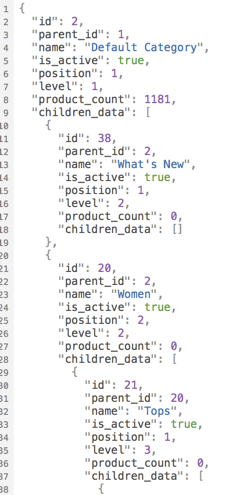
    Magento 2 comes with a modern REST interface. One of the advantages of the REST interface is that it can handle multiple response types. A client can request data from the server with a list of acceptable response formats. Out of the box Magento 2 supports two types. It comes with JSON and XML support.

    You can test it with a simple call to your local store.

    curl -X GET --header "Accept: application/json" "http://<store-baseurl>/rest/default/V1/categories"

    If you omit the accept header the server will return JSON as default. Let’s change the accept header to “application/json”.

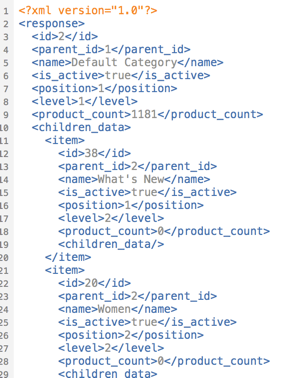
    curl -X GET --header "Accept: application/xml" "http://<store-baseurl>/rest/default/V1/categories"

    Now you should see a well formed XML document:

    Extend the list of acceptable mime types

    Magento 2 can handle JSON and XML. What if we want to add an alternative return format? The bad news… it cannot handle it by default. The good news… You can add the support by yourself.
    The response is generated internally by response renderers which must implement the RendererInterface.

    interface RendererInterface
    {
        /**
         * Render content in a certain format.
         *
         * @param object|array|int|string|bool|float|null $data
         * @return string
         */
        public function render($data);
    
        /**
         * Get MIME type generated by renderer.
         *
         * @return string
         */
        public function getMimeType();
    }
    

    The interface is really simple. A mime type must be defined. In our example we intend to handle the mime type “application/pdf”. The main idea of this demo is to return an existing invoice directly as printable PDF document instead of the JSON or XML data.

    ## Request Workflow

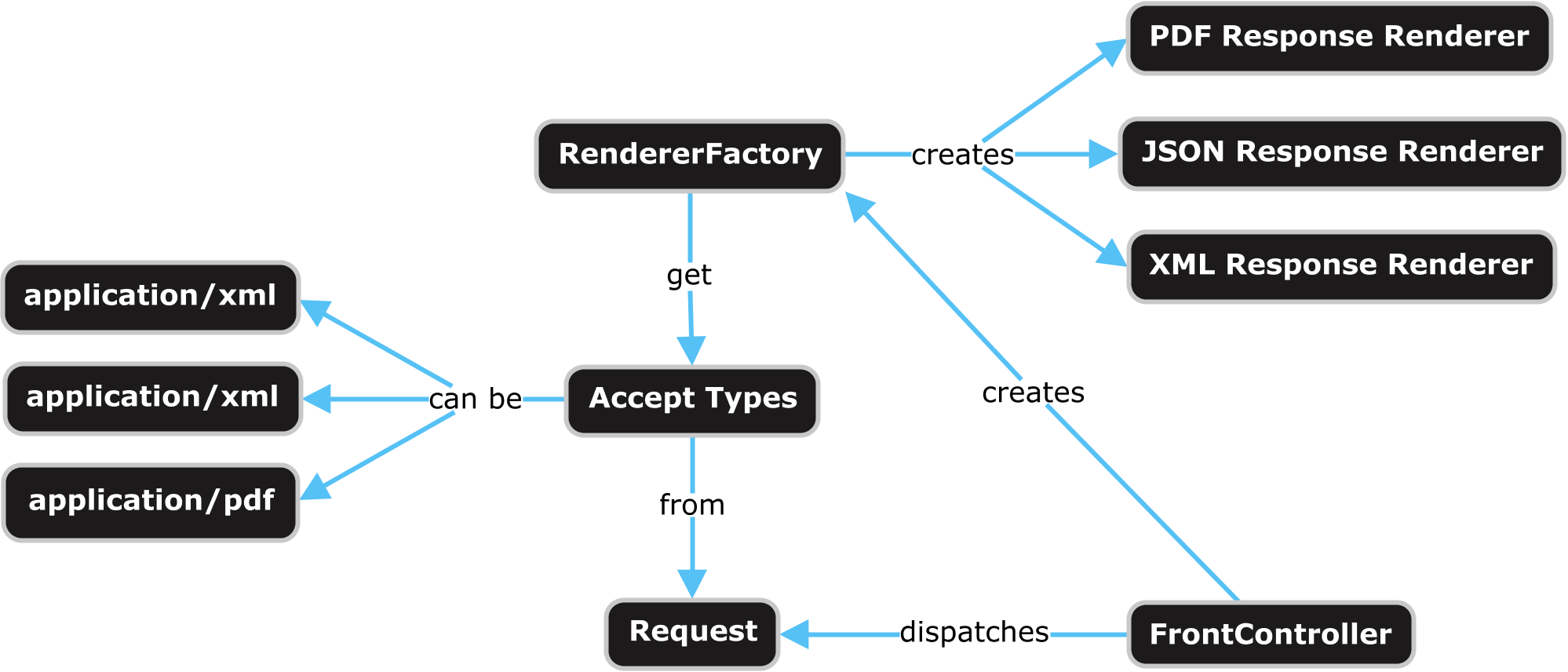
    A request by a browser or a HTTP client (i.e. curl) is sent to the server. The request is dispatched by a special REST FrontController. The FrontController executes some business logic and passes the generated output data to a response object. The response object is generated by a RendererFactory which creates a renderer object based on the mime types of the request accept header.

    Webapi Response Rendering Overview

    If we want to add our own renderer for a specific mime type we can use the Magento 2 Dependency Injection for that. The RendererFactory gets a list of available renderers via di.xml. The next thing we need to do is to create an own module and to add the di.xml in our module with following content:

    <?xml version="1.0"?>
    <config xmlns:xsi="http://www.w3.org/2001/XMLSchema-instance"
            xsi:noNamespaceSchemaLocation="urn:magento:framework:ObjectManager/etc/config.xsd">
    
        <type name="Magento\Framework\Webapi\Rest\Response\RendererFactory">
            <arguments>
                <argument name="renders" xsi:type="array">
                    <item name="application_pdf" xsi:type="array">
                        <item name="type" xsi:type="string">application/pdf</item>
                        <item name="model" xsi:type="string">\N98\WebapiRestPdf\Response\Renderer\PdfRenderer</item>
                    </item>
                </argument>
            </arguments>
        </type>
    
    </config>
    

    Now our response renderer must be created. It must implement the renderer interface. Firstly we add the getMimeType method and let them return the value “application/pdf”. Secondly we implement the render method which returns the PDF data. In our example we only support the REST URL “/V1/invoices”.

    <?php
    namespace N98\WebapiRestPdf\Response\Renderer;
    
    use Magento\Framework\Webapi\Exception;
    use Magento\Framework\Webapi\Rest\Request;
    use Magento\Framework\Webapi\Rest\Response\RendererInterface;
    use Magento\Sales\Api\InvoiceRepositoryInterface;
    use N98\WebapiRestPdf\Service\InvoicePdfGeneratorService;
    
    class PdfRenderer implements RendererInterface
    {
        /**
         * @var \Magento\Framework\Webapi\Rest\Request
         */
        private $request;
    
        /**
         * @var \N98\WebapiRestPdf\Service\InvoicePdfGeneratorService
         */
        private $invoicePdfGeneratorService;
    
        /**
         * @var \Magento\Sales\Api\InvoiceRepositoryInterface
         */
        private $invoiceRepository;
    
        /**
         * Pdf constructor.
         * @param \Magento\Framework\Webapi\Rest\Request $request
         * @param \N98\WebapiRestPdf\Service\InvoicePdfGeneratorService $invoicePdfGeneratorService
         * @param \Magento\Sales\Api\InvoiceRepositoryInterface $invoiceRepository
         */
        public function __construct(
            Request $request,
            InvoicePdfGeneratorService $invoicePdfGeneratorService,
            InvoiceRepositoryInterface $invoiceRepository
        ) {
            $this->request = $request;
            $this->invoicePdfGeneratorService = $invoicePdfGeneratorService;
            $this->invoiceRepository = $invoiceRepository;
        }
    
        /**
         * Render content in a certain format.
         *
         * @param object|array|int|string|bool|float|null $data
         * @return string
         * @throws \Magento\Framework\Webapi\Exception
         */
        public function render($data)
        {
            if (!strstr($this->request->getPathInfo(), '/V1/invoices')) {
                throw new Exception(__('PDF rendering is not supported for this URI'));
            }
    
            if (isset($data['entity_id'])) {
                $invoice = $this->invoiceRepository->get($data['entity_id']);
                $pdf = $this->invoicePdfGeneratorService->execute($invoice);
    
                return $pdf->render();
            }
         
            return null;
        }
    
        /**
         * Get MIME type generated by renderer.
         *
         * @return string
         */
        public function getMimeType()
        {
            return 'application/pdf';
        }
    }
    

    For a better software architecture we place the PDF generation code in an own InvoicePdfGeneratorService class.

    <?php
    namespace N98\WebapiRestPdf\Service;
    
    use Magento\Sales\Api\Data\InvoiceInterface;
    
    class InvoicePdfGeneratorService
    {
        /**
         * @var \Magento\Sales\Model\Order\Pdf\Invoice
         */
        private $invoicePdf;
    
        /**
         * PdfGeneratorService constructor.
         * @param \Magento\Sales\Model\Order\Pdf\Invoice $invoicePdf
         */
        public function __construct(\Magento\Sales\Model\Order\Pdf\Invoice $invoicePdf)
        {
            $this->invoicePdf = $invoicePdf;
        }
    
        /**
         * @param \Magento\Sales\Api\Data\InvoiceInterface $invoice
         * @return \Zend_Pdf
         */
        public function execute(InvoiceInterface $invoice)
        {
            return $this->invoicePdf->getPdf([$invoice]);
        }
    }
    

    That’s all we need to code. As you can see Magento 2 is very extendable. If you have ideas for additional formats, create your own renderer.

    Testing

    Before we start a test of the new functionality, we need an invoice in the database. Simply create a new order in your shop and create an invoice for it in the Magento admin.

    To test the new renderer we can use CURL again. To fetch an invoice you need API credentials. The simplest way to do that, is to get an “Access Token”.

    Have a look in the documentation to see how you can obtain an access token: http://devdocs.magento.com/guides/v2.1/get-started/authentication/gs-authentication-token.html

    On my local machine this CURL command looks like this:

    curl -o invoice.pdf -X GET \
    --header "Accept: application/pdf" \
    --header "Authorization: Bearer 0b4sdr02nis73md8qsg3y3b6uk4hi5k4" \
    "http://magento.dev/rest/default/V1/invoices/1"

    This command calls the Magento Shop, which should now return the content of a PDF file. The PDF content is written to the file “invoice.pdf”.

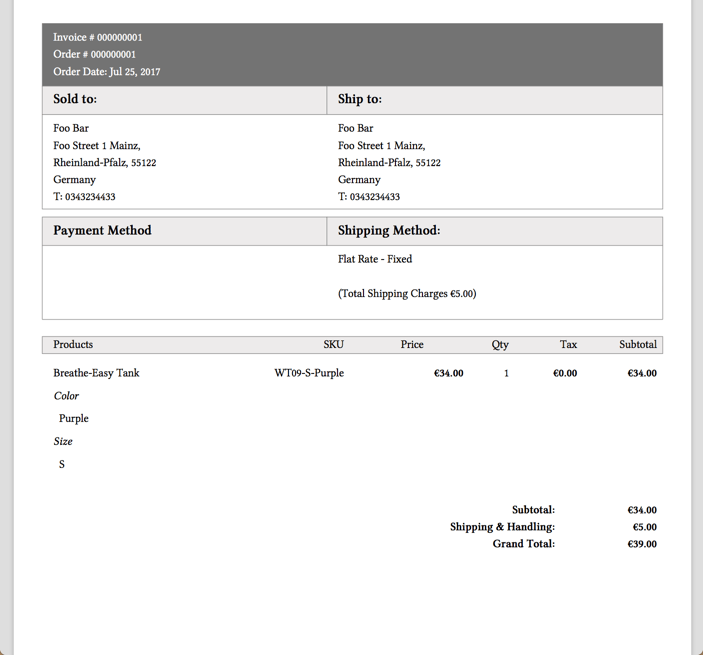
    My PDF looks like this:

    Great! We can now get PDF invoices by the REST API!

    Conclusion

    Magento 2 can be extended in an easy way. If you like to play a little bit with the code of this blog post, checkout our demo module on Github.

    https://github.com/netz98/N98_WebapiRestPdf

  • Think outside the box: Magento 2 as API framework

    Think outside the box: Magento 2 as API framework

    In this article, we will cover the web-API and how to use Magento 2 as a standalone API-framework.

    If the web-API is new to you, I recommend to read the development documentation of it first: Magento 2 API documentation

    Why should I do this?

    Short answer: Because you can!

    Not really, there is no reason why you shouldn’t try it at least and have some fun with it – you might get used to it 😉

    With Magento 2, the whole web-API was rebuild from scratch to compete with state of the art frameworks. Together with the well working dependency injection approach, it absolutely makes sense to take a deeper look at it.

    Also, one big advantage of Magento’s implementation of the API is the easy wiring between the request-routing and the executed code that handles the request.

    Compared to Symfony, for example, the creation of new endpoints is easier and more intuitive.

    In the simplest possible case, the definition of a endpoint only contains 6 lines of code:

    <route url="/V1/modules" method="GET">
         <service class="Magento\Backend\Service\V1\ModuleServiceInterface" method="getModules"/>
         <resources>
             <resource ref="Magento_Backend::admin"/>
         </resources>
    </route>

    Aside from the easy definition of a new API endpoint, you can also use Magento’s build-in features such as ACL resources for access management, plugins/interceptors, automatically generated factories and proxies.

    You see, beside the basic shop functionality you also have a well designed toolset to create APIs at your fingertips, no matter of the size or complexity of your project.

    Challenge accepted

    So, what do we need to modify the default Magento installation in order to get this working?

    In fact, it isn’t as much as you might think. We only need to hide the Magento storefront to the public and that’s it (more or less).

    For sure, you also could hide the administration backend and the API endpoints, that comes along with Magento by default, but in our case we are absolutely fine with them. We keep them for now, because of we will need them later.

    Hide the shop

    For hiding the shop, there is a wide range of multiple options that starts with modifying the webserver’s request-resolving and ends with rewriting the entire routing component of the Magento core.

    In our case, we did something in between and created a module with a very low footprint to achieve this.

    By installing thins module, all storefront requests will be blocked except the REST, Swagger and the administration backend related ones.

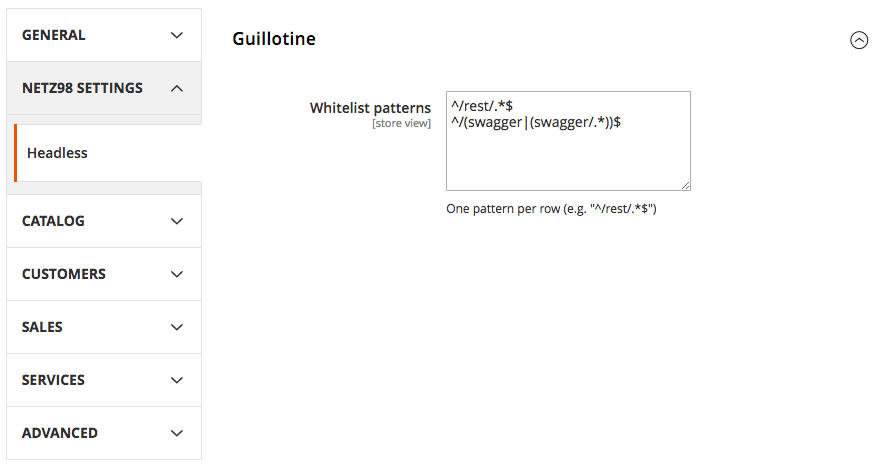
    If you want to allow more pages to be accessible, you can simply modify the whitelist-patterns using the system configuration settings.

    To hide the default frontend of Magento, simply install the following module according to it’s installation guide: netz98/headless-guillotine

    Example Usage

    After installing the module, you will find a new system-configuration setting:

    This will rise an exception in case a blocked route is requested. The printed error will do the trick while you are testing, but I would recommend to add a configuration for handling the exception in a proper way later on – so the customer won’t get a blank page with cryptic informations in case he directly accesses the page  😉

    Summary

    You see, with a very view steps you can use Magento 2 as a API framework, that implements state of the art techniques and supports the modern web-development.

    The module provided by netz98 makes it really simple to quickly hide your storefront and to start your backend development.

    Final Words

    Have you implemented similar things or have you tested the setup as described in this post?

    Let me know about it in the comments below, I’d really like to chat with you about your approaches and ideas – your feedback is highly appreciated!

  • PSR-7 Standard – Part 2 – Request and URI

    PSR-7 Standard – Part 2 – Request and URI

    This post is part of series:


    In the last blog post we described the history of PSR-7. The standard contains only interfaces. Today we start with the first two interfaces. The RequestInterface and the UriInterface.

    What is a HTTP Request?

    To start we create a little server simulation script with this content:

    <?php
    print_r($_REQUEST);
    

    After the creation we start the server script with PHP’s internal server by running this in our command line:

    php -S 127.0.0.1:8080 server.php

    This will start a server on our local machine listening on port 8080. Now, we have a little server to test some example requests.

    Example GET Request

    GET Requests are really simple. We can call the URL /mypath?foo=bar&baz=zoz with this simple text snippet.

    GET /mypath?foo=bar&baz=zoz HTTP/1.1
    Host: example.com
    

    To simulate a call we can make use of the popular command line tool “curl”. If it is not installed on your machine, you should install it.

    curl 'http://127.0.0.1:8080/mypath?foo=bar&baz=zoz'

    If our server is running, we should see the response in the command line:

    Array
    (
        [foo] => bar
        [baz] => zoz
    )

    Curl command to simulate:

    curl -X POST -d foo=bar -d baz=zoz 'http://127.0.0.1:8080/mypath'

    Example POST Request

    We can also post data. This is mostly done in HTML forms. The parameters are now part of a body. We need to tell the server the length of the data like in this snippet:

    POST /mypath HTTP/1.1
    Host: example.com
    Content-Type: application/x-www-form-urlencoded
    Content-Length: 15
    
    foo=bar&baz=zoz´
    

    As you can see, sending requests to a HTTP server is quite simple.

    Sending Requests in PHP

    In PHP we have several possibilities to send data to a remote server. The simplest way is to use one of the build-in functions like fopen, file_get_contents.

    Let’s create a file named client.php and this content:

    <?php
    echo file_get_contents('http://127.0.0.1:8080/mypath?foo=bar&baz=zoz');
    

    The output of the server should be the same as in our previous curl example. That was easy, but the usage of this functions has one drawback. The function was build to make calls to a local filesystem. It is possible to prohibit calls to remote servers by disabling it with the php.ini directive allow_url_fopen.

    Another popular way is the CURL PHP Module which adds additional PHP functions.

    <?php
    
    $ch = curl_init();
    
    curl_setopt($ch, CURLOPT_URL, 'http://127.0.0.1:8080/mypath?foo=bar&baz=zoz');
    $result = curl_exec($ch);
    print_r($result);
    
    curl_close($ch);

    But what if the module is not installed?

    To deal with this issues there are a lot of userland PHP clients in the wild. Most of the clients have an own abstraction of the request. That’s where the PSR-7 standards can help us in several ways.

    1. Harmonize the way how a request is built.
    2. Re-use code across applications.
    3. Dealing with the local environment (available PHP-Modules).

    RequestInterface

    The following code snippet shows the RequestInterface. The RequestInterface allows us to describe a RFC 7230 HTTP message.

    <?php
    
    namespace Psr\Http\Message;
    
    interface RequestInterface extends MessageInterface
    {
        /**
         * Retrieves the message's request target.
         * @return string
         */
        public function getRequestTarget();
    
        /**
         * Return an instance with the specific request-target.
         *
         * @param mixed $requestTarget
         * @return static
         */
        public function withRequestTarget($requestTarget);
    
        /**
         * Retrieves the HTTP method of the request.
         *
         * @return string Returns the request method.
         */
        public function getMethod();
    
        /**
         * Return an instance with the provided HTTP method.
         *
         * @param string $method Case-sensitive method.
         * @return static
         * @throws \InvalidArgumentException for invalid HTTP methods.
         */
        public function withMethod($method);
    
        /**
         * Retrieves the URI instance.
         * 
         * @return UriInterface Returns a UriInterface instance
         *     representing the URI of the request.
         */
        public function getUri();
    
        /**
         * Returns an instance with the provided URI.
         *
         * @param UriInterface $uri New request URI to use.
         * @param bool $preserveHost Preserve the original state of the Host header.
         * @return static
         */
        public function withUri(UriInterface $uri, $preserveHost = false);
    }

    Every library that creates an implementation of this interfaces should be used to create a HTTP request for every HTTP (1.1) server on the planet.

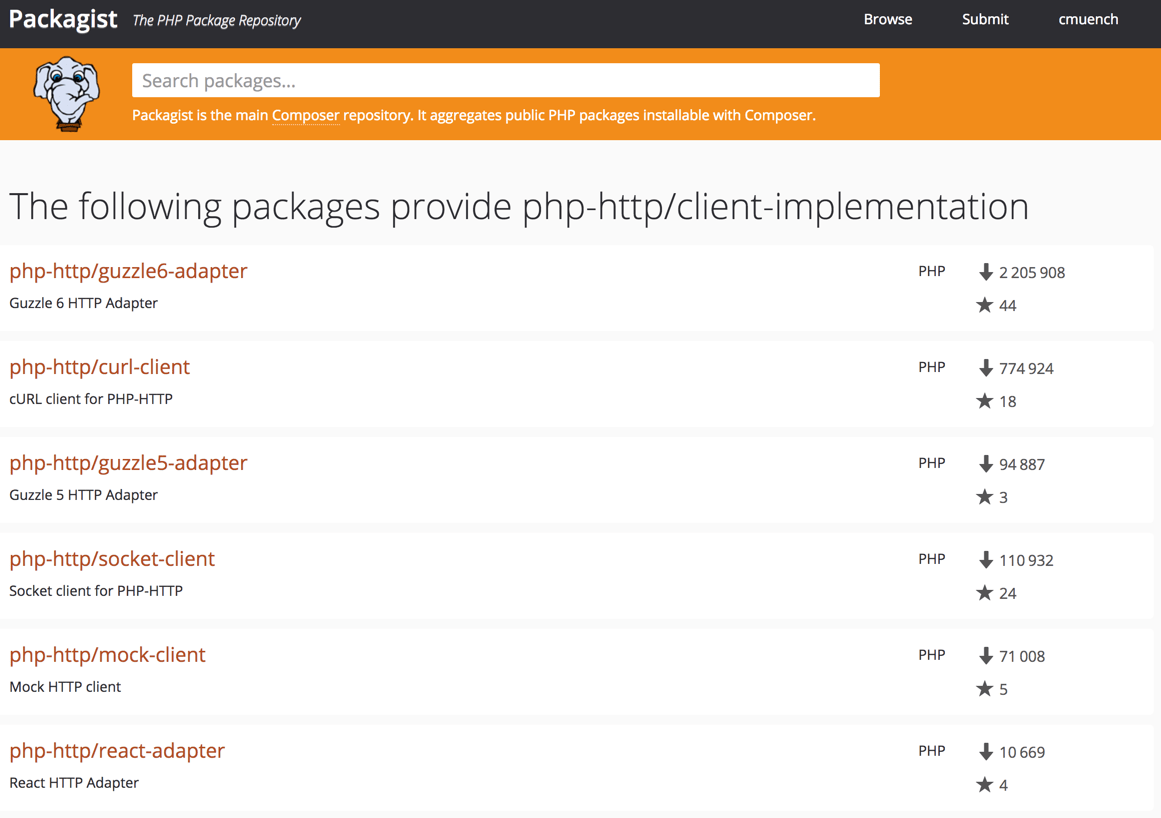
    To find an existing implementation we can use packagist.org. There is a virtual package with the name “psr/http-message-implementation” available. Feel free to use one of the implementations. As PHP developers we do not like to reinvent the wheel. https://packagist.org/providers/psr/http-message-implementation

    In our example at the end of the article we use the Guzzle Guzzle library. It is also possible to only install the PSR-7 implementation of the library (package: guzzlehttp/psr7) which implements the virtual package. If you are not familiar what a virtual package is, think of it like an interface for Composer packages. There is a good article which describes virtual packages.

    UriInterface

    The UriInterface describes the URI which should be called by our Request.

    <?php
    
    namespace Psr\Http\Message;
    
    /**
     * Value object representing a URI.
     */
    interface UriInterface
    {
        /**
         * Retrieve the scheme component of the URI.
         *
         * @return string The URI scheme.
         */
        public function getScheme();
    
        /**
         * Retrieve the authority component of the URI.
         *
         * @return string The URI authority, in "[user-info@]host[:port]" format.
         */
        public function getAuthority();
    
        /**
         * Retrieve the user information component of the URI.
         *
         * @return string The URI user information, in "username[:password]" format.
         */
        public function getUserInfo();
    
        /**
         * Retrieve the host component of the URI.
         *
         * @return string The URI host.
         */
        public function getHost();
    
        /**
         * Retrieve the port component of the URI.
         *
         * @return null|int The URI port.
         */
        public function getPort();
    
        /**
         * Retrieve the path component of the URI.
         *
         * @return string The URI path.
         */
        public function getPath();
    
        /**
         * Retrieve the query string of the URI.
         *
         * @return string The URI query string.
         */
        public function getQuery();
    
        /**
         * Retrieve the fragment component of the URI.
         *
         * @return string The URI fragment.
         */
        public function getFragment();
    
        /**
         * Return an instance with the specified scheme.
         *
         * @param string $scheme The scheme to use with the new instance.
         * @return static A new instance with the specified scheme.
         * @throws \InvalidArgumentException for invalid schemes.
         * @throws \InvalidArgumentException for unsupported schemes.
         */
        public function withScheme($scheme);
    
        /**
         * Return an instance with the specified user information.
         *
         * @param string $user The user name to use for authority.
         * @param null|string $password The password associated with $user.
         * @return static A new instance with the specified user information.
         */
        public function withUserInfo($user, $password = null);
    
        /**
         * Return an instance with the specified host.
         *
         * @param string $host The hostname to use with the new instance.
         * @return static A new instance with the specified host.
         * @throws \InvalidArgumentException for invalid hostnames.
         */
        public function withHost($host);
    
        /**
         * Return an instance with the specified port.
         *
         * @param null|int $port The port to use with the new instance; a null value
         *     removes the port information.
         * @return static A new instance with the specified port.
         * @throws \InvalidArgumentException for invalid ports.
         */
        public function withPort($port);
    
        /**
         * Return an instance with the specified path.
         *
         * @param string $path The path to use with the new instance.
         * @return static A new instance with the specified path.
         * @throws \InvalidArgumentException for invalid paths.
         */
        public function withPath($path);
    
        /**
         * Return an instance with the specified query string.
         *
         * @param string $query The query string to use with the new instance.
         * @return static A new instance with the specified query string.
         * @throws \InvalidArgumentException for invalid query strings.
         */
        public function withQuery($query);
    
        /**
         * Return an instance with the specified URI fragment.
         *
         * @param string $fragment The fragment to use with the new instance.
         * @return static A new instance with the specified fragment.
         */
        public function withFragment($fragment);
    
        /**
         * Return the string representation as a URI reference.
         *
         * @see http://tools.ietf.org/html/rfc3986#section-4.1
         * @return string
         */
        public function __toString();
    }

    One important thing you should know is that the implementation of the URI is always immutable. This means that every method returns a new instance of the object instead of a reference to the existing object.

    Wrong script:

    <?php
    $uri = new Uri();
    $uri->withHost(‘127.0.0.1’);
    $uri->withPort(8080);
    echo $uri; // empty output

    Correct script:

    <?php
    $uri = new Uri();
    $uri = $uri->withHost(‘127.0.0.1’);
    $uri = $uri->withPort(8080);
    echo $uri; // output: http://127.0.0.1:8080
    
    // or by using fluent interface
    
    $uri = (new Uri())->withHost('127.0.0.1')->withPort(8080);

    Using Guzzle

    As last part of this article we make use of the popular HTTP client library Guzzle. The library offers all the stuff HTTP provides. In our example we explicitly make use of the Guzzle PSR-7 implementation of the RequestInterface. The class we use is \GuzzleHttp\Psr7\Request.

    If you like to test the script, please feel free to install Guzzle using composer in your local directory (where all the other files mentioned above are) :

    composer.phar require guzzlehttp/guzzle:~6.0

    The code we use is this:

    <?php
    
    require_once 'vendor/autoload.php';
    
    $request = new \GuzzleHttp\Psr7\Request('GET', 'http://127.0.0.1:8080/mypath?foo=bar&baz=zoz');
    
    $client = new \GuzzleHttp\Client();
    $response = $client->send($request);
    echo $response->getBody();

    The Response of the script should be the same as before. What are the advantages of this approach?

    1. We create a PSR-7 compatible Request with Guzzle.
    2. The Guzzle HTTP Client follows the standard. So the Request must not be created by the Guzzle library. Use whatever you want.

    The next part of the series describes the HTTP Response.